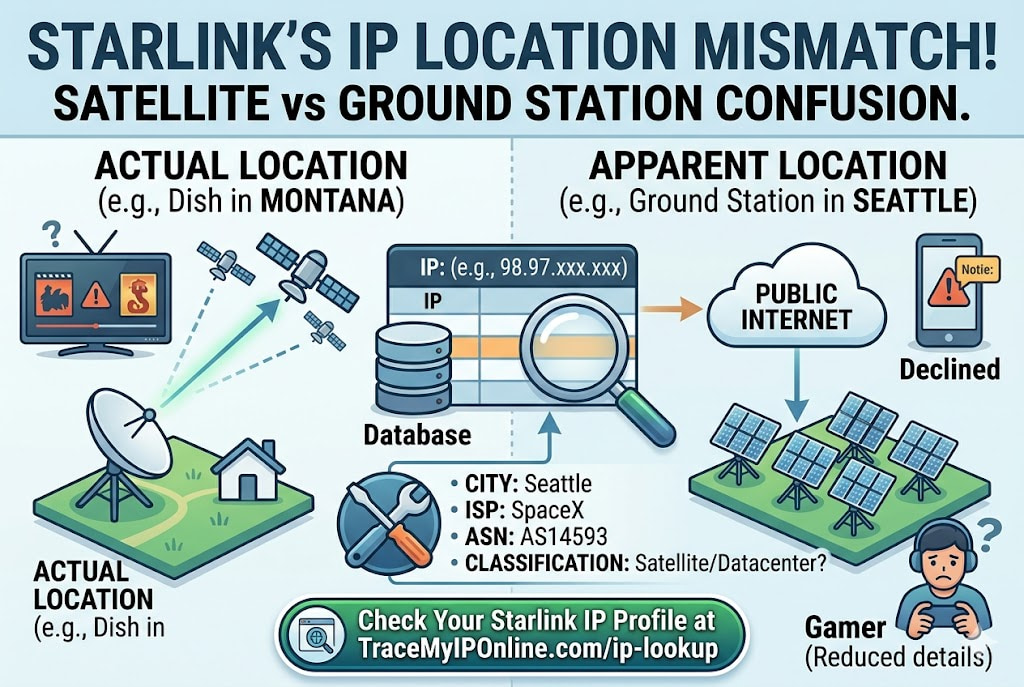
Starlink is not routed like cable or fiber. Your traffic goes up to a low Earth orbit satellite, routes through SpaceX ground stations, and arrives on the internet from SpaceX IP blocks. The IP you get is not tied to your physical location. Starlink users in rural Montana and suburban Texas might have IPs resolving to the same city. That quirk causes real problems — and understanding why explains what actually helps.
Starlink Gives You an IP Address Unlike Any Other Residential Service — Here Is Why That Matters
Starlink is not routed like cable or fiber. Your traffic goes up to a satellite in low Earth orbit, gets routed through SpaceX ground stations, and arrives on the public internet from one of Starlink's IP blocks. The IP address you get is not tied to your physical location in the way that Comcast or BT IPs are. Starlink users in rural Montana and suburban Texas might have IPs that geolocate to the same city — wherever the nearest ground station is.
That quirk causes real problems. Websites show content for the wrong region. IP-based fraud detection systems flag Starlink connections. Some services that rely on geolocation accuracy behave unexpectedly. Understanding why this happens — and what it looks like from a lookup — is more useful than being confused by it.
"Starlink's network architecture is fundamentally different from terrestrial ISPs. Traffic is not routed regionally through a local exchange — it goes to the nearest ground station with capacity, which can be hundreds of miles from the subscriber. From a geolocation database perspective, the IP looks like it belongs to wherever the ground station is, not where the dish is. As Starlink scales, the geolocation mismatch will improve, but satellite internet will always be less geographically precise than fiber because of how the routing works."
— Dr. Priya Chandran, Satellite Network Architecture Researcher, University of Surrey
How Starlink IPs Differ From Terrestrial ISP IPs
With a cable or fiber ISP, your IP address comes from a block registered to your regional ISP infrastructure. Comcast users in Chicago get IPs from Comcast's Chicago-region block. BT users in London get IPs from BT's London infrastructure. The geolocation databases that websites query can map these IP ranges to fairly specific geographic areas because the infrastructure itself is geographically specific.
Starlink assigns IPs from blocks registered to SpaceX. Your traffic reaches the internet through whichever ground station handles your satellite's current downlink — and that station might be in a different state or even a different country than your dish. As you move (or as satellites move overhead), the ground station routing can shift, and your IP might change accordingly.
The ASN for Starlink is typically AS14593 (Space Exploration Technologies Corp). Any lookup on a Starlink IP will show SpaceX as the ISP. The connection type is classified in various ways — some databases classify Starlink as residential, others as satellite, and some flag it as a datacenter or hosting provider due to the SpaceX ASN. That misclassification causes the most practical problems.
Practical Problems Starlink Users Report
Wrong region content: Streaming services and websites with regional content restrictions use IP geolocation. A Starlink user in rural Colorado whose IP geolocates to California might see California-region content, California-specific pricing, or California-required legal disclosures rather than what a Colorado user would see. This is particularly noticeable on weather services, local news sites, and e-commerce with state-specific tax calculations.
Payment and banking friction: Banks and payment processors compare the IP geolocation to the billing address. A Starlink user in Montana with an IP that geolocates to Seattle might have transactions flagged because the billing address (Montana) does not match the apparent location (Seattle). This generates fraud alerts and declined transactions — more common for Starlink users than terrestrial ISP users because the mismatch is larger.
Gaming matchmaking: Online games use IP geolocation for server region selection and matchmaking. A Starlink user being assigned to the wrong region's servers gets higher ping and mismatched matchmaking pools — a different problem from the DDoS exposure concerns with P2P games, but frustrating in its own way.
VPN detection false positives: Some services that block VPN connections also block Starlink because SpaceX's ASN is classified as hosting/datacenter by certain databases. Starlink users may see VPN error messages on services like Netflix without using a VPN. Check whether your Starlink IP is being classified as datacenter at tracemyiponline.com/vpn-detector.
Before vs After: Starlink IP Lookup Results
Starlink subscriber in rural Wyoming — IP lookup results: IP: 98.97.xxx.xxx. ISP: SpaceX Services Inc. ASN: AS14593. Location: Salt Lake City, Utah (subscriber is in Wyoming). Connection type: Classified as hosting/satellite by some databases, residential by others. Reputation: Generally clean — SpaceX maintains their IP blocks actively.
Comparison — cable internet subscriber in same Wyoming town — IP lookup results: IP: 71.xxx.xxx.xxx. ISP: CenturyLink. ASN: AS209 (CenturyLink). Location: Cheyenne, Wyoming (subscriber is 50 miles away — hub routing). Connection type: Residential. Reputation: Clean.
Both users see geolocation mismatches — this is normal with all ISPs. The key differences are the ISP classification (SpaceX vs. regional ISP) and the connection type classification, which affects how fraud detection and streaming services treat the connection. Run both checks yourself at tracemyiponline.com/ip-lookup.
For California and New York Starlink Users
California has the most Starlink subscribers of any US state — SpaceX's headquarters location and the early adoption in the state's rural communities drove adoption. California Starlink users frequently report their IP geolocating to a different California city or even to Nevada or Oregon, depending on which ground station handles their traffic.
For California Starlink users experiencing payment friction: document that you are using Starlink when contacting banks or payment processors about declined transactions. The mismatch between billing address and IP geolocation is a known issue with satellite internet — fraud departments at major banks increasingly have protocols for it.
New York rural users on Starlink — particularly in upstate New York — often find their IP geolocating to New Jersey or Pennsylvania. Check your current location display at tracemyiponline.com/ip-lookup.
For London and UK Starlink Users
Starlink UK users typically have IPs geolocating to wherever SpaceX's UK or European ground stations route their traffic — which may not be their actual location. Rural Wales or Scottish Highland users might find their IP geolocating to southern England or even continental Europe during satellite passes.
UK-specific concerns: BBC iPlayer and other UK streaming services that require UK IP addresses may behave unexpectedly if Starlink routes traffic through a non-UK ground station. Some Starlink UK users have reported intermittent iPlayer access issues due to temporary routing through non-UK infrastructure. Check your current IP's country classification at tracemyiponline.com/ip-lookup.
For Canadian Starlink Users
Canada has significant Starlink adoption in remote and rural areas — exactly the markets where Starlink's coverage advantage over terrestrial ISPs is largest. Canadian Starlink users in northern Ontario, British Columbia, or the Prairies frequently find their IP geolocating to major US cities or southern Canadian cities depending on ground station routing.
For Ontario Starlink users: the billing address versus IP geolocation mismatch is the same as for US users. Inform financial institutions that you use satellite internet when opening accounts or if transactions are flagged. Check your IP's current display at tracemyiponline.com/ip-lookup.
For Australian Starlink Users
Australia is one of Starlink's largest markets by subscriber count — the combination of vast remote areas with poor terrestrial internet and SpaceX's early Australian licensing made it a priority market. Australian Starlink users in remote Western Australia, Queensland outback, or rural New South Wales may find their IP geolocating to major Australian cities or occasionally to New Zealand or other Pacific locations depending on ground station routing.
For Sydney and Melbourne Starlink users in peri-urban areas: geolocation accuracy is generally better in Australia's population centers because ground station density is higher relative to suburban coverage areas. Check your current IP at tracemyiponline.com/ip-lookup.
Does Starlink Affect VPN Performance?
Starlink's latency is higher than terrestrial fiber but lower than traditional geostationary satellite internet — typically 20-60ms in good conditions compared to 600ms+ for older satellite services. For VPN use, this latency adds to the VPN's own processing overhead. WireGuard handles this better than OpenVPN due to lower protocol overhead.
Some Starlink users find that a VPN actually improves their effective location classification — replacing the SpaceX ASN with a recognizable VPN or residential proxy IP resolves the misclassification problem for streaming services. Whether this is worth the latency trade-off depends on the specific service and use case. Verify any VPN is working correctly over Starlink at tracemyiponline.com/vpn-detector.
Frequently Asked Questions
Is the IP Lookup tool free?
Yes — 100% free, no signup. Visit tracemyiponline.com/ip-lookup and check any IP instantly.
Why does my Starlink IP show a different state or country than I'm in?
Starlink routes your traffic through ground stations that may be geographically distant from your dish. The IP is registered to SpaceX infrastructure, not to your physical location. The geolocation database maps the IP to the ground station's location, not yours. This is normal Starlink behavior, not an error.
Can I fix the geolocation mismatch on Starlink?
Not directly — the mismatch is architectural. A VPN with servers in your actual region can replace the Starlink IP with one that geolocates more accurately to your area. Verify the VPN works at tracemyiponline.com/vpn-detector. For most everyday purposes, the mismatch has no practical impact.
Does Starlink have a static IP option?
Starlink offers a static IP as a paid add-on for business subscribers. Consumer plans use dynamic IPs that can change as routing shifts between ground stations. The static IP option provides consistency but the geolocation is still tied to ground station infrastructure rather than physical dish location.
Is Starlink IP classified as residential or business?
Classification varies by database. Some classify Starlink as residential satellite, others as hosting/datacenter due to the SpaceX ASN. This inconsistency is why some services flag Starlink connections unexpectedly. Check your current classification at tracemyiponline.com/ip-lookup — the connection type field shows how your IP is currently being classified.
Will my Starlink IP show up on blacklists?
Generally no — SpaceX actively manages their IP reputation. Check at tracemyiponline.com/blacklist-checker. The classification issue (datacenter vs residential) is a separate problem from reputation — your Starlink IP can have a clean reputation and still be flagged by services that block non-residential IPs.
Satellite Internet Is Different — Understanding How Changes What You Expect
Starlink works well for most internet tasks. The geolocation quirks affect a specific subset of use cases — geographically targeted content, fraud detection systems, and services that classify connections by network type. Most Starlink users encounter these issues occasionally rather than constantly.
Knowing that the mismatch is architectural rather than a technical problem changes how you respond to it. It is not something to troubleshoot on your end. It is context to provide when reporting unexpected behavior to banks, streaming services, or other services that flag your connection.
Check your current Starlink IP profile at tracemyiponline.com/ip-lookup. Check whether it is being flagged as VPN/datacenter at tracemyiponline.com/vpn-detector. Check IP reputation at tracemyiponline.com/blacklist-checker. All free at TraceMyIPOnline.com.