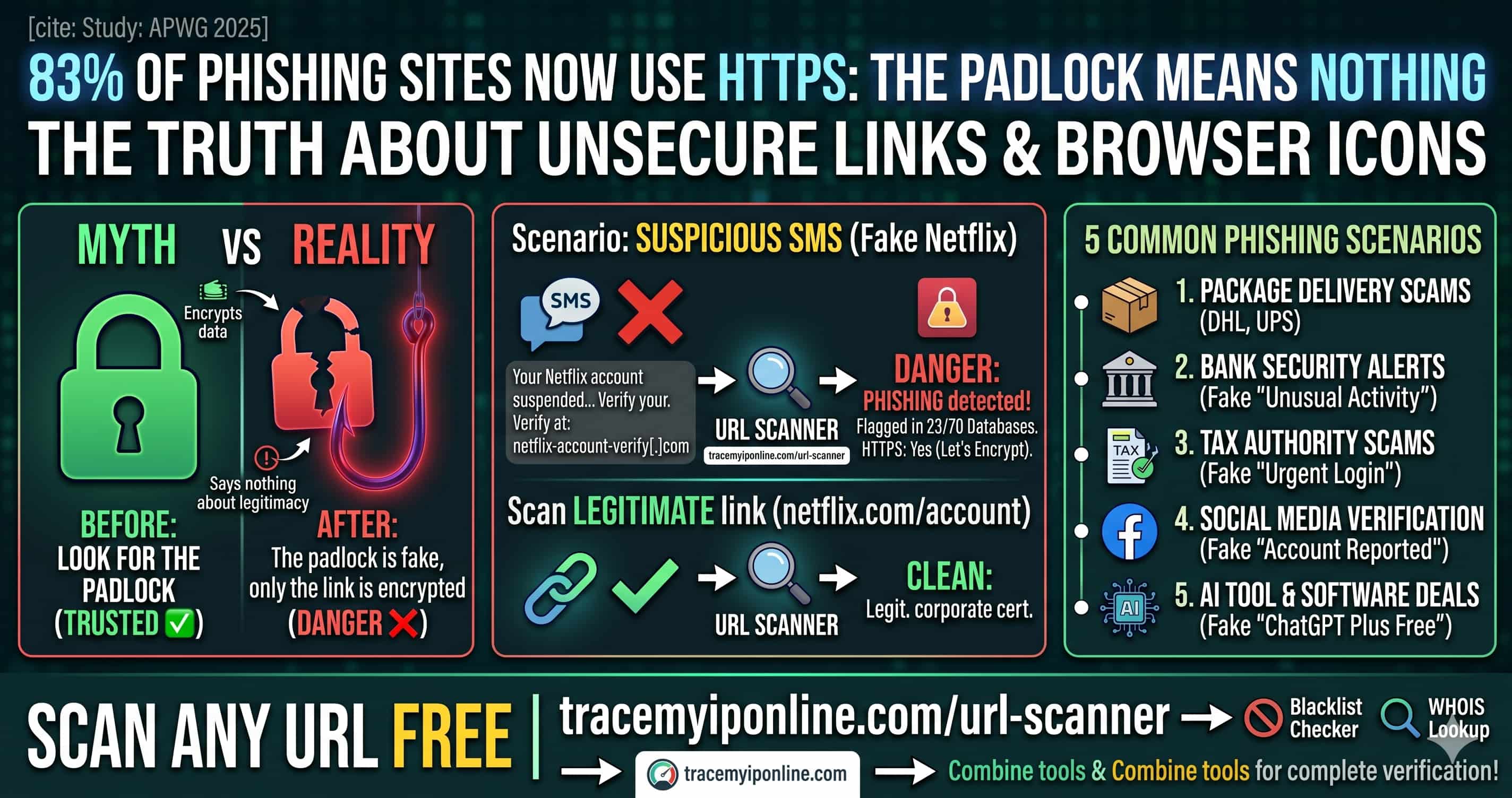
The green padlock means nothing anymore. In 2025, 83% of phishing websites use valid HTTPS certificates — the same padlock your bank has. Scammers get free SSL in under 10 minutes. Before you click any suspicious link, scan it free at TraceMyIPOnline.com — checked against 70+ threat databases, instant results, no signup required.
83% of Phishing Sites Now Use HTTPS — That Green Padlock Means Nothing
For years, internet safety advice was simple: look for the padlock. If a site has HTTPS, it is safe. That advice is now dangerously wrong. The Anti-Phishing Working Group reported in 2025 that 83% of phishing websites use HTTPS with valid SSL certificates — the same green padlock your bank uses. Scammers get free SSL certificates in under 10 minutes from services like Let's Encrypt. The padlock only means the connection is encrypted. It says nothing about whether the destination is legitimate.
Before you click any suspicious link, scan it free at tracemyiponline.com/url-scanner — no signup, instant results against 70+ threat databases.
"The HTTPS myth is one of the most dangerous misconceptions in consumer cybersecurity education. We spent 15 years teaching people to trust the padlock. Now that attackers routinely use it, that training has become a vulnerability. URL scanning before clicking is the correct modern behavior — it takes 5 seconds and checks against live threat intelligence that browsers simply do not have access to by default."
— Marcus Webb, Threat Intelligence Lead, CyberVector Security Research
What Does a URL Scanner Actually Check?
Our URL scanner checks submitted links against multiple layers of threat intelligence simultaneously:
Malware databases: Known URLs distributing malware, ransomware, or exploit kits. Updated continuously by threat intelligence providers.
Phishing feeds: URLs confirmed as phishing pages by security researchers, browser vendors, and anti-phishing working groups. The APWG alone processes millions of reports per month.
Domain age: Newly registered domains are statistically far more likely to be malicious. Our scanner flags domains under 30 days old in the context of a suspicious URL.
Redirect chains: Many malicious URLs use multiple redirects to obscure the final destination. Our scanner follows the full chain and shows you where the link ultimately leads.
SSL certificate details: While an SSL cert alone is meaningless for safety, its issuer, age, and domain match reveal useful signals about legitimacy.
IP reputation: The IP address behind the URL is checked against blacklists and known malicious hosting infrastructure. Combine with our Blacklist Checker for deeper analysis.
Before vs After: URL Scanner in Action
Suspicious SMS: "Your Netflix account has been suspended. Verify at: netfIix-account-verify[.]com"
URL scan results: Domain registered 6 days ago. Flagged in 23 of 70 threat databases. Redirect chain: netfIix-account-verify[.]com → credential-harvest[.]xyz. IP blacklisted for phishing. HTTPS: Yes (Let's Encrypt, 3 days old). Verdict: PHISHING — do not click ❌
Legitimate Netflix link shared by a colleague: netflix.com/account
URL scan results: Domain registered 1997. Clean in all 70 databases. No redirects. IP belongs to Netflix CDN infrastructure. HTTPS: Yes (DigiCert, corporate certificate). Verdict: LEGITIMATE ✅
Scan any link yourself at tracemyiponline.com/url-scanner before clicking. Also verify the domain with our WHOIS Lookup.
The 5 Most Common Phishing Scenarios in 2026
Package delivery scams: Fake DHL, UPS, FedEx, and Royal Mail notifications with tracking links. Volume spikes significantly around shopping seasons. The link leads to a credential or payment page.
Bank security alerts: "Unusual activity detected" emails with urgent login links. Real banks do not send login links by email — they ask you to visit the site directly.
Tax authority scams: IRS, HMRC, CRA, and ATO impersonation. Peak around tax filing deadlines. Often request payment via gift cards or cryptocurrency — no legitimate tax authority does this.
Social media account verification: "Your account has been reported. Verify your identity to avoid suspension." Particularly targeting Instagram, Facebook, and TikTok business accounts.
AI tool and software deals: A growing 2026 category — fake promotions for popular AI tools. "Get ChatGPT Plus for free — limited time." Links to credential harvesting pages designed to look like OpenAI or Microsoft login screens.
For California and New York Users: Phishing Costs and Legal Recourse
California residents lost over $2.1 billion to online fraud in 2024 (FBI IC3). New York City alone reported 34,000 cybercrime complaints in the same period. Both states have active cybercrime prosecution units, but recovery after credential theft or financial fraud is slow and uncertain.
Prevention is significantly more effective than recovery. California's CCPA gives you rights over your data — but those rights mean nothing if you hand credentials to a phishing site voluntarily. The California Department of Justice specifically recommends URL scanning tools as part of consumer cyber hygiene. Scan suspicious links free at tracemyiponline.com/url-scanner.
For London and UK Users: NCSC Guidance on Suspicious Links
The National Cyber Security Centre (NCSC) reports that phishing is the most common cyber threat facing UK individuals and businesses, accounting for over 80% of successful attacks. UK Finance reported £1.17 billion in fraud losses in 2025, with a significant proportion from phishing-enabled account takeover.
The NCSC's "Suspicious Email Reporting Service" (SERS) has processed over 27 million suspicious email reports since launch. Their official guidance includes checking links before clicking using URL scanning tools. Our free URL Scanner checks against the same threat intelligence categories used by professional security teams — available to London, Manchester, and Edinburgh users at no cost.
For Toronto and Ontario Users: The Canadian Anti-Fraud Centre
The Canadian Anti-Fraud Centre (CAFC) received reports of CAD $567 million in losses to fraud in 2025. Ontario consistently accounts for the highest volume of reports nationally, driven by population concentration in Toronto and surrounding areas.
The CAFC's "Fraud Prevention Month" campaign explicitly recommends verifying suspicious links and websites before clicking. Our free URL Scanner gives Ontario residents instant access to professional-grade link analysis. Combine with our WHOIS Lookup for complete verification of any suspicious site.
For Sydney and Australian Users: Scamwatch and Link Safety
The ACCC's Scamwatch reported AUD $2.74 billion in scam losses in 2025 — a record high. Phishing via SMS (smishing) is a particularly fast-growing vector in Australia, with fake Australia Post, myGov, and ATO messages leading the category.
The ACCC has specifically called out the dangers of clicking links in unsolicited messages. Our free URL scanner at tracemyiponline.com/url-scanner is available to all Australian users — enter any suspicious link before clicking and get instant threat assessment results.
URL Shorteners: The Invisible Threat
bit.ly, tinyurl.com, t.co — shortened URLs are everywhere, and they are a persistent phishing vector because they completely hide the destination. A URL like bit.ly/3xK9mPq could lead anywhere.
Our URL scanner follows short link redirects and shows you the full chain — where the short link goes, where that goes, and where you ultimately end up. This makes shortened URLs significantly safer to evaluate before clicking. Always scan shortened URLs at tracemyiponline.com/url-scanner before opening them.
Frequently Asked Questions
Is the URL Scanner completely free?
Yes — 100% free, no signup, no account. Scan any URL at tracemyiponline.com/url-scanner instantly.
How many threat databases does the scanner check against?
The scanner checks against 70+ threat intelligence databases including major antivirus vendors, phishing feeds, malware databases, and domain reputation services.
Can I scan a URL without visiting it?
Yes — that is the entire point. Paste the URL into our scanner without clicking it. The scanner visits the URL on our servers and reports back to you, keeping your device safe.
A site has HTTPS — does that mean it's safe?
No. HTTPS only means the connection between your browser and the site is encrypted. It says nothing about whether the site is legitimate. As of 2025, 83% of phishing sites use HTTPS. Always scan suspicious URLs regardless of whether they use HTTPS.
The URL scanner says a link is clean — is it definitely safe?
No scanner catches everything. New phishing sites are created constantly and may not yet appear in threat databases. A clean scan result reduces risk significantly but is not a guarantee. Use multiple signals: scan the URL, check the domain age with WHOIS, and trust your instincts about unsolicited messages.
Can I scan URLs from WhatsApp or text messages?
Yes — copy the URL from any message, paste it into our scanner at tracemyiponline.com/url-scanner, and get instant results. This is particularly important for SMS links which bypass many email security filters.
What should I do if the URL scanner flags a link as dangerous?
Do not click it. If the link came from an email claiming to be from your bank, contact your bank directly using the number on your card. Report the phishing attempt to your country's cybercrime reporting service (IC3 in the US, NCSC in the UK, CAFC in Canada, Scamwatch in Australia).
Five Seconds Can Save You Everything
The pattern is consistent across thousands of fraud cases: the victim clicked a link without checking it. The link looked legitimate. It had HTTPS. It came in a convincing email. And yet a 5-second URL scan would have flagged it.
Before you click anything suspicious, scan it at tracemyiponline.com/url-scanner — free, no signup. Verify the domain at our WHOIS Lookup. Check the hosting IP at our Blacklist Checker. All free. All instant. All at TraceMyIPOnline.com.