DNS floods made up 40% of network-layer DDoS attacks by mid-2026. Here's how to read your domain's DNS records before something breaks.
DNS floods made up 40% of all network-layer DDoS attacks by the second quarter of 2026, up from 25.7% just three months earlier, according to Cloudflare's H1 2026 threat report. Most site owners never look at a DNS record until something breaks, and by then the record is usually the thing that broke. This guide explains what a DNS lookup shows, how to read A, AAAA, MX, and TXT records, and how to run one yourself in under a minute.
Run a free lookup right now with the [DNS Lookup tool](/dns-lookup) on TraceMyIPOnline. Enter any domain and it returns every record type without a signup.
> Most domain problems people bring to us are not hosting problems. They are DNS records that were changed, forgotten, or never set up correctly in the first place. A lookup is the first thing to check, before touching anything else.
>
> — TMIO Editorial Team, TraceMyIPOnline
## What Is a DNS Lookup?
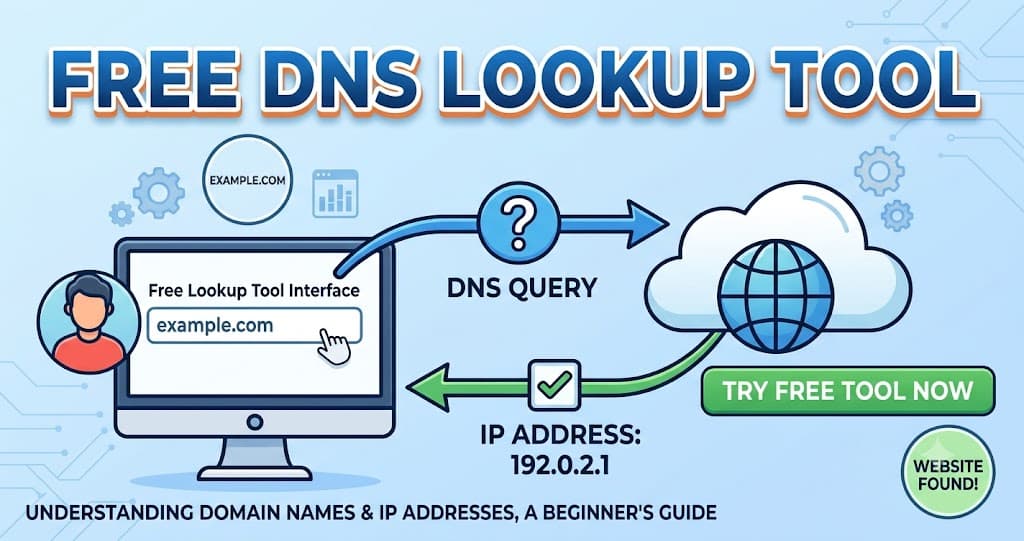
DNS stands for Domain Name System. It is the internet's directory, translating a domain like tracemyiponline.com into the IP address a computer needs to connect. A DNS lookup queries that directory and returns the records published for a domain.
Every domain has several record types, each doing a different job. Some point to a web server, some route email, some prove ownership for a verification service. A single lookup usually returns all of them at once, which is why the results can look crowded the first time you see them.
## How to Run a DNS Lookup in 4 Steps
1. **Open the [DNS Lookup tool](/dns-lookup).** Type in any domain name, yours or someone else's, since DNS records are public by design.
2. **Choose a record type, or check all of them.** Most lookup tools default to showing A, AAAA, MX, TXT, NS, and CNAME together.
3. **Read the results.** Each record shows a type, a value, and a TTL (time to live), which is how long that answer is cached before a resolver checks again.
4. **Compare against what you expect.** If you just changed a DNS setting, an old value still showing usually means the TTL has not expired yet, not that the change failed.
## A Record: Points a Domain to an IPv4 Address
The A record is the most basic one. It maps a domain name to an IPv4 address, the four-number format like 203.0.113.45. When someone types your domain into a browser, the A record tells their device which server to contact.
If a site loads at the wrong server, redirects to a parking page, or does not load at all, the A record is usually the first thing to check. A stale A record, still pointing at an old host after a migration, is one of the most common causes of a site going down without warning.
## AAAA Record: Points a Domain to an IPv6 Address
The AAAA record does the same job as the A record, but for IPv6 addresses, the longer format with letters and colons. Google reported that 50.1% of its traffic ran over IPv6 as of March 2026, up from 46.3% a year earlier, so a domain without an AAAA record is invisible to an increasing share of visitors' preferred path, even though most will still connect over IPv4 as a fallback.
Not every host requires an AAAA record, and plenty of working sites run on A records alone. It becomes worth setting up once your hosting provider supports IPv6 natively, since dual-stack (both A and AAAA) tends to load slightly faster for IPv6-first networks.
## MX Record: Routes Your Email
The MX (Mail Exchange) record tells the internet which mail servers accept email for your domain. It lists one or more servers with a priority number, and lower numbers are tried first. If your MX record points to the wrong server, or is missing entirely, mail addressed to your domain bounces or disappears.
This is the record people break most often during a provider switch. Moving from one email host to another without updating the MX record means new mail keeps arriving at the old provider, sometimes for days, until the change propagates.
## TXT Record: Verification, SPF, and DKIM
A TXT record holds arbitrary text tied to a domain, and it does several unrelated jobs. Search engines and other services use it to verify domain ownership. Email systems use it for SPF and DKIM, which tell receiving mail servers which sources are allowed to send mail as your domain and help stop spoofing.
A domain can carry many TXT records at once. Losing or misconfiguring an SPF record is a common cause of legitimate email landing in spam, because receiving servers can no longer confirm the sender is authorized.
## DNS Lookup for California Users
California hosts a large share of the world's cloud infrastructure, and a lot of small businesses there run multi-region setups without realizing it. A single domain lookup can show A records pointing at two or three different data centers, which is normal for load balancing but confusing if you were not expecting it.
If a California-based business just moved from a self-hosted server to a cloud provider, check the TTL on the old A record before the migration. A low TTL, an hour or less, means the change propagates fast. A high TTL, set months earlier and forgotten, can leave some visitors hitting the old server for a day or more.
## DNS Lookup for New York Users
Financial and media companies concentrated in New York often run stricter DNS setups, including DNSSEC, which cryptographically signs records to prevent tampering. A standard lookup shows whether DNSSEC is present, though verifying the signature chain needs a dedicated tool.
For everyday troubleshooting, the same four record types cover most New York small business cases: a wrong A record after a host change, a missing MX record after switching email providers, or a TXT record that never got added when a marketing tool asked for one.
## DNS Lookup for London Users
UK businesses commonly split infrastructure between a UK-based host for compliance reasons and a US-based email provider. That split is normal, and a DNS lookup will show an A record on one continent and an MX record on another without anything being wrong.
What causes support tickets in London is usually a TTL mismatch during a provider migration. If your registrar and your new host disagree on propagation timing, run a lookup from two different networks (home broadband and mobile data) to see whether the change has reached both yet.
## DNS Lookup for Toronto Users
Canadian domains sometimes carry a .ca-specific CIRA registration alongside a .com, and each can have entirely separate DNS records if they are set up independently. A lookup on the .com and a separate lookup on the .ca can return different A and MX records, which is easy to forget if only one gets updated.
If a Toronto business added a subdomain for a new service and it is not resolving, check whether a CNAME or A record was actually created for that subdomain. A missing subdomain record is one of the most common reasons a "works on our staging site" setup fails once it goes live.
## Before and After: Diagnosing a Broken DNS Setup
These are made-up example values, but the pattern matches a real misconfiguration.
| Record | Before (broken) | After (fixed) |
|---|---|---|
| A | 203.0.113.10 (old host) | 203.0.113.45 (new host) |
| MX | mail.oldprovider.example (priority 10) | mail.newprovider.example (priority 10) |
| TXT (SPF) | missing | v=spf1 include:newprovider.example ~all |
| Site status | Loads old cached version or times out | Loads correctly |
| Email status | Mail bounces or lands in spam | Mail delivers normally |
The TXT row is the one people forget. The A and MX records get updated during a migration, and the SPF record gets missed, so the site works fine while email quietly starts landing in spam.
## DNS Lookup Tools Compared
| Feature | TMIO DNS Lookup | dig / nslookup (command line) | Registrar's DNS panel |
|---|---|---|---|
| Shows all record types at once | Yes | One type per command by default | Only what you have configured |
| Works on any domain | Yes | Yes | Only domains you own |
| No installation needed | Yes | Built into most operating systems | Requires login |
| Beginner friendly | Yes | Requires command syntax | Varies by registrar |
The command line tools are more powerful for advanced diagnostics, like tracing the full resolution path or querying a specific nameserver directly. For a quick check of what a domain is currently publishing, a browser-based lookup is faster and needs no setup.
## DNS Security Statistics for 2026
- DNS-based attacks accounted for 34.3% of all network-layer DDoS activity in the first half of 2026 (Cloudflare).
- DNS floods climbed from 25.7% to 40.0% of network-layer attacks between Q1 and Q2 2026 (Cloudflare).
- The average DNS attack now costs US organizations $1.27 million, a 49% year-over-year increase (IDC, cited by Cybersecurity News).
- 48% of DNS attack victims lost over $500,000, and 10% lost more than $5 million (IDC).
- Most US firms took over a day to detect a DNS attack (IDC).
None of this requires enterprise-level defenses for a small business domain. It does mean that a wrong or abandoned DNS record is not just an inconvenience, since attackers increasingly target the same infrastructure that everyday misconfigurations already leave exposed.
## Common DNS Lookup Problems and Fixes
**Site loads old content after a change.** The TTL has not expired. Wait it out, or lower the TTL to a few minutes before your next planned change so future updates propagate faster.
**Email stopped arriving after switching providers.** Check the MX record first. If it still points to the old provider, update it and verify with a fresh lookup.
**Legitimate email landing in spam.** Check for an SPF TXT record and confirm it lists your current sending provider. A missing or outdated SPF record is the most common cause.
**A subdomain will not resolve.** Confirm a CNAME or A record actually exists for that specific subdomain. Subdomains need their own record; they do not inherit the root domain's settings automatically.
**Different results depending on network.** This is usually propagation delay, not an error. Run the lookup again after the TTL window has passed, and check again from a second network to confirm.
## Frequently Asked Questions About DNS Lookups
### What is a DNS lookup?
A DNS lookup queries the Domain Name System for the records published under a domain, including the IP address it points to, its mail servers, and any verification or security records. It shows what is currently live, publicly, for that domain.
### What does an A record do?
An A record maps a domain name to an IPv4 address. It tells browsers and other services which server to contact when someone visits that domain.
### What is the difference between an A record and an AAAA record?
An A record points to an IPv4 address. An AAAA record does the same job for IPv6 addresses. A domain can have both at once, which is called dual-stack.
### Why is my MX record important?
The MX record tells the internet which mail servers accept email for your domain. If it is missing or points to the wrong server, mail addressed to you will bounce or disappear.
### What is a TXT record used for?
TXT records hold text tied to a domain, commonly used for domain ownership verification, SPF, and DKIM, which help prevent your domain from being used to send spoofed email.
### How long does a DNS change take to go live?
It depends on the TTL (time to live) set on the old record, which can range from a few minutes to 48 hours. Lowering the TTL before a planned change makes the update propagate faster afterward.
### Can anyone look up my domain's DNS records?
Yes. DNS records are public by design, since resolvers all over the internet need to read them to connect visitors to your site and deliver your email.
### Why do I see different DNS results on different networks?
This usually means the change has reached some resolvers but not others yet, which is normal during the TTL window. It can also happen if a network's resolver has cached an old answer.
### What is a CNAME record?
A CNAME record points one domain or subdomain to another domain name instead of directly to an IP address. It is common for pointing a subdomain like blog.example.com to a hosting provider's own domain.
### Do I need DNSSEC for a small business domain?
Not usually. DNSSEC adds cryptographic signing to prevent record tampering, and it matters more for high-value domains like banks or large platforms. Most small business domains run safely without it.
**Ready to check your domain?** Run the free [DNS Lookup tool](/dns-lookup) now, no signup needed. If your DNS looks fine but you want to see who registered a domain, try the [WHOIS Lookup](/whois-lookup) next.
Run a free lookup right now with the [DNS Lookup tool](/dns-lookup) on TraceMyIPOnline. Enter any domain and it returns every record type without a signup.
> Most domain problems people bring to us are not hosting problems. They are DNS records that were changed, forgotten, or never set up correctly in the first place. A lookup is the first thing to check, before touching anything else.
>
> — TMIO Editorial Team, TraceMyIPOnline
## What Is a DNS Lookup?
DNS stands for Domain Name System. It is the internet's directory, translating a domain like tracemyiponline.com into the IP address a computer needs to connect. A DNS lookup queries that directory and returns the records published for a domain.
Every domain has several record types, each doing a different job. Some point to a web server, some route email, some prove ownership for a verification service. A single lookup usually returns all of them at once, which is why the results can look crowded the first time you see them.
## How to Run a DNS Lookup in 4 Steps
1. **Open the [DNS Lookup tool](/dns-lookup).** Type in any domain name, yours or someone else's, since DNS records are public by design.
2. **Choose a record type, or check all of them.** Most lookup tools default to showing A, AAAA, MX, TXT, NS, and CNAME together.
3. **Read the results.** Each record shows a type, a value, and a TTL (time to live), which is how long that answer is cached before a resolver checks again.
4. **Compare against what you expect.** If you just changed a DNS setting, an old value still showing usually means the TTL has not expired yet, not that the change failed.
## A Record: Points a Domain to an IPv4 Address
The A record is the most basic one. It maps a domain name to an IPv4 address, the four-number format like 203.0.113.45. When someone types your domain into a browser, the A record tells their device which server to contact.
If a site loads at the wrong server, redirects to a parking page, or does not load at all, the A record is usually the first thing to check. A stale A record, still pointing at an old host after a migration, is one of the most common causes of a site going down without warning.
## AAAA Record: Points a Domain to an IPv6 Address
The AAAA record does the same job as the A record, but for IPv6 addresses, the longer format with letters and colons. Google reported that 50.1% of its traffic ran over IPv6 as of March 2026, up from 46.3% a year earlier, so a domain without an AAAA record is invisible to an increasing share of visitors' preferred path, even though most will still connect over IPv4 as a fallback.
Not every host requires an AAAA record, and plenty of working sites run on A records alone. It becomes worth setting up once your hosting provider supports IPv6 natively, since dual-stack (both A and AAAA) tends to load slightly faster for IPv6-first networks.
## MX Record: Routes Your Email
The MX (Mail Exchange) record tells the internet which mail servers accept email for your domain. It lists one or more servers with a priority number, and lower numbers are tried first. If your MX record points to the wrong server, or is missing entirely, mail addressed to your domain bounces or disappears.
This is the record people break most often during a provider switch. Moving from one email host to another without updating the MX record means new mail keeps arriving at the old provider, sometimes for days, until the change propagates.
## TXT Record: Verification, SPF, and DKIM
A TXT record holds arbitrary text tied to a domain, and it does several unrelated jobs. Search engines and other services use it to verify domain ownership. Email systems use it for SPF and DKIM, which tell receiving mail servers which sources are allowed to send mail as your domain and help stop spoofing.
A domain can carry many TXT records at once. Losing or misconfiguring an SPF record is a common cause of legitimate email landing in spam, because receiving servers can no longer confirm the sender is authorized.
## DNS Lookup for California Users
California hosts a large share of the world's cloud infrastructure, and a lot of small businesses there run multi-region setups without realizing it. A single domain lookup can show A records pointing at two or three different data centers, which is normal for load balancing but confusing if you were not expecting it.
If a California-based business just moved from a self-hosted server to a cloud provider, check the TTL on the old A record before the migration. A low TTL, an hour or less, means the change propagates fast. A high TTL, set months earlier and forgotten, can leave some visitors hitting the old server for a day or more.
## DNS Lookup for New York Users
Financial and media companies concentrated in New York often run stricter DNS setups, including DNSSEC, which cryptographically signs records to prevent tampering. A standard lookup shows whether DNSSEC is present, though verifying the signature chain needs a dedicated tool.
For everyday troubleshooting, the same four record types cover most New York small business cases: a wrong A record after a host change, a missing MX record after switching email providers, or a TXT record that never got added when a marketing tool asked for one.
## DNS Lookup for London Users
UK businesses commonly split infrastructure between a UK-based host for compliance reasons and a US-based email provider. That split is normal, and a DNS lookup will show an A record on one continent and an MX record on another without anything being wrong.
What causes support tickets in London is usually a TTL mismatch during a provider migration. If your registrar and your new host disagree on propagation timing, run a lookup from two different networks (home broadband and mobile data) to see whether the change has reached both yet.
## DNS Lookup for Toronto Users
Canadian domains sometimes carry a .ca-specific CIRA registration alongside a .com, and each can have entirely separate DNS records if they are set up independently. A lookup on the .com and a separate lookup on the .ca can return different A and MX records, which is easy to forget if only one gets updated.
If a Toronto business added a subdomain for a new service and it is not resolving, check whether a CNAME or A record was actually created for that subdomain. A missing subdomain record is one of the most common reasons a "works on our staging site" setup fails once it goes live.
## Before and After: Diagnosing a Broken DNS Setup
These are made-up example values, but the pattern matches a real misconfiguration.
| Record | Before (broken) | After (fixed) |
|---|---|---|
| A | 203.0.113.10 (old host) | 203.0.113.45 (new host) |
| MX | mail.oldprovider.example (priority 10) | mail.newprovider.example (priority 10) |
| TXT (SPF) | missing | v=spf1 include:newprovider.example ~all |
| Site status | Loads old cached version or times out | Loads correctly |
| Email status | Mail bounces or lands in spam | Mail delivers normally |
The TXT row is the one people forget. The A and MX records get updated during a migration, and the SPF record gets missed, so the site works fine while email quietly starts landing in spam.
## DNS Lookup Tools Compared
| Feature | TMIO DNS Lookup | dig / nslookup (command line) | Registrar's DNS panel |
|---|---|---|---|
| Shows all record types at once | Yes | One type per command by default | Only what you have configured |
| Works on any domain | Yes | Yes | Only domains you own |
| No installation needed | Yes | Built into most operating systems | Requires login |
| Beginner friendly | Yes | Requires command syntax | Varies by registrar |
The command line tools are more powerful for advanced diagnostics, like tracing the full resolution path or querying a specific nameserver directly. For a quick check of what a domain is currently publishing, a browser-based lookup is faster and needs no setup.
## DNS Security Statistics for 2026
- DNS-based attacks accounted for 34.3% of all network-layer DDoS activity in the first half of 2026 (Cloudflare).
- DNS floods climbed from 25.7% to 40.0% of network-layer attacks between Q1 and Q2 2026 (Cloudflare).
- The average DNS attack now costs US organizations $1.27 million, a 49% year-over-year increase (IDC, cited by Cybersecurity News).
- 48% of DNS attack victims lost over $500,000, and 10% lost more than $5 million (IDC).
- Most US firms took over a day to detect a DNS attack (IDC).
None of this requires enterprise-level defenses for a small business domain. It does mean that a wrong or abandoned DNS record is not just an inconvenience, since attackers increasingly target the same infrastructure that everyday misconfigurations already leave exposed.
## Common DNS Lookup Problems and Fixes
**Site loads old content after a change.** The TTL has not expired. Wait it out, or lower the TTL to a few minutes before your next planned change so future updates propagate faster.
**Email stopped arriving after switching providers.** Check the MX record first. If it still points to the old provider, update it and verify with a fresh lookup.
**Legitimate email landing in spam.** Check for an SPF TXT record and confirm it lists your current sending provider. A missing or outdated SPF record is the most common cause.
**A subdomain will not resolve.** Confirm a CNAME or A record actually exists for that specific subdomain. Subdomains need their own record; they do not inherit the root domain's settings automatically.
**Different results depending on network.** This is usually propagation delay, not an error. Run the lookup again after the TTL window has passed, and check again from a second network to confirm.
## Frequently Asked Questions About DNS Lookups
### What is a DNS lookup?
A DNS lookup queries the Domain Name System for the records published under a domain, including the IP address it points to, its mail servers, and any verification or security records. It shows what is currently live, publicly, for that domain.
### What does an A record do?
An A record maps a domain name to an IPv4 address. It tells browsers and other services which server to contact when someone visits that domain.
### What is the difference between an A record and an AAAA record?
An A record points to an IPv4 address. An AAAA record does the same job for IPv6 addresses. A domain can have both at once, which is called dual-stack.
### Why is my MX record important?
The MX record tells the internet which mail servers accept email for your domain. If it is missing or points to the wrong server, mail addressed to you will bounce or disappear.
### What is a TXT record used for?
TXT records hold text tied to a domain, commonly used for domain ownership verification, SPF, and DKIM, which help prevent your domain from being used to send spoofed email.
### How long does a DNS change take to go live?
It depends on the TTL (time to live) set on the old record, which can range from a few minutes to 48 hours. Lowering the TTL before a planned change makes the update propagate faster afterward.
### Can anyone look up my domain's DNS records?
Yes. DNS records are public by design, since resolvers all over the internet need to read them to connect visitors to your site and deliver your email.
### Why do I see different DNS results on different networks?
This usually means the change has reached some resolvers but not others yet, which is normal during the TTL window. It can also happen if a network's resolver has cached an old answer.
### What is a CNAME record?
A CNAME record points one domain or subdomain to another domain name instead of directly to an IP address. It is common for pointing a subdomain like blog.example.com to a hosting provider's own domain.
### Do I need DNSSEC for a small business domain?
Not usually. DNSSEC adds cryptographic signing to prevent record tampering, and it matters more for high-value domains like banks or large platforms. Most small business domains run safely without it.
**Ready to check your domain?** Run the free [DNS Lookup tool](/dns-lookup) now, no signup needed. If your DNS looks fine but you want to see who registered a domain, try the [WHOIS Lookup](/whois-lookup) next.