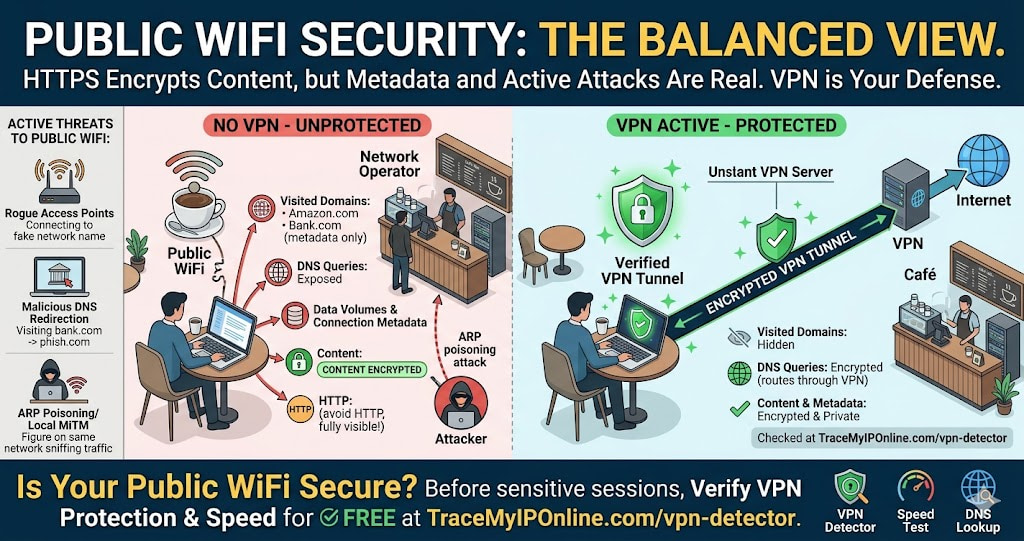
The popular narrative about public WiFi security treats all risks as equivalent and all solutions as equally necessary. The actual risk profile is more specific. Public WiFi does have real security risks — they are not the risks most people imagine. In 2026, with HTTPS adoption above 95%, passive traffic eavesdropping is largely a solved problem. The real risks are different. Here is what they are and what actually helps.
Public WiFi Is Less Dangerous Than People Think — in One Specific Way
The popular narrative about public WiFi security gets something importantly wrong. It treats all public WiFi risks as equivalent and all solutions as equally necessary. The actual risk profile is more specific, and understanding it leads to more useful decisions than the generic "never use public WiFi" advice that most people hear and then ignore anyway.
Here is the honest picture: public WiFi does have real security risks. They are not the risks most people imagine. And the practical mitigation is straightforward.
"The biggest misconception about public WiFi is that passive eavesdropping on HTTPS traffic is still a significant threat. It largely was, in 2012. In 2026, with HTTPS adoption above 95% for web traffic and HTTP Strict Transport Security widespread, passive traffic interception on modern networks yields almost nothing useful. The real public WiFi risks in 2026 are rogue access points, credential interception on HTTP or insecure login forms, and malicious DNS redirection — threats that require active attacks rather than passive monitoring."
— Dr. Evgenia Petrov, Applied Cryptography and Network Security, ETH Zurich
What Public WiFi Actually Exposes
Your IP address from the network operator: When you connect to a coffee shop, hotel, or airport WiFi, you are assigned an IP address from that network. That IP is shared with all other users on the same network at the same time — sometimes hundreds of people. The IP you use on public WiFi is completely different from your home IP.
This has privacy implications: sites you visit during the session log the public WiFi network's IP, not your home IP. In that narrow sense, public WiFi gives you more IP privacy than your home connection — though the network operator can see which device made which request.
Your device to the network operator: The WiFi network operator — the coffee shop, hotel, or whoever runs the network — can see all unencrypted traffic from your device and all connection metadata for encrypted traffic. DNS queries, connection timing, data volumes, IP addresses of sites you visit — all visible to the network operator regardless of HTTPS.
Rogue access points: A malicious actor can set up a WiFi network with the same or similar name to a legitimate public network. When your device connects to the rogue AP instead of the real one, all your traffic goes through the attacker's infrastructure. They can see unencrypted traffic completely and can attempt to downgrade or intercept encrypted traffic through various techniques.
ARP poisoning and man-in-the-middle on local network: On a shared WiFi network, an attacker on the same network can use ARP spoofing to position themselves between your device and the router. This allows interception of unencrypted traffic and can degrade encrypted connections in some configurations.
What Public WiFi Does Not Expose in 2026
The commonly cited risk of someone "reading your traffic" on public WiFi needs context.
HTTPS traffic content: Modern HTTPS uses TLS 1.2 or 1.3 with strong encryption. A passive eavesdropper on the same network sees encrypted ciphertext. Reading the content of HTTPS traffic requires breaking that encryption, which is not feasible for casual attackers. Banking, shopping, email — all conducted over HTTPS are encrypted in transit.
Password theft from HTTPS logins: Logging into Gmail, your bank, or any site using HTTPS sends credentials in encrypted form. An eavesdropper on the public WiFi cannot read your password from intercepted HTTPS traffic. This specific risk is much lower than it was when HTTP logins were common.
Your home IP address: Public WiFi gives you the network's IP, not your home IP. From an IP exposure perspective, using public WiFi and your home connection are different — you leave a different IP footprint on public WiFi.
Before vs After: Public WiFi With and Without Protection
User connects to airport WiFi — no VPN: IP assigned by airport network: 10.72.34.201 (private) → public IP shared with hundreds of airport users. The airport network operator can see: all DNS queries, connection metadata for HTTPS traffic (destination domain visible through SNI), full content of any HTTP traffic. Other users on the same network could attempt ARP spoofing to intercept traffic. Risk level: moderate.
Same user connects to airport WiFi — VPN active and verified at tracemyiponline.com/vpn-detector: All traffic from the device goes through an encrypted VPN tunnel to the VPN server. The airport network operator sees: encrypted traffic going to one IP (the VPN server). DNS queries: routed through VPN, not visible to network operator. Content: not visible. Other network users attempting ARP spoofing see: encrypted VPN traffic, useless without the encryption keys. Risk level: low. ✅
For California and New York Users: Public WiFi and CCPA
California's CCPA treats IP addresses as personal information. Hotel, coffee shop, and airport WiFi networks that log connection data including IP assignments are collecting personal information from California residents. Under CCPA, these businesses should have privacy policies covering this data collection.
Practically, most public WiFi operators collect this data and most California residents using these networks have no realistic mechanism for opt-out. A VPN prevents the network from seeing your traffic destinations — the IP the network logs is real, but the content and destination of your browsing is protected. Verify VPN protection at tracemyiponline.com/vpn-detector.
New York's financial district has high concentrations of workers accessing corporate systems over public WiFi — coffee shops around Hudson Yards, WeWork spaces, hotel lobbies. For corporate data accessed over public WiFi, a VPN is standard security practice and increasingly required by corporate security policies under NYDFS and SOX compliance frameworks.
For London and UK Users: Public WiFi and UK GDPR
UK GDPR applies to public WiFi operators collecting connection data from UK users. Large providers — BT Openzone, The Cloud (Sky), Virgin WiFi — are covered entities with obligations for data collected from network users. For individual coffee shops and hotels providing WiFi, GDPR compliance varies considerably.
The practical security position is the same regardless of the operator's compliance status: a VPN prevents the network from seeing your browsing destinations and content. The IP the network logs is the VPN server's IP from the network's perspective — not meaningfully linked to your browsing activity. Test your VPN at tracemyiponline.com/vpn-detector.
For Toronto and Ontario Users: Public WiFi Privacy Under PIPEDA
Canadian public WiFi operators collecting personal information from users are subject to PIPEDA's consent and purpose limitation requirements. Shopping mall WiFi, hotel WiFi, and airport WiFi in Ontario collect connection data including device identifiers and IP assignments. PIPEDA requires meaningful consent — though most users click through terms without reading them.
For Ontario users accessing corporate systems or sensitive personal accounts over public WiFi: PIPEDA compliance by the network operator does not protect the content of your traffic from the network operator itself. A VPN does. Verify at tracemyiponline.com/vpn-detector.
For Sydney and Australian Users: Public WiFi and the Privacy Act
Australia's Privacy Act covers personal information collected by public WiFi operators as organizations. Major providers — Telstra Air, various airport and shopping center operators — have obligations for data collected from network users. Individual cafes providing WiFi through consumer-grade routers are less likely to have formal compliance frameworks.
The ACSC specifically recommends VPN use on public WiFi as a baseline security measure for Australian users. For Sydney and Melbourne users accessing work systems over public WiFi — coffee meetings, transit hubs, hotel lobbies — a tested VPN is the appropriate technical control. Verify at tracemyiponline.com/vpn-detector.
How to Stay Secure on Public WiFi — Practical Measures
Use a VPN — verified as working: The most effective single measure. Encrypts traffic between your device and the VPN server, preventing the network operator and other users from seeing your browsing content or destinations. A VPN showing "connected" is not enough — test it at tracemyiponline.com/vpn-detector before trusting it on sensitive sessions.
Verify the network name before connecting: Ask staff what the exact WiFi network name is. Connecting to "Starbucks WiFi" when the real network is "Starbucks_Guest" might connect you to a rogue access point. When multiple similarly-named networks appear, verify before connecting.
Use HTTPS everywhere: Most browsers now default to HTTPS. The HTTPS Everywhere browser extension (from EFF) forces HTTPS on sites that support it. HTTP connections on public WiFi are fully readable by network operators and other users — avoid them.
Do not access sensitive accounts without a VPN: Banking, corporate systems, and personal email should only be accessed on public WiFi if you have a verified VPN. The risk of credential interception on HTTPS is low, but the risk of operator data logging and rogue AP attacks is real. A VPN addresses both.
Disable automatic WiFi connection: Devices that automatically join known networks can connect to rogue access points using names matching networks you have used before. On iPhone: Settings, WiFi, Ask to Join Networks — set to Ask. On Android: WiFi settings, disable Auto-connect or Saved Networks for public networks.
Frequently Asked Questions
Can someone on the same public WiFi see my browsing?
For HTTPS traffic: they can see you are connected to a domain (from SNI in TLS handshake) but not the content of pages or any data you submit. For HTTP traffic: they can see everything. For DNS queries: visible unless you use DNS over HTTPS. A VPN encrypts everything before it leaves your device, preventing all of this.
Does using mobile data instead of public WiFi solve the security problem?
Mobile data uses your carrier's encrypted cellular network rather than a shared WiFi network. Eavesdropping attacks from other users are not possible on cellular networks — you would need physical access to carrier infrastructure. Mobile data is generally more secure than public WiFi for most threat models. The trade-off is data usage and potential speed limitations.
Is hotel WiFi safer than coffee shop WiFi?
Not inherently. Hotel networks often have higher traffic volumes and more sophisticated infrastructure, but they are still shared networks where the operator can see connection metadata. Hotel networks are more likely to have formal security policies, but the technical risk profile is similar. Use a VPN on both.
Can a VPN be detected and blocked on public WiFi?
Some networks (corporate, educational, some hotel WiFi) block common VPN ports or protocols. If your VPN fails to connect, try switching protocols — WireGuard, OpenVPN TCP port 443, or SSTP often work through restrictive networks because port 443 is also used by HTTPS and is rarely blocked. If the VPN cannot connect, your fallback is mobile data.
Does the public WiFi network see my device identity?
The network sees your device's MAC address when you connect — a hardware identifier unique to your network adapter. Modern devices randomize MAC addresses for privacy (iOS since 2020, Android since 2019, Windows 10 2004+), but the effectiveness of randomization varies by device and implementation. The network also sees your device name (often your name, from device setup) in DHCP requests.
The Balanced View
Public WiFi is not as dangerous as dramatic security articles make it sound in 2026 — but it is not without real risks. The specific threats are rogue access points, DNS-level traffic analysis, and operator data logging. A VPN addresses all three.
Avoid it entirely for genuinely sensitive sessions without a VPN. Use it freely for general browsing on HTTPS sites if you accept the operator can see connection metadata. Test your VPN at tracemyiponline.com/vpn-detector before trusting it for sensitive public WiFi sessions. Check your speed on public WiFi versus home at tracemyiponline.com/speed-test. All free at TraceMyIPOnline.com.