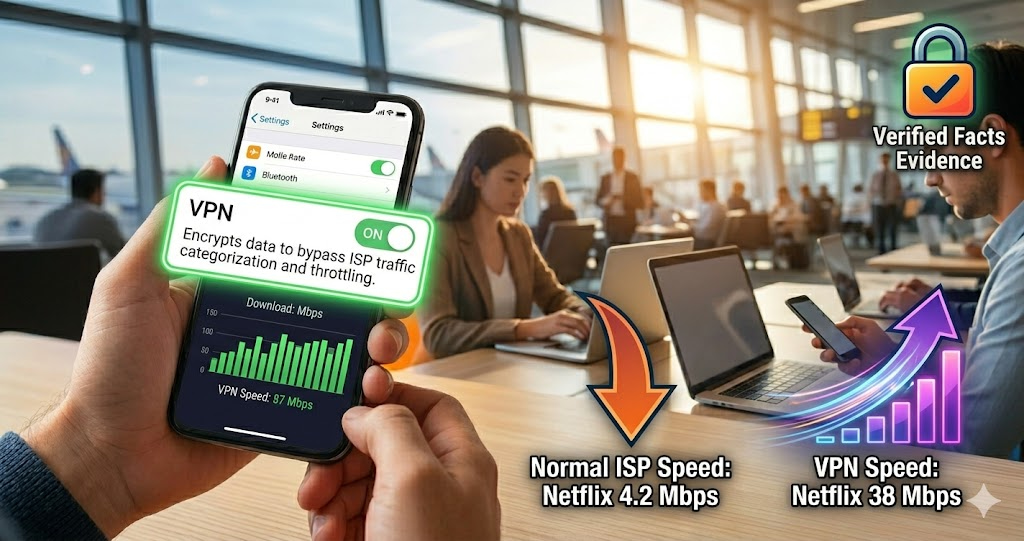
ISP throttling is not a conspiracy theory. It is a documented, technically measurable practice where internet providers intentionally slow down traffic to specific services. Netflix, YouTube, gaming servers, torrent traffic — all have been provably throttled by major ISPs. The useful news: throttling leaves fingerprints. The speed difference between throttled service and VPN-routed traffic is measurable evidence.
Your ISP May Be Slowing Down Specific Websites — Here Is How to Prove It
ISP throttling is not a conspiracy theory. It is a documented, technically measurable practice where internet providers intentionally slow down traffic to specific services, destinations, or content types. Netflix, YouTube, gaming servers, torrent traffic, VoIP calls — all have been provably throttled by major ISPs across the US, UK, Canada, and Australia. The most common experience: everything else on your internet works fine, but one specific service is inexplicably slow.
The useful news: throttling leaves fingerprints. The speed difference between your connection to a throttled service and your connection through a VPN (which bypasses throttling by encrypting traffic the ISP cannot categorize) is measurable evidence.
"ISP throttling detection is one of the clearest applications of controlled network measurement. The methodology is straightforward: measure speeds to a service without a VPN, then measure again with a VPN active. If speeds improve significantly with the VPN — where the ISP cannot inspect traffic to identify the service — that difference is strong evidence of application-specific throttling rather than general congestion. This technique has been used in regulatory filings, net neutrality advocacy, and academic research to document throttling behavior by major carriers."
— Dr. Arjun Menon, Network Measurement and Policy Research, IIT Bombay
The Difference Between Throttling and Congestion
Both throttling and network congestion produce slow speeds. They have different causes and different solutions, and distinguishing them is the first diagnostic step.
Network congestion affects all traffic equally during peak hours. If your internet is slow for everything — streaming, gaming, browsing, downloads — from 7pm to 10pm and fine at 2am, that is congestion. Your neighborhood shares network capacity, and peak-hour demand exceeds supply. The solution is either upgrading your plan, switching ISPs, or accepting the limitation.
ISP throttling affects specific services selectively. If YouTube loads slowly while Google Drive transfers at full speed, or if Netflix buffers while Spotify streams perfectly, that selectivity is the signature of throttling rather than general congestion. The ISP is inspecting traffic (a technique called Deep Packet Inspection, or DPI) to identify the service and applying rate limits to it specifically.
The VPN test distinguishes these: if your speeds to the slow service improve significantly when you encrypt traffic through a VPN — removing the ISP's ability to identify and throttle it — you have demonstrated selective throttling rather than general congestion.
How to Test for ISP Throttling — Step by Step
Step 1: Establish your baseline speed. Run a speed test at tracemyiponline.com/speed-test without any VPN active. Note your download speed, upload speed, and ping. This is your unthrottled connection benchmark — what you are actually paying for.
Step 2: Test the specific service you suspect is being throttled. If you suspect Netflix throttling, measure your Netflix streaming quality at different times. If you suspect gaming throttling, measure ping to game servers. Document the results: time of day, speed or quality metrics, which service.
Step 3: Enable a VPN and repeat both tests. Connect to a VPN server close to your actual location (to minimize added latency), then run the speed test again at tracemyiponline.com/speed-test and test the specific service again. The VPN encrypts your traffic — your ISP can no longer identify which service you are using and cannot apply service-specific throttling.
Step 4: Compare the results. If your general speed test shows similar or slightly lower speeds with VPN (expected — VPN adds overhead), but the specific throttled service shows significantly better performance with VPN, you have demonstrated selective throttling. Document the before/after numbers.
Step 5: Test at different times. Throttling can be time-based. Run the comparison during peak hours (evening, weekends) and off-peak (early morning). Consistent throttling of a specific service at all hours differs from congestion-related slowdowns that only appear at peak times.
Before vs After: Documented Throttling Evidence
User complaint: Netflix consistently buffers at 480p despite 100 Mbps plan. Other services work fine.
Speed test at tracemyiponline.com/speed-test without VPN: 98 Mbps down, 12 Mbps up, 14ms ping. General speed is fine — matches the plan.
Netflix test without VPN: maximum sustained speed to Netflix CDN servers: 4.2 Mbps. Video quality: 480p with buffering. Speed test shows 98 Mbps generally, but Netflix is receiving 4.2 Mbps.
VPN connected (US server, same city). Speed test with VPN: 87 Mbps down (expected 10-15% reduction from VPN overhead). Netflix test with VPN: sustained speed to Netflix CDN: 38 Mbps. Video quality: 4K without buffering.
Conclusion: ISP is throttling Netflix specifically. The 4.2 Mbps cap on Netflix traffic while general traffic runs at 98 Mbps is selective throttling detected through DPI. With VPN obscuring the traffic type, Netflix receives 38 Mbps — consistent with general internet speed minus VPN overhead. This data is sufficient for a regulatory complaint. ✅
For California and New York Users: Net Neutrality and ISP Throttling Rights
California's SB-822, the strongest state-level net neutrality law in the US, prohibits ISPs from throttling, blocking, or paid prioritization of lawful internet content. It applies to ISPs operating in California — Comcast, AT&T, Spectrum, and others serving California customers are covered. The California Attorney General's office enforces SB-822.
For California users who document throttling through the VPN comparison test: file a complaint with the California Attorney General's office and with the FCC. The speed test data from tracemyiponline.com/speed-test combined with before/after VPN measurements constitutes usable documentation for a regulatory complaint.
New York does not have a comprehensive net neutrality law equivalent to California's SB-822, though the New York Public Service Commission has jurisdiction over some ISP practices. Federal net neutrality rules under FCC jurisdiction apply to New York users. Document your throttling evidence and file with the FCC's Consumer Complaint Center at consumercomplaints.fcc.gov. Check your current speeds at tracemyiponline.com/speed-test.
For London and UK Users: Ofcom and ISP Traffic Management
UK ISPs are permitted to engage in "traffic management" — including throttling — but are required by Ofcom to disclose these practices in their terms of service and key facts documents. The Open Internet regulation (implementing EU net neutrality rules, retained in UK law post-Brexit) allows reasonable traffic management but prohibits blocking or throttling based on commercial interests.
For UK users suspecting throttling: first check your ISP's traffic management policy — BT, Sky, Virgin Media, and TalkTalk all publish these. If your documented throttling is not covered by the disclosed policy, file a complaint with your ISP and escalate to Ofcom or the Communications Ombudsman. Run your speed tests at tracemyiponline.com/speed-test at multiple times of day and document the results alongside the VPN comparison. Ofcom's broadband performance research accepts consumer-provided speed data.
For Toronto and Ontario Users: CRTC and Traffic Management
The CRTC's Internet Traffic Management Practices (ITMP) framework requires Canadian ISPs to disclose traffic management practices and prohibits practices that discriminate against specific applications or services without justification. Rogers, Bell, Videotron, and Telus are all covered by CRTC ITMP rules.
For Ontario users who document throttling: file a complaint with the CRTC through their online complaint form. Include your before/after VPN speed test data from tracemyiponline.com/speed-test, the specific service affected, the times of testing, and the speed differential. The CRTC takes ITMP complaints seriously, particularly when supported by documented measurement data.
For Sydney and Australian Users: ACCC and NBN Performance
The ACCC's NBN Wholesale Market Indicators Report and annual Broadband Performance monitoring program both address ISP speed delivery against advertised rates. Australian Consumer Law prohibits misleading conduct — an ISP advertising speeds that are not delivered due to deliberate throttling may be in breach.
For Sydney and Melbourne NBN users suspecting throttling: Telstra, Optus, and TPG have published traffic management policies for NBN services. If your documented speeds through the VPN comparison test show significant throttling of specific services, file complaints with the TIO (Telecommunications Industry Ombudsman) and the ACCC. Speed test data from tracemyiponline.com/speed-test is exactly the kind of evidence these bodies use.
What to Do If You Confirm Throttling
Document everything first: Multiple speed tests at different times of day, before and after VPN comparison, screenshots with timestamps, the specific service affected. Regulatory complaints are more effective with systematic evidence than with a single data point.
Contact your ISP: File a formal complaint. ISPs sometimes resolve throttling complaints — particularly if you can demonstrate you are on a plan that does not disclose the throttling in its terms. Get a complaint reference number.
File with the regulator: After giving the ISP a chance to respond, escalate to the relevant regulator (FCC/state AG in the US, Ofcom in the UK, CRTC in Canada, ACCC/TIO in Australia). Your documented speed test evidence is the core of this complaint.
Consider changing ISPs: In competitive markets, documented throttling of services you specifically use is a legitimate reason to switch. Check whether alternative ISPs in your area have better performance records for your specific services before switching.
Frequently Asked Questions
Is the Speed Test tool free?
Yes — 100% free, no signup. Visit tracemyiponline.com/speed-test and run a test instantly.
Can ISPs see that I am using a VPN?
ISPs can see that you are making an encrypted connection to a VPN server's IP address, but they cannot see the traffic content or where you are connecting to through the VPN. Some ISPs throttle all VPN traffic — if speeds are still poor with a VPN, the ISP may be targeting VPN traffic specifically rather than service-specific throttling.
My VPN slowed things down even more — what does that mean?
If speeds decrease with VPN rather than improve, either: the VPN server is geographically far away adding significant latency, the VPN provider's servers are overloaded, or the ISP is throttling VPN traffic specifically. Try a different VPN server location, a different VPN protocol (WireGuard is typically fastest), or a different VPN provider. Check your IP and connection at tracemyiponline.com/ip-lookup.
How many speed tests should I run before concluding there is throttling?
At minimum: 3-5 tests without VPN, 3-5 tests with VPN, repeated at different times of day, over 2-3 days. A single test is not sufficient evidence — network conditions vary. Consistent patterns across multiple tests are what establish throttling versus random variation.
Is throttling legal?
It depends on jurisdiction and context. In California, net neutrality law makes most throttling of lawful services illegal. In the UK and Canada, throttling is permitted if disclosed but regulated. In most US states without net neutrality laws, throttling is generally legal unless it violates the terms of your service agreement. Document and check your ISP's terms before filing a complaint.
Can I get a refund if throttling is confirmed?
Possibly. If your ISP's terms of service do not disclose the throttling and you can demonstrate you are not receiving the service you paid for, you may have grounds for a refund or contract exit without penalty. This is more straightforward in the UK (Ofcom codes) and Australia (ACL consumer guarantees) than in most US states.
The Measurement Is the Evidence
ISP throttling disputes are won or lost on documented measurement data. The VPN comparison method is technically straightforward, produces clear evidence of selective throttling versus general congestion, and is accepted by regulators in all four Tier-1 jurisdictions. The test takes about 20 minutes, costs nothing, and produces the kind of specific, comparative data that regulators can act on.
Run your speed test at tracemyiponline.com/speed-test. Check your IP details at tracemyiponline.com/ip-lookup. Verify your VPN at tracemyiponline.com/vpn-detector. Check open ports at tracemyiponline.com/port-checker. All free at TraceMyIPOnline.com.