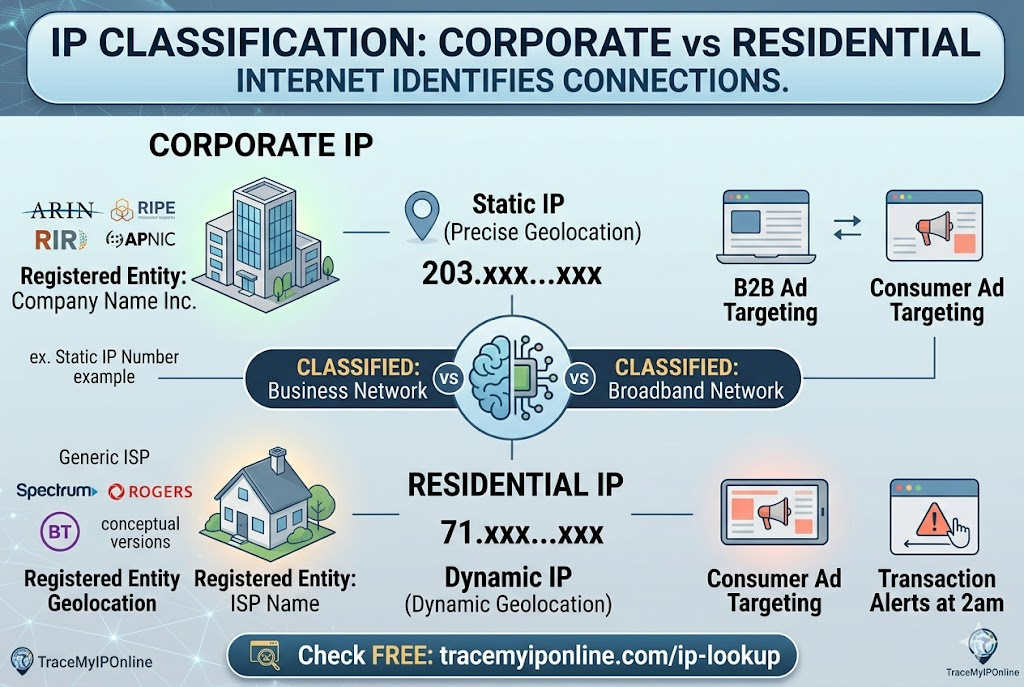
When you connect from a company office, you get an IP registered to your employer — not to your ISP. To every website you visit, that corporate IP reveals your company's name directly. Your home broadband shows your ISP. Fraud detection, ad targeting, and content restriction all treat these differently. Remote workers who switch between connections encounter this gap constantly without knowing it is the cause.
Corporate IPs and Residential IPs Look Very Different to the Internet — And That Difference Has Real Consequences
When you connect to the internet from a company office, you get an IP address from your employer's registered block rather than from a residential ISP. To websites, security systems, and fraud detection platforms, that corporate IP looks completely different from a home broadband connection. The distinction is not subtle — it changes how you are classified, what content you see, and in some cases whether you can access specific services at all.
Most employees working in offices have never thought about this. Remote workers who switch between home broadband and corporate VPN encounter it constantly without necessarily knowing why things behave differently on one connection versus the other.
"The corporate versus residential IP distinction is one of the most reliable signals in internet fraud detection. Corporate IPs are registered to legal entities with verifiable information — company name, address, ARIN or RIPE registration records. Residential IPs are registered to ISPs and associated with individual customers through ISP records. A consumer financial transaction from a corporate IP is worth a second look. A business wire transfer from a residential hotspot at 2am is also worth a second look. The classification helps establish whether the connection matches the expected context."
— Dr. Carlos Mendez, Enterprise Network Security, IE Business School Madrid
How Corporate IPs Differ From Residential IPs
Registration: Corporate IPs are registered directly to the company in RIR (Regional Internet Registry) databases — ARIN for North America, RIPE NCC for Europe, APNIC for Asia-Pacific. A lookup on a corporate IP returns the company name directly. A residential IP lookup returns the ISP name (Comcast, BT, Rogers) — not the individual customer.
Static vs dynamic: Corporate IPs are almost always static — the same IP block is assigned to the company permanently and does not change as individual users connect. Residential IPs are typically dynamic — assigned from a pool and can change. This makes corporate IPs more geolocation-stable and more precisely attributed.
Volume and concentration: A corporate IP block might serve thousands of employees through a single public IP or a small CIDR range. Many users, same IP. This concentration pattern is recognizable to fraud detection systems — it looks different from a residential dynamic IP pool.
Geolocation accuracy: Corporate IPs typically geolocate more precisely than residential IPs. The office address is often registered with the IP block, so geolocation databases can be more accurate to the building level rather than just the city.
Reputation: Corporate IPs generally have very clean reputation profiles — companies have strong incentives to manage their IP blocks and avoid blacklisting. Check any IP's reputation at tracemyiponline.com/blacklist-checker.
What Changes When You Connect Through Corporate Network vs Home
What websites see: On corporate network — your employer's company name, exact office location, corporate ASN, static IP. On home broadband — your ISP name, approximate neighborhood or ISP hub city, residential ASN, dynamic IP.
Fraud detection behavior: Banking logins from corporate IPs during business hours are typically low-risk from a fraud-scoring perspective — consistent pattern, known corporate entity, business hours timing. The same login from an unfamiliar residential IP at 3am might trigger additional verification, even if the password is correct.
Ad targeting: Advertisers use IP classification for targeting. Corporate IPs receive B2B-oriented ad targeting. Residential IPs receive consumer-oriented targeting. Remote workers who access personal accounts through corporate VPN might notice their ad targeting shifts toward business content.
Content restrictions: Some content is restricted by IP classification. Consumer entertainment platforms may restrict or limit access from corporate IPs. Conversely, some business services require or prefer corporate IP connections for security reasons.
Before vs After: The Remote Work IP Switch
Employee working from home on personal broadband — IP lookup: IP: 71.xxx.xxx.xxx. ISP: Spectrum. Location: Dallas, Texas (approximate). Connection type: Residential. ASN: AS11426 (Charter Communications). Company name: Not visible — only the ISP appears.
Same employee connected to corporate VPN — IP lookup: IP: 203.xxx.xxx.xxx. ISP: Employer Company Name Inc. Location: Austin, Texas (employer HQ). Connection type: Corporate/Business. ASN: AS[company ASN]. Company name: Visible in lookup as the registered entity.
From the perspective of any website the employee visits while on corporate VPN, the employer's identity is apparent in the IP lookup. This is relevant for privacy, for understanding unexpected behavior on personal accounts, and for security monitoring. Check both your home and work connection at tracemyiponline.com/ip-lookup.
For California and New York Remote Workers: Corporate IP and Privacy
California's CCPA treats IP addresses as personal information. When you work remotely and access personal accounts through a corporate VPN, those personal accounts may log your employer's corporate IP rather than your home IP. Depending on your employer's VPN configuration (full tunnel vs split tunnel), your personal browsing may route through corporate infrastructure — visible to your employer's network monitoring before reaching the internet.
For California and New York remote workers: understand whether your corporate VPN uses full tunnel (all traffic routes through the company network) or split tunnel (only company-specific traffic routes through VPN, personal traffic goes directly through your home ISP). Check which IP your browser sees at tracemyiponline.com/ip-lookup while connected to your work VPN to determine the configuration.
For London and UK Remote Workers: Corporate IP Under UK GDPR
UK employers have data protection obligations regarding employee monitoring. Under UK GDPR, monitoring employee internet traffic — which becomes possible when traffic routes through corporate network infrastructure — requires disclosure to employees and a lawful basis for the processing.
The ICO's Employment Practices Code addresses employee monitoring obligations. If you work remotely and your corporate VPN routes all traffic through company infrastructure, your employer has visibility into your internet activity that they are legally obligated to disclose in their privacy notice or acceptable use policy.
Check whether your work VPN shows the corporate IP at tracemyiponline.com/ip-lookup. If it does, your traffic is routing through company infrastructure.
For Toronto and Ontario Remote Workers: Corporate IP and PIPEDA
Canadian employers monitoring employee internet activity through corporate network infrastructure must comply with PIPEDA's requirements for employee privacy. The OPC has published guidance on employee privacy in the workplace that covers remote work scenarios — the same network monitoring obligations apply whether employees are in the office or working from home on corporate VPN.
For Ontario remote workers: a corporate VPN that shows the employer's IP at tracemyiponline.com/ip-lookup means your employer's infrastructure is handling your traffic. Review your employer's acceptable use policy and privacy notice to understand what monitoring applies.
For Sydney and Australian Remote Workers: Corporate IP and the Privacy Act
Australian employers have Privacy Act obligations regarding employee information. The OAIC has noted that employer monitoring of remote work traffic through corporate networks constitutes collection of personal information and is subject to the Australian Privacy Principles.
For Sydney and Melbourne remote workers: check your work connection's IP at tracemyiponline.com/ip-lookup. If it shows your employer's corporate IP, your traffic is routing through company infrastructure. Your employer's IT and HR policies should disclose what monitoring applies to this traffic.
Corporate IPs in Security Investigations
From a security investigation perspective, corporate IPs are easier to attribute than residential IPs. A corporate IP appears in server logs linked to a specific company — the registered entity is in the public ARIN or RIPE database. Abuse complaints go directly to the registered contact rather than to a large ISP's abuse team.
This attribution clarity cuts both ways. It makes corporate IP abuse easier to investigate and report — phishing emails sent from a corporate IP, for instance, lead investigators directly to the registered company. It also means corporate network misuse is more easily traceable back to the source organization.
Check any corporate IP with our full suite: IP Lookup for registration details, Blacklist Checker for reputation, WHOIS Lookup for domain verification, and DNS Lookup for email infrastructure. All free at TraceMyIPOnline.com.
How ISPs Assign Residential IP Blocks — And Why They Change
Residential IP assignment works differently from corporate. ISPs receive large IP blocks from ARIN or RIPE and distribute them to customers dynamically from their DHCP pools. The ISP's name appears in the registry, not the individual customer's. When you get a new IP after restarting your router, you get a different address from the same pool — same ISP name, different number.
The implications for security: residential IPs are less precisely attributable because the connection from public IP to specific customer exists only in ISP logs, accessible only through legal process. Corporate IPs are more precisely attributable because the registered entity is publicly visible in RIR databases.
Frequently Asked Questions
Is the IP Lookup tool free?
Yes — 100% free, no signup. Visit tracemyiponline.com/ip-lookup and check any IP's full profile instantly.
Can I see what company an IP belongs to?
For corporate IPs, yes — the registered organization name appears in the lookup. For residential IPs, you see the ISP name rather than the individual customer. The ISP is the registered entity for residential IP blocks.
How do I know if my work VPN is routing all my traffic through the corporate network?
Check your IP at tracemyiponline.com/ip-lookup while connected to your work VPN. If it shows your employer's name or a corporate IP block, your traffic is routing through company infrastructure. If it shows your home ISP, your VPN is likely split-tunnel configured to only route work-specific traffic.
Why does my home IP sometimes show my employer's city?
Two possibilities: you are connected to a corporate VPN that routes traffic through company infrastructure in their city, or your ISP routes traffic through a hub that geolocates to a different city. Check at tracemyiponline.com/ip-lookup to see the ISP name — if it shows your employer rather than your home ISP, the VPN is the cause.
Can websites detect that I am using a corporate network?
Yes — corporate IPs are classified as such in geolocation databases. Websites can determine that a connection comes from a business network rather than a residential connection. This affects ad targeting, fraud scoring, and in some cases content availability.
Does using a corporate IP affect my personal online shopping?
It can. E-commerce sites use IP classification for pricing, regional availability, and fraud detection. A purchase from a corporate IP when your billing address is residential can occasionally trigger additional verification steps. Using split-tunnel VPN (which routes only work traffic through the corporate network) avoids this for personal browsing.
Knowing Which IP You Are Using Makes Troubleshooting Straightforward
Most connection behavior issues that remote workers encounter — unexpected content restrictions, fraud alerts on personal accounts, ad targeting that seems wrong — become immediately explainable once you check which IP you are actually presenting to the internet. A 10-second check at tracemyiponline.com/ip-lookup answers the first question in any such investigation.
Check your current IP whether on home broadband or corporate VPN. Check your IP reputation at tracemyiponline.com/blacklist-checker. Verify your VPN configuration at tracemyiponline.com/vpn-detector. All free at TraceMyIPOnline.com.