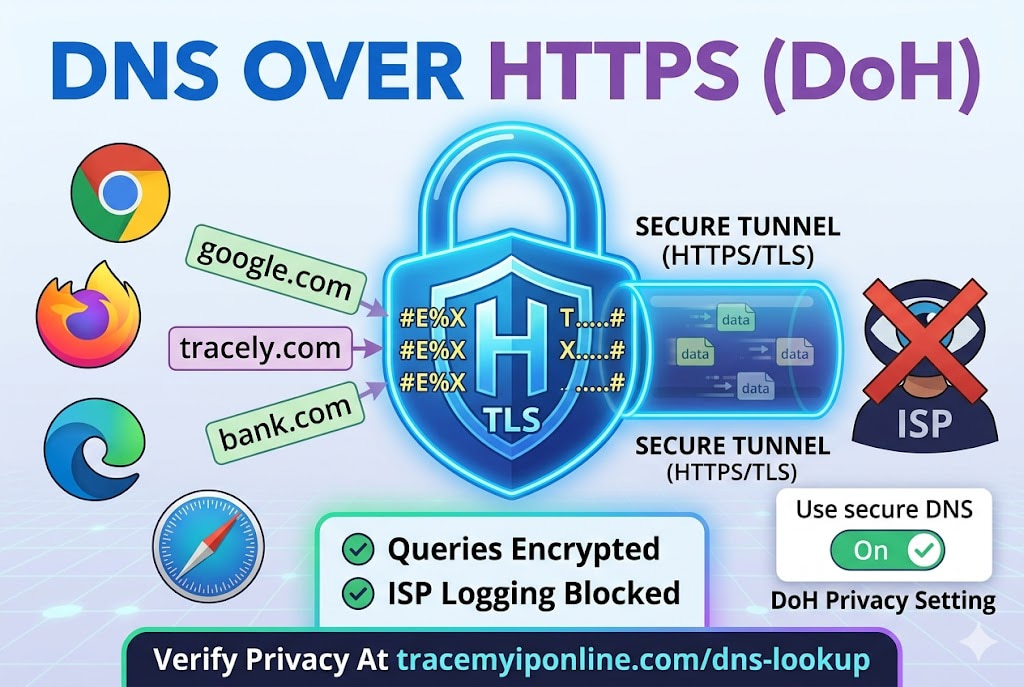
Every website you visit starts with a DNS query — a request sent to your ISP's servers in plaintext that logs every domain you visit. DNS over HTTPS encrypts those queries so your ISP cannot read them. The feature is built into Chrome, Firefox, Edge, and Safari. It takes two minutes to enable. It is free. Almost nobody has turned it on. Here is what it does, what it does not do, and how to enable it.
DNS Over HTTPS — The Privacy Setting Most Browsers Support That Almost Nobody Has Turned On
Every website you visit starts with a DNS query — a request that translates the domain name into an IP address. By default, that query travels to your ISP's DNS servers in plaintext. Unencrypted. Visible to your ISP, to anyone monitoring the network between your device and the DNS server, and to the DNS server itself.
DNS over HTTPS (DoH) fixes this specific problem by encrypting DNS queries inside standard HTTPS traffic. Your ISP can see that you are making HTTPS connections — just as they can see any other HTTPS traffic — but they cannot read the contents, which means they cannot see which domains you are querying. The feature is available in Chrome, Firefox, Edge, and Safari. Most people have never enabled it.
Check what DNS servers your connection currently uses at tracemyiponline.com/dns-lookup — free, no signup.
"The DNS privacy gap has been a known problem for a long time, and DNS over HTTPS is a reasonable solution for a specific part of it — the query visibility from your ISP and any intermediate network. It does not solve everything: your DoH provider still sees your queries, and HTTPS connection metadata is still visible to your ISP. But for users whose primary concern is ISP-level DNS logging, DoH provides real protection that does not require a VPN."
— Dr. Rajiv Menon, DNS Security and Privacy Research, Indian Institute of Science
What DNS Over HTTPS Actually Does — And What It Does Not
Standard DNS sends queries in plaintext UDP packets to port 53. These are readable by anything on the network path — your router, your ISP, any monitoring infrastructure between your device and the DNS server. Your ISP's DNS servers log every query, building a record of every domain you visit.
DNS over HTTPS wraps those same DNS queries inside standard HTTPS (TLS-encrypted HTTP/2) connections to a DoH-capable resolver. The query content is encrypted. Your ISP can see that you are making HTTPS connections to a DoH resolver's IP address, but they cannot read the domain names you are querying.
What DoH protects: The content of DNS queries from ISP logging. DNS queries from network-level monitoring (WiFi network administrators, public hotspot operators). DNS hijacking attacks where malicious DNS responses are injected into unencrypted queries.
What DoH does not protect: Your DNS queries from the DoH provider you chose (Cloudflare, Google, NextDNS — they see your queries instead of your ISP). HTTPS connection metadata — your ISP still sees which IP addresses you connect to, even if they cannot see the domain names. Browser fingerprint, account tracking, and other non-DNS tracking methods. SNI (Server Name Indication) in TLS handshakes, which reveals domain names at the connection level even when DNS queries are encrypted (though ECH — Encrypted Client Hello — is emerging as a solution to this).
How to Enable DNS Over HTTPS — Every Major Browser
Chrome (desktop): Click the three-dot menu at the top right. Select Settings. Navigate to Privacy and Security, then Security. Scroll to Advanced and find "Use secure DNS." Toggle it on and select your preferred provider — Google or Cloudflare are the main options. You can also add a custom provider URL if you use a service like NextDNS.
Firefox: Click the three-line menu. Select Settings. Go to Privacy and Security. Scroll down to DNS over HTTPS. Select "Max Protection" (all DNS via DoH, Firefox warns if it cannot use DoH) or "Increased Protection" (DoH preferred but falls back to system DNS). Choose Cloudflare (default), NextDNS, or a custom resolver.
Microsoft Edge: Click the three-dot menu. Select Settings. Go to Privacy, Search, and Services. Scroll to Security, find "Use secure DNS to specify how to lookup the network address for websites." Toggle on and select a provider.
Safari (Mac): Safari itself does not have a DoH setting — it uses the system DNS. To enable DoH system-wide on a Mac, go to System Preferences, Network, select your connection, click Advanced, then DNS. Add 1.1.1.1 and 1.0.0.1 as DNS servers. This changes the DNS resolver but does not encrypt queries at the system level unless you use a DoH profile.
For full system-level DoH on iOS or macOS, Apple supports DNS configuration profiles that enable DoH or DoT (DNS over TLS) system-wide. These are available from Cloudflare (1.1.1.1 app), NextDNS, and others.
Which DoH Provider to Choose
Cloudflare (1.1.1.1): The fastest DoH provider globally based on independent benchmarks. Privacy policy commits to not logging query data after 24 hours, with annual independent audits. DoH URL: https://cloudflare-dns.com/dns-query. The 1.1.1.1 app on iOS and Android enables DoH and DoT system-wide. Check whether your DNS is currently resolving through Cloudflare at tracemyiponline.com/dns-lookup.
Google (8.8.8.8): Fast and reliable globally. Google retains DNS query data for a limited period and uses it for security and product improvement purposes. Better privacy than your ISP's DNS for most users, though Google's broader data collection practices may be a concern for privacy-focused users. DoH URL: https://dns.google/dns-query.
NextDNS: Configurable DNS with ad blocking, parental controls, and detailed analytics. Free tier for 300,000 queries per month, paid after that. Detailed logging control — you can see exactly what DNS queries are being made and block specific categories. Useful for households wanting visibility and control over DNS at the network level.
Quad9 (9.9.9.9): Privacy-focused, non-profit operated. Blocks known malicious domains by default. Does not log IP addresses. Operated by the Quad9 Foundation in Switzerland, with strong data protection laws. DoH URL: https://dns.quad9.net/dns-query.
Before vs After: DNS Privacy With and Without DoH
User on standard ISP DNS, no DoH: DNS query for google.com sent to 75.75.75.75 (Comcast DNS) in plaintext. Comcast logs: query timestamp, source IP, requested domain. Comcast DNS access log now contains a record of this user visiting google.com at this time. This record exists for every domain the user visits, retained according to ISP policy (often 12-18 months for US ISPs).
Same user with Cloudflare DoH enabled in browser: DNS query for google.com sent to 1.1.1.1 (Cloudflare) inside encrypted HTTPS. Comcast sees: encrypted HTTPS connection to 1.1.1.1. Comcast log: HTTPS connection to Cloudflare at timestamp, approximately X bytes. Domain visited: not recorded. Cloudflare log: query received, resolved, not linked to IP per their privacy policy. ✅
Verify your current DNS resolver at tracemyiponline.com/dns-lookup before and after enabling DoH to confirm the change took effect.
For California and New York Users: DNS Privacy and ISP Data Practices
US ISPs have been legally permitted to sell anonymized customer browsing data since 2017. California's CCPA treats IP-linked DNS query data as personal information and gives California residents opt-out rights — but exercising opt-out rights with Comcast or AT&T while continuing to use their DNS defeats the purpose. Enabling DoH to Cloudflare or Quad9 moves your DNS queries outside your ISP's logging infrastructure.
New York residents without CCPA-equivalent protections have even fewer statutory tools for ISP DNS privacy. For both California and New York users whose primary concern is ISP-level DNS logging: DoH provides real, measurable protection at no cost. Check your current DNS at tracemyiponline.com/dns-lookup.
For London and UK Users: DNS Privacy Under the IPA
The UK's Investigatory Powers Act requires ISPs to retain internet connection records — which includes DNS query data — for 12 months. BT, Sky, Virgin Media, and other UK ISPs are legally required to collect and retain this data. DoH to a non-UK provider means DNS queries are resolved outside UK ISP infrastructure, though the ISP can still see connection metadata.
UK residents using Cloudflare DoH or Quad9 have their DNS queries processed outside the UK data retention framework. The retained records show encrypted HTTPS connections to a DoH resolver rather than individual domain queries. This is meaningful privacy protection within the constraints of what the law requires ISPs to retain. Check your DNS configuration at tracemyiponline.com/dns-lookup.
For Toronto and Ontario Users: DoH and ISP DNS Logging
Canadian ISPs retain connection metadata for network management and law enforcement purposes. The OPC has noted that DNS query logging constitutes personal information collection under PIPEDA when it can be linked to individuals. Using DoH with a third-party resolver moves DNS processing outside Rogers' or Bell's infrastructure, reducing the scope of DNS data they can collect from your connection.
For Ontario users concerned about ISP DNS logging: DoH is free, takes 2 minutes to enable in your browser, and measurably reduces what your ISP can observe about your browsing activity. Check the result at tracemyiponline.com/dns-lookup.
For Sydney and Australian Users: DoH and Mandatory Retention
Australia's mandatory metadata retention requires ISPs to retain internet connection records for two years, which includes DNS query data when it passes through ISP DNS infrastructure. DNS over HTTPS to Cloudflare or Quad9 routes queries through those providers' infrastructure rather than Telstra's or Optus's — what ends up in the mandatory retention records is a connection to a DoH server, not individual domain queries.
Australian users enabling DoH should verify the change works at tracemyiponline.com/dns-lookup. After enabling DoH in your browser, the DNS lookup results should show resolution through Cloudflare (1.1.1.1) or Google (8.8.8.8) rather than your ISP's DNS servers.
DoH Limitations Worth Knowing
Browser-level only: Enabling DoH in Chrome encrypts DNS queries from Chrome. Other applications on your system — email clients, software updaters, other browsers — still use the system DNS. For full-system DoH, you need an OS-level configuration or a DoH-capable DNS resolver running locally.
SNI still visible: When your browser connects to a website, the TLS handshake includes the Server Name Indication (SNI) field which contains the domain name in plaintext. Your ISP can see this even if the DNS query was encrypted via DoH. Encrypted Client Hello (ECH) addresses this but adoption is still limited. DoH reduces the domain-visibility problem but does not eliminate it entirely.
You trust the DoH provider: Your ISP is no longer seeing your DNS queries, but Cloudflare or Google is. You are choosing which entity to trust with your query data. Both Cloudflare and Google have published privacy policies covering their DNS services, but you are still making a trust decision.
Corporate networks may override DoH: Many corporate networks intercept DNS traffic and redirect it through their own resolvers regardless of client settings. If you are on a work network, your IT department's DNS infrastructure likely overrides DoH settings. This is intentional for network monitoring and security purposes.
Frequently Asked Questions
Is enabling DoH free?
Yes — the feature is built into modern browsers at no cost. The Cloudflare (1.1.1.1) and Google (8.8.8.8) DoH resolvers are free to use. NextDNS has a free tier. Quad9 is free and non-profit operated.
Will enabling DoH make my internet faster or slower?
It depends on which DoH provider you choose compared to your current ISP DNS. Cloudflare's 1.1.1.1 is consistently the fastest DNS resolver globally per independent benchmarks — switching to it from a slow ISP DNS can actually improve page load times. Switching from a fast ISP DNS to a geographically distant DoH resolver can add minimal latency. Check your current DNS performance at tracemyiponline.com/dns-lookup.
Does DoH work with a VPN?
If your VPN routes all traffic through its tunnel, DoH queries will be sent through the VPN tunnel to the DoH resolver. Whether this is better or worse than your VPN's own DNS depends on the VPN's DNS configuration. Check for DNS leaks at tracemyiponline.com/dns-lookup with VPN connected — if your ISP's DNS appears, you have a DNS leak that DoH alone does not fix.
Can DoH break any websites or services?
Rarely. Some content delivery networks and split-horizon DNS setups can behave differently with third-party DNS resolvers than with ISP DNS. If you notice specific sites stopping working after enabling DoH, try disabling DoH temporarily to test. This is uncommon with Cloudflare or Google DoH.
Is DoH the same as a VPN?
No. DoH encrypts only DNS queries — it does not encrypt your other internet traffic, change your IP address, or hide your connection destinations (only the domain names in DNS queries). A VPN encrypts all traffic and changes your visible IP. They address different parts of the privacy problem and can be used together.
Two Minutes to Encrypt Your DNS — Worth Doing
DoH is one of the smaller privacy improvements available — it addresses DNS query visibility specifically and nothing else. But it is free, takes two minutes to enable, and measurably reduces what your ISP can observe about your browsing. For users whose primary privacy concern is ISP-level monitoring, it provides real benefit without the cost or complexity of a VPN.
Enable DoH in your browser settings, then verify it worked at tracemyiponline.com/dns-lookup. Check your full IP profile at tracemyiponline.com/ip-lookup. If you use a VPN, test it at tracemyiponline.com/vpn-detector. All free at TraceMyIPOnline.com.