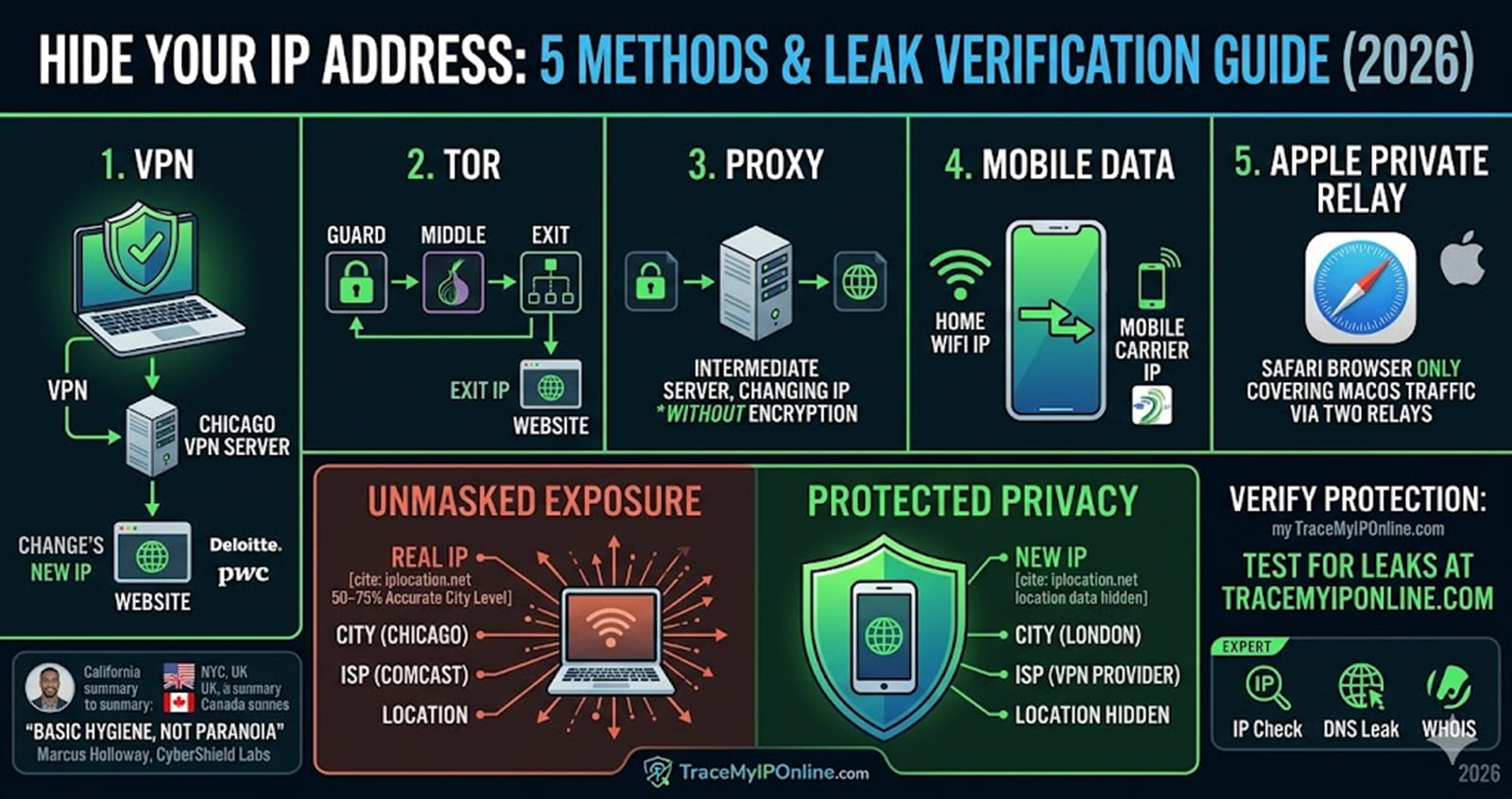
Your IP address tells every website your city, ISP, and location — automatically, every time you connect. This guide covers 5 free methods to hide it in 2026, plus how to confirm your protection is actually working before you trust it.
Every time you open a browser, your IP address goes with you — to every website, every ad network, every third-party tracker running silently in the background. It's not a conspiracy. It's just how the internet was built.
The good news: hiding it isn't complicated, and it doesn't have to cost money.
This guide covers five methods that actually work in 2026, what each one leaves exposed, and how to verify your IP is actually hidden after you set it up.
What Your IP Address Reveals (More Than You Think)
Your IP doesn't show your home address. But it does show your city, your ISP, your general coordinates, and your device's rough location — enough for advertisers to build a profile, and enough for bad actors to start probing.
According to cybersecurity expert Marcus Holloway, Senior Network Security Analyst at CyberShield Labs: "Most users assume IP tracking is a background inconvenience. In practice, your IP is the first data point in almost every targeted ad campaign, geo-restriction system, and DDoS attack. Hiding it is basic hygiene, not paranoia."
Here's what websites see right now when you visit them without protection:
- City and region (50–75% accurate at city level, per iplocation.net's 2026 data)
- Your Internet Service Provider name
- Whether you're on residential, mobile, or datacenter connection
- Your timezone and browser fingerprint
Before we get into methods, check your own exposure — run a free IP lookup at TraceMyIPOnline.com to see exactly what sites are seeing when you connect.
Method 1: VPN — Best for Daily Use
A VPN routes all your traffic through a remote server. Websites see the server's IP, not yours. Your ISP sees encrypted data going to one destination — they can't see where you're actually browsing.
How it works in plain terms: You connect to a VPN server in, say, Chicago. Every site you visit thinks you're in Chicago. Your real location disappears from the equation.
2026 cost reality: NordVPN runs around $3.09/month on a two-year plan. Surfshark is as low as $1.78/month. Free VPN tiers exist but they come with data caps (usually 500MB–10GB/month) and slower speeds.
Watch out for: Free VPNs with no clear business model. If they're not charging you, you're the product. Look for independent audits — NordVPN and Surfshark have both been verified by PwC and Deloitte.
What it doesn't protect: WebRTC leaks. Some browsers send your real IP even through a VPN via WebRTC. After connecting, verify your protection at TraceMyIPOnline.com — if your real IP still shows, you have a leak.
Method 2: Tor Browser — Best for Strong Anonymity
Tor bounces your traffic through three volunteer-operated relays before reaching its destination. Each relay only knows the previous and next hop — no single point knows both who you are and where you're going.
Before using Tor: Your traffic path = Your device → Website. Everything logged directly to your IP.
After using Tor: Your traffic path = Guard node → Middle relay → Exit node → Website. The website sees the exit node's IP. Your ISP sees only that you're using Tor.
The tradeoff is speed. Tor typically delivers 5–15 Mbps in real-world conditions. Netflix won't load. Most banking sites block Tor exit nodes. It's not built for streaming or everyday browsing.
It's built for: Journalists, researchers, whistleblowers, and anyone who needs strong anonymity. If that's not you, a VPN is the more practical daily driver.
Method 3: Proxy Server — Quickest for Single Tasks
A proxy sits between your browser and the website. The site sees the proxy's IP instead of yours. Fast, easy, no software to install.
The catch: No encryption. Anyone monitoring your network — your ISP, your employer, someone on the same public WiFi — can still see what you're doing. The proxy just changes what the destination website sees, not what happens in transit.
Use proxies for: casual geo-unblocking, quick single-task browsing where encryption doesn't matter.
Don't use proxies for: banking, logging into accounts, anything involving sensitive data.
Method 4: Mobile Data — Easiest Quick Fix
Switch from your home WiFi to your phone's mobile data and you instantly get a different IP address — your carrier's mobile IP instead of your ISP's residential one.
It doesn't make you anonymous. Your carrier still knows exactly who you are. But it does change the IP websites see, which is sometimes all you need — to bypass a soft IP block, for example, or to test how a site looks from a mobile connection.
Use your WHOIS lookup tool at TraceMyIPOnline.com to check if your mobile IP is flagged in any blocklists before relying on it.
Method 5: Apple Private Relay — For Safari Users Only
iCloud Private Relay (part of iCloud+) routes Safari traffic through two separate relays. Apple knows your IP. The content provider knows the site you're visiting. Neither knows both. It's VPN-lite, built into iOS and macOS.
Limitation: Safari only. It doesn't cover apps, other browsers, or system-level traffic. If you're watching something on Chrome or downloading files, Private Relay isn't protecting you.
How These Methods Compare: TMIO vs. Competitors
ToolEncrypts TrafficFree TierSpeed ImpactDevice CoverageVPN (paid) | Yes | Limited | Low–Medium | All devices
Tor | Yes | Free | High | Browser only
Proxy | No | Free | Low | Browser only
Mobile Data | No | Free | None | Phone only
Private Relay | Partial | iCloud+ | Low | Safari only
Tor | Yes | Free | High | Browser only
Proxy | No | Free | Low | Browser only
Mobile Data | No | Free | None | Phone only
Private Relay | Partial | iCloud+ | Low | Safari only
Sites like WhatIsMyIPAddress.com and iplocation.net cover this topic but don't provide tools to immediately verify your protection. With TraceMyIPOnline, you can run an IP check, a DNS leak test, and a WHOIS lookup in one place — before and after enabling protection.
How to Hide Your IP in California (and Other US States)
California has some of the strongest digital privacy laws in the US — CCPA gives residents the right to opt out of data selling. But that law doesn't stop passive IP tracking. If you're in Los Angeles or San Francisco, your residential IP is directly tied to your ISP account. A VPN server in another state is the cleanest fix.
VPN providers like NordVPN and Surfshark operate hundreds of US servers. Pick one outside California if you want to appear from a different state entirely.
IP Privacy in New York and the Northeast
New York City sees some of the highest concentrations of ad targeting and price discrimination based on IP location. Hotels, airlines, and even some e-commerce sites adjust prices based on where you're browsing from.
Switch your IP to a different city before comparing prices. Then run a fresh lookup at TraceMyIPOnline.com to confirm the switch worked before you book.
UK Users: IP Hiding After the Online Safety Act
Since the Online Safety Act came into force, ISPs in the UK are required to collect and store more browsing metadata. In London and Manchester, this has pushed more users toward VPNs. UK-based servers on Tor are also seeing more traffic.
If you're in the UK and want to check whether your DNS is leaking your real provider despite using a VPN, run a DNS lookup at TraceMyIPOnline.com. A leak here means your ISP can still see your DNS queries even when your IP is masked.
Canada: Toronto and BC Users Dealing with ISP Throttling
Canadian ISPs have a documented history of throttling certain types of traffic — especially streaming and large downloads. In Toronto and British Columbia, throttling during peak hours is common.
A VPN encrypts your traffic, which means your ISP can't see the type of data you're sending. They can't throttle what they can't identify. This is one of the underrated practical benefits of VPN use that has nothing to do with privacy — it's just faster internet during peak hours.
How to Verify Your IP Is Actually Hidden
Don't assume your protection is working. Test it.
- Note your current IP at TraceMyIPOnline.com
- Enable your VPN, Tor, or proxy
- Check your IP again — if it changed, the method is working
- Look at the ISP name shown — it should now be your VPN provider, not your real ISP
If your real IP, city, or ISP is still showing, your protection has a leak.
FAQs
Q: Can my ISP see my activity if I use a VPN? No. A VPN encrypts your traffic before it leaves your device. Your ISP sees only that you're connected to a VPN — not what you're doing inside that connection.
Q: Does hiding my IP make me completely anonymous? No. Your IP is one data point. Websites also use browser fingerprinting, cookies, and login data to identify you. Hiding your IP reduces tracking but doesn't eliminate it.
Q: Is hiding your IP address legal? In most countries, yes. Using a VPN or Tor is legal in the US, UK, Canada, and Australia. Some countries (China, Russia, UAE) restrict VPN use — check local laws.
Q: Will a free VPN actually protect me? Some free tiers from reputable providers (ProtonVPN's free tier, for example) are legitimate. Many free VPNs log and sell your data. Check for an independently audited no-logs policy before trusting any free VPN.
Q: What's the fastest method to hide my IP? Switching to mobile data is the fastest — no setup needed. For encryption, a VPN with a nearby server adds the least latency.
Q: Can websites still track me through Tor? If you log into an account while using Tor, that account ties your identity to the session. Tor hides your IP, but not your identity if you voluntarily identify yourself.
Q: Does hiding my IP stop ads? It reduces geo-targeted ads. It doesn't stop all ads — ad networks also use cookies and browser fingerprints. Combine IP hiding with a browser ad blocker for better results.
Q: How do I know if my IP is on a blocklist? Use the WHOIS and IP lookup tools at TraceMyIPOnline.com. Blacklisted IPs can cause issues with email delivery, accessing certain services, or being flagged as suspicious.
Q: Does Apple Private Relay work like a VPN? Not exactly. It only covers Safari traffic and uses a two-relay system instead of a single VPN server. It's a lighter option that doesn't require a separate app.
Q: What's the difference between a proxy and a VPN? A proxy changes your IP at the browser level. A VPN changes your IP at the device level and encrypts all traffic. VPNs are more secure; proxies are faster for simple tasks.
Check Your IP Right Now — No Signup Needed
Before setting up any protection, see exactly what websites see when you connect. TraceMyIPOnline's free IP lookup shows your current IP, city, ISP, and whether your connection looks like a residential, mobile, or datacenter address.
No account. No email. Instant results.