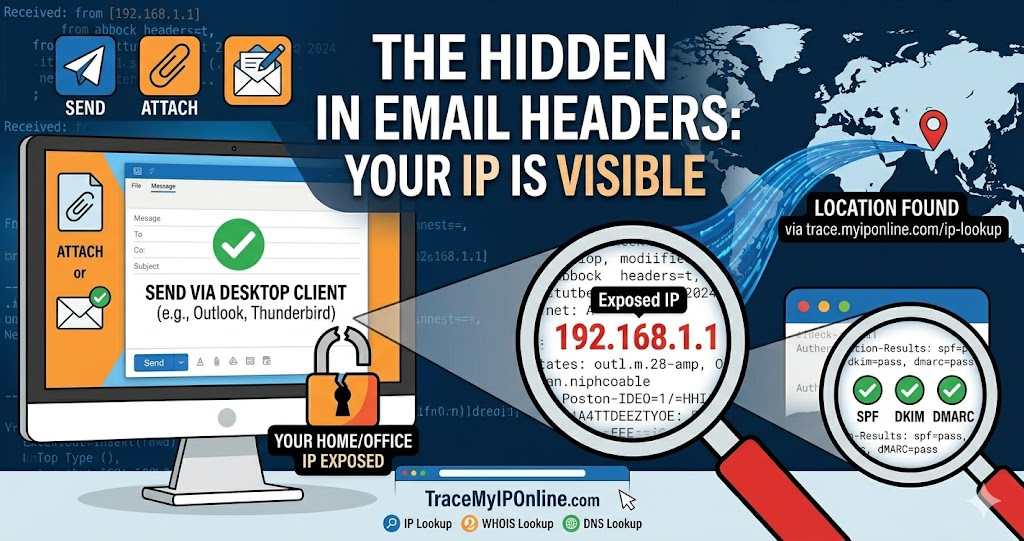
When you send an email from Outlook or Thunderbird, the email header includes your sending IP address. Any recipient who checks the full headers can see exactly which IP sent the message — your home IP, office IP, or mobile carrier's IP. Web-based services like Gmail strip this automatically. Desktop clients typically do not.
Every Email You Send From a Desktop Client Contains Your IP Address
When you send an email from Outlook or Thunderbird, the email header includes your sending IP address. Any recipient who checks the full headers can see exactly which IP sent the message — your home IP, office IP, or mobile carrier's IP. Web-based services like Gmail and Outlook.com strip this automatically. Desktop clients typically do not.
"Email header analysis remains one of the most reliable techniques in digital forensics. The IP address in the Received headers tells you the actual sending infrastructure, which frequently contradicts the claimed From address. A business email claiming to be from a company's official domain but originating from a residential ISP in a different country is a consistent fraud signature that header analysis catches immediately."
— Dr. Yuki Chen, Digital Forensics Research, National Taiwan University
How to Find the IP in an Email Header
Gmail: Open the email, click the three-dot menu, select "Show original." Look for "Received: from" lines — the bottom-most one contains the originating IP in square brackets.
Outlook desktop: Double-click the email, then File, Properties. The Internet Headers box shows the full headers.
Apple Mail: View menu, Message, All Headers.
Once you have the IP, paste it into tracemyiponline.com/ip-lookup to see the sender's ISP, country, and connection type.
Three Practical Scenarios Where Email IP Tracing Matters
Business email fraud: An email claims to come from your accountant requesting an urgent wire transfer. Header check: IP traces to a residential ISP in Nigeria. Your accountant's office is in Chicago. Residential Nigerian ISP on an email supposedly from a Chicago accounting firm — spoofed From address, real origin visible in headers. Wire transfer cancelled. ❌ (detected)
Harassment documentation: Receiving harassing emails from an unknown address. Header analysis reveals an IP tracing at tracemyiponline.com/ip-lookup to a specific residential ISP in your city. This documents the network of origin for a police report. Law enforcement can subpoena the ISP to identify the subscriber.
Spam origin investigation: Your domain receives spam in large volumes. Header analysis shows originating IPs belonging to a botnet — compromised residential connections. Check whether your own IP is on blacklists at tracemyiponline.com/blacklist-checker to ensure you are not listed alongside the spam source.
Authentication Records in Headers — SPF, DKIM, DMARC
Beyond IP addresses, email headers contain authentication results showing whether a message actually came from the claimed domain.
SPF fail: The email was sent from an IP not authorized to send mail for that domain — strong spoofing evidence.
DKIM fail: The cryptographic signature does not verify — the message was not properly authorized by the domain's private key.
DMARC fail: Combined authentication failure — a clear spoofing indicator when the From address claims a major organization.
Verify what DNS records a domain has at tracemyiponline.com/dns-lookup — check SPF, DKIM, and DMARC records alongside the IP evidence.
For California and New York Users: Email Headers as Legal Evidence
In California and New York civil and criminal proceedings, email headers are admissible electronic evidence. The IP address in email headers, combined with ISP subscriber records obtained through legal process, has been used in harassment, defamation, and fraud prosecutions. Preserve full email headers by saving the raw source as a text file. Include header IP and lookup results from tracemyiponline.com/ip-lookup in any police report or legal filing.
For London and UK Users: Email Headers and Action Fraud
Action Fraud and the NCSC both accept reports of phishing and email-based fraud with header evidence. When reporting business email compromise to Action Fraud, include full email headers and IP lookup results from tracemyiponline.com/ip-lookup — this strengthens the report and helps investigators trace the sending infrastructure.
For Toronto and Ontario Users: Email Evidence and CAFC
The Canadian Anti-Fraud Centre accepts phishing and email fraud reports with full email header evidence. For CASL complaints about unsolicited commercial email, header IP combined with WHOIS data at tracemyiponline.com/whois-lookup can identify the sender for a CRTC complaint.
For Sydney and Australian Users: Email Evidence and ACMA
Australia's Spam Act enforcement by the ACMA relies on reported evidence including email headers. Including full headers and IP trace results from tracemyiponline.com/ip-lookup in spam complaints provides actionable data for investigators. The ACMA has used IP-based evidence in successful Spam Act prosecutions.
Protecting Your Own IP When Sending Email
If you send from a desktop client and want to prevent your IP appearing in headers: switch to web-based email (Gmail and Outlook.com strip sender IPs), or route mail through a VPN before sending so the VPN server IP appears instead of your real IP. Verify your VPN is working correctly at tracemyiponline.com/vpn-detector before sending sensitive emails through it.
Frequently Asked Questions
Is the IP Lookup tool free?
Yes — 100% free, no signup. Visit tracemyiponline.com/ip-lookup and check any IP instantly.
Does Gmail include my IP in outgoing headers?
No. Gmail replaces the sender's IP with Google's mail server IP. Your home or office IP is not visible to recipients of emails sent through Gmail's web interface or mobile apps.
The IP in the header traces to a different country than claimed — is that definitely fraud?
It is a strong red flag, particularly for financial requests. Someone using a VPN would also show a different country. The combination of wrong country, SPF/DKIM failure, and an unusual request is compelling evidence of fraud. Document and report through appropriate channels.
Can I find someone's exact address from their email IP?
No. IP geolocation provides approximate city-level location. The exact address is available only to the ISP, accessible only through legal process. The IP provides enough evidence to support a police report — law enforcement handles the ISP subpoena step.
What if the email traces to a VPN or proxy IP?
The sender used a VPN to obscure their real IP. Note the VPN provider from the lookup at tracemyiponline.com/ip-lookup — legitimate VPN providers have abuse contact information and legal obligations to respond to valid law enforcement requests.
How do I tell which Received header contains the originating IP?
Email headers are listed from most recent to oldest at the top. The bottom-most "Received: from" line was added first and contains the originating connection. Work from the bottom up when tracing the origin.
Headers Are the Hidden Evidence Layer
Email content is what senders want you to see. Email headers are what the mail system records about how the message actually traveled. For fraud detection, harassment documentation, and spam investigation, headers are consistently more reliable than content — senders can control what the content says, but they cannot hide what the routing infrastructure records.
Trace any email IP at tracemyiponline.com/ip-lookup. Check domain authenticity at tracemyiponline.com/whois-lookup. Verify DNS authentication at tracemyiponline.com/dns-lookup. All free at TraceMyIPOnline.com.