VPN marketing has made a mess of public understanding. Some ads make VPNs sound like total online invisibility. Others are vague. The reality is specific: a VPN does some things very well, some things adequately, and some things not at all. This guide explains the technical reality — what actually changes when you connect, what stays the same, and how to verify it is working.
What a VPN Actually Does — No Marketing Involved
VPN marketing has made a mess of public understanding. Some ads make VPNs sound like total online invisibility — "hackers can't see you," "complete anonymity," "bank-grade encryption keeping you safe." Others are more conservative but still vague. The reality is specific: a VPN does some things very well, some things adequately, and some things not at all. Knowing the difference is what lets you use one effectively.
Check whether your VPN is working correctly right now at tracemyiponline.com/vpn-detector — free, 20 seconds, no signup.
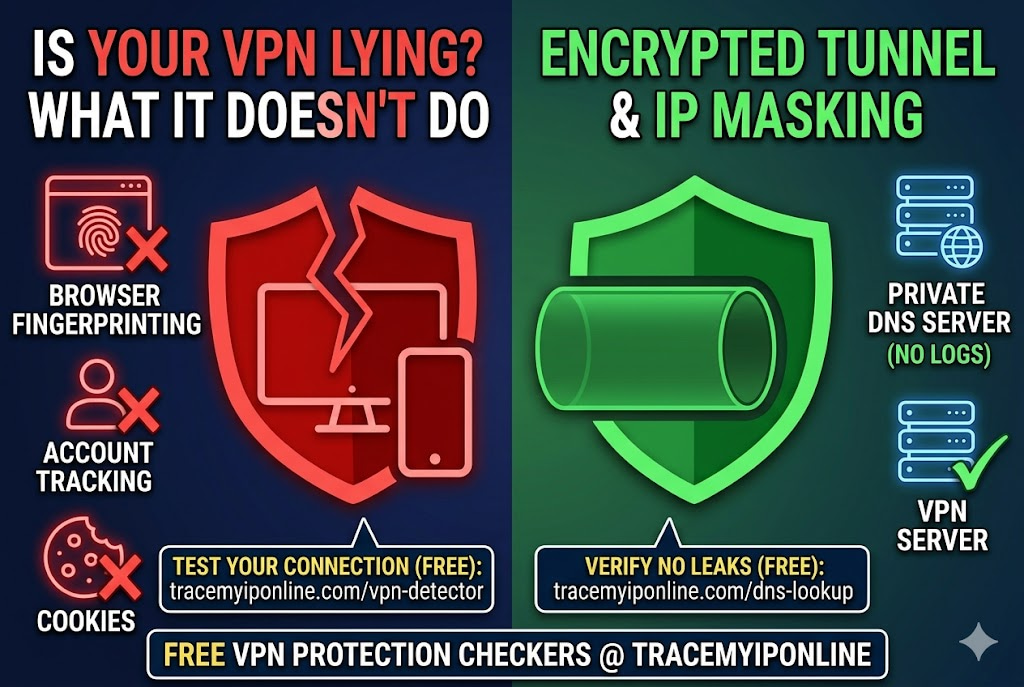
"The fundamental misunderstanding I encounter most often is people treating a VPN as a complete privacy solution rather than a specific tool for a specific job. A VPN routes your traffic through an encrypted tunnel to a different server — that is what it does. It protects your traffic from your local network and ISP. It masks your IP from destination sites. It does not prevent browser fingerprinting, account-linked tracking, or the VPN provider itself from seeing your traffic. Understanding the scope makes the tool genuinely useful rather than a false reassurance."
— Dr. Tomasz Kowalski, Cryptography and Network Security, Warsaw University of Technology
How a VPN Actually Works — The Technical Reality
When you connect to the internet without a VPN, your device connects directly to whatever server you are requesting. Your ISP routes the traffic, sees the destination, and logs connection metadata. The destination server sees your real IP address.
When you connect through a VPN:
Your device establishes an encrypted connection to a VPN server. All your internet traffic goes through that encrypted tunnel to the VPN server. The VPN server forwards your requests to the actual destinations — websites, services, whatever you are accessing. Responses come back to the VPN server, through the tunnel, to your device.
From your ISP's perspective: they see encrypted traffic going to one IP address — the VPN server. They cannot see the content or the individual destinations. From the destination website's perspective: they see a connection from the VPN server's IP address, not yours.
The encryption used — typically AES-256 for the data, with key exchange through protocols like WireGuard, OpenVPN, or IKEv2 — is the same category of encryption used by banks and government systems. Brute-forcing it is not feasible. Your ISP, or anyone monitoring the network path between you and the VPN server, cannot read the encrypted content.
What a VPN Protects You From
Your ISP seeing your browsing destinations: Without a VPN, your ISP logs every domain you visit through DNS queries and connection metadata. With a working VPN, your ISP sees only encrypted traffic to the VPN server — not the individual sites. This is the primary practical benefit for most users.
Your real IP from websites: Sites you visit see the VPN server's IP, not yours. This changes your apparent geographic location, prevents IP-based tracking across sites, and is the basis of geo-unblocking for streaming services.
Traffic interception on public WiFi: Coffee shops, hotels, airports — public WiFi networks can be monitored by whoever operates them, or by other users on the same network using man-in-the-middle techniques. A VPN encrypts all traffic before it leaves your device, making interception useless.
IP-based targeting: If someone has your IP and is using it — DDoS attacks, targeted harassment, P2P gaming attacks — a VPN masks your real IP. They can target the VPN server's IP, but that is a shared resource with millions of users, not specifically you. Verify your VPN is actually masking your IP at tracemyiponline.com/vpn-detector.
What a VPN Does Not Protect You From
Browser fingerprinting: A VPN changes your IP but not your browser's unique technical profile. Canvas fingerprinting, WebGL, font lists, screen resolution, and other browser characteristics create a fingerprint that persists regardless of IP changes. If a site fingerprinted you last week and you come back with a VPN today, they can still recognize you. Check your fingerprint at tracemyiponline.com/browser-fingerprint.
Account-linked tracking: If you are logged into Google, Facebook, or any other account, those platforms track your activity regardless of your IP. They know who you are. The VPN changes your network identity but not your account identity.
Cookies and standard tracking: Cookies set by sites you visit persist across sessions. Clearing cookies removes them, but sites re-set them on your next visit. A VPN does not prevent cookie-based tracking.
The VPN provider itself: Your traffic goes through the VPN server. The VPN provider can see everything your ISP previously saw. You are trusting the VPN provider with data you previously left with your ISP. The question of VPN logging policies matters here — a provider that logs and sells data is no improvement over an ISP that does the same.
Legal compulsion: A VPN provider operating in a jurisdiction with data retention laws can be legally compelled to produce logs. A genuine no-logs provider has nothing to produce, but verifying "no-logs" requires trusting the provider's word and, ideally, independent audits that confirm it.
Before vs After: What Changes When You Connect a VPN
Run these checks yourself to see the difference:
Before connecting VPN — visit tracemyiponline.com/ip-lookup: You see your real IP, your ISP's name (Comcast, BT, Rogers, Telstra, etc.), your approximate city, and your connection classified as "residential."
After connecting VPN — same check: IP changes to the VPN server's address. ISP shows as the VPN provider or their datacenter operator. Location shows the VPN server city. Connection classified as "datacenter/VPN." Your real IP, real ISP, and home city: not visible.
What does not change: Your browser fingerprint at tracemyiponline.com/browser-fingerprint — identical with or without VPN. Any accounts you are logged into still track your activity. Cookies placed by sites you visited before connecting VPN remain on your device.
VPN Protocols — Which One You Should Be Using in 2026
WireGuard: The most recent major protocol. Significantly faster than OpenVPN with comparable security. Smaller codebase means fewer potential vulnerabilities. Widely supported by major VPN providers. If your provider offers WireGuard, use it.
OpenVPN: Well-tested over many years. Reliable and secure. Slightly slower than WireGuard. Good choice when WireGuard is not available. The UDP variant is faster; the TCP variant is more reliable through restrictive networks.
IKEv2/IPSec: Particularly efficient for mobile devices that switch between WiFi and cellular data. Fast reconnection when the network changes. Good choice for phone VPN use.
L2TP/IPSec: Older and slower than the above. Avoid unless it is the only option.
PPTP: Obsolete and known to be insecure. If your VPN only offers PPTP, that VPN should not be trusted for any privacy-sensitive purpose.
For California and New York Users: VPN for ISP Privacy
California's CCPA gives consumers rights over their IP-derived browsing data — but exercising those rights with every ISP and ad network is a significant administrative effort. A VPN prevents ISP data collection proactively, without requiring individual opt-out requests.
For New York residents without comprehensive state privacy law covering ISPs: a tested, no-leak VPN is the most reliable practical tool for limiting what Comcast, Spectrum, or Verizon can log about browsing behavior. Test yours at tracemyiponline.com/vpn-detector and verify DNS routing at tracemyiponline.com/dns-lookup.
For London and UK Users: VPN and the IPA
The Investigatory Powers Act 2016 requires UK ISPs to retain 12 months of connection metadata. A VPN does not eliminate this retention — it changes what is retained. Instead of individual site connection records, the retained data shows a VPN connection. The legal requirement for ISPs to retain the data still applies; the content of what is retained changes.
For UK residents concerned about ISP-level surveillance: a VPN with verified no DNS leaks (check at tracemyiponline.com/dns-lookup) is the current practical mitigation. UK-based VPN providers are subject to IPA requests; providers based outside the UK jurisdiction have different obligations.
For Toronto and Ontario Users: VPN Selection and PIPEDA
PIPEDA requires organizations collecting personal data to limit collection to necessary purposes. As a Canadian VPN user, you are transferring trust from your ISP to your VPN provider. The provider you choose should have a clear, specific privacy policy that describes exactly what they log — not vague language about not logging "browsing activity" that leaves room for connection metadata logging.
Independent audits of VPN providers' no-logs claims are available for several major providers. Prioritize these over marketing claims. Then verify the technical implementation works: tracemyiponline.com/vpn-detector and tracemyiponline.com/dns-lookup.
For Sydney and Australian Users: VPN and Mandatory Retention
Australia's mandatory metadata retention regime applies to ISPs, not to VPN providers not operating as telecommunications carriers. A VPN changes which entity holds the connection data — from your Telstra or Optus ISP to the VPN provider. If the VPN provider is not a registered Australian carrier, the mandatory retention law may not apply to them.
This distinction matters for Australian users specifically wanting to limit the scope of legally retained metadata. Choose a VPN provider whose legal jurisdiction is outside the Five Eyes intelligence-sharing alliance if this is a primary concern. Test the chosen VPN works as expected at tracemyiponline.com/vpn-detector.
The Kill Switch — Why It Matters More Than Most VPN Settings
A kill switch is a VPN setting that blocks all internet traffic if the VPN connection drops. Without a kill switch, a VPN disconnection sends traffic over your real IP until the VPN reconnects — potentially for seconds, potentially longer. With a kill switch, nothing goes through until the VPN is back up.
This matters most during extended sessions where a brief VPN dropout could expose activity you specifically did not want visible. Enable the kill switch in your VPN app settings and keep it on. It has no downside except brief internet outages during VPN reconnection events.
Frequently Asked Questions
Is VPN detection by websites a problem?
For some use cases, yes. Streaming services detect VPN datacenter IPs and restrict content access. Banking and financial services sometimes flag VPN logins as suspicious. For general browsing privacy, it is not a concern — most sites do not actively block VPN users. Check whether your VPN IP is flagged at tracemyiponline.com/vpn-detector.
Can a free VPN be trusted?
With rare exceptions, no. Free VPN services have to monetize somehow — and the most common model is logging and selling user traffic data. Providing secure, fast VPN infrastructure costs real money. If you are not paying for it, you are often the product. Use an audited, paid provider for anything privacy-sensitive.
Does using a VPN make me completely anonymous?
No. It removes your IP from the information available to sites you visit and prevents ISP-level logging of browsing destinations. But browser fingerprinting, account logins, payment information, and behavioral patterns can all identify you independent of IP. Check your fingerprint at tracemyiponline.com/browser-fingerprint to see what persists beyond IP masking.
Does a VPN slow down my internet?
Some reduction is inevitable — traffic takes a longer path through the VPN server. On a good provider with a nearby server, this is typically 5-15%. On a free or overloaded server, it can be 50-80%. Test your speeds with VPN on and off at tracemyiponline.com/speed-test to measure the actual impact.
Do I need a VPN at home, or only on public WiFi?
On public WiFi: clearly worth using — the network can be monitored by others. At home: useful if you want to limit ISP data collection, which is a real concern given current US law. Less critical if you are primarily concerned about endpoint security rather than surveillance. Your threat model determines whether home VPN use is warranted for your specific situation.
How do I know if my VPN is actually working?
Visit tracemyiponline.com/vpn-detector with your VPN connected. Your real IP, real ISP, and home location should not appear anywhere in the results. If they do — or if WebRTC reveals your real IP despite the VPN IP showing correctly — you have a leak that needs fixing.
Use It as the Tool It Is
A VPN is a specific tool that does a specific job well. It routes your traffic through an encrypted tunnel to mask your IP from destination sites and prevent ISP traffic logging. It does not make you invisible. It does not protect you from fingerprinting. It does not secure accounts you are logged into.
Used correctly — with leak testing, kill switch enabled, and a provider with audited no-logs policy — a VPN is genuinely useful for the things it does. The mistake is expecting it to do things it was not designed for.
Test your VPN right now at tracemyiponline.com/vpn-detector. Check your IP profile at tracemyiponline.com/ip-lookup. Verify DNS routing at tracemyiponline.com/dns-lookup. Check your browser fingerprint at tracemyiponline.com/browser-fingerprint. All free at TraceMyIPOnline.com.