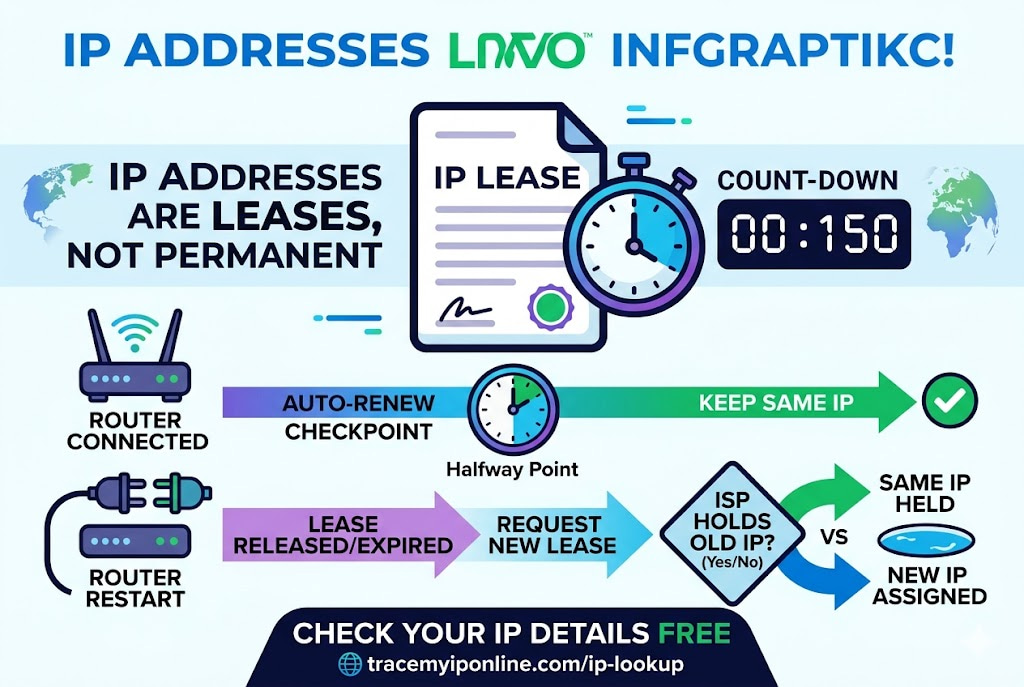
You restart your router and get a new IP. Or you keep the same one for three months. Or it changes unexpectedly. None of this is random — there is a specific process governing how ISPs allocate and manage IP addresses. Understanding the DHCP lease system explains the behavior, which in turn makes troubleshooting significantly less confusing than most people find it.
How Your ISP Actually Assigns Your IP Address — The Process Most People Never Think About
You restart your router and get a new IP. Or you keep the same IP for three months and then it changes unexpectedly. Or you sign up for a static IP and nothing changes anymore. None of this is random — there is a specific process governing how internet providers allocate and manage IP addresses. Understanding it explains the behavior, which in turn makes troubleshooting significantly less mysterious.
See your current assigned IP and ISP details at tracemyiponline.com/ip-lookup — free, instant, no signup.
"DHCP lease management is the invisible infrastructure that most home users interact with constantly without knowing it exists. The IP your router holds is a lease — it expires, it can be renewed, it can be reassigned. The duration of that lease varies enormously between ISPs and between service tiers. Understanding that your IP is a lease rather than a permanent assignment changes how you think about IP changes, troubleshooting, and the relationship between your router's restart behavior and your public IP."
— Dr. Nguyen Thanh, Network Resource Management Research, Hanoi University of Science and Technology
The DHCP Lease System — What It Is and How It Works
DHCP (Dynamic Host Configuration Protocol) is the system your ISP uses to automatically assign IP addresses to customer routers. When your router connects to the ISP network, it sends a DHCP request asking for an IP address. The ISP's DHCP server responds with an IP address and a lease duration — essentially, "you can use this address for X amount of time."
At the halfway point of the lease, your router automatically tries to renew it. If the renewal succeeds — which it almost always does when the router stays connected — you keep the same IP for the next lease period. If the renewal fails, or if you restart your router between lease renewals, the process starts fresh. You may get the same IP back (if it has not been assigned to anyone else) or a different one from the available pool.
The lease duration varies by ISP and plan type:
Short leases (minutes to hours): Common for mobile data connections, some cable ISPs in dense urban areas. These change frequently.
Medium leases (24-72 hours): Typical for residential broadband from major ISPs in the US, UK, Canada, and Australia. Your IP is semi-stable but can change after a few days.
Long leases (weeks to months): Some ISPs effectively assign the same IP for very long periods, though technically as renewable leases rather than static IPs. Your IP feels static but technically is not.
Why Restarting Your Router Sometimes Changes Your IP
When you restart your router, it disconnects from the ISP network and its current DHCP lease is released or expires. When it reconnects, it requests a new IP lease. What happens next depends on the ISP:
If the ISP's DHCP server still has your old IP available and associates it with your router's MAC address, it may reassign the same IP. Some ISPs deliberately do this for several days after a disconnect — the IP is "held" for you as a courtesy during brief outages or restarts.
If the ISP's DHCP server has assigned your old IP to another customer, or if the holding period has expired, you get a different IP from the available pool. This is the router restart that actually changes your IP.
To maximize the chance of getting a new IP: leave the router powered off for 10-20 minutes rather than restarting immediately. The longer the disconnect, the more likely your old IP has been released back to the pool. Verify the result at tracemyiponline.com/ip-lookup.
Static IPs — Who Gets Them and How They Work
A static IP is an address permanently assigned to your account — it does not change when you restart your router, does not expire, and is reserved for you in the ISP's allocation system.
Static IPs are typically offered as a paid add-on for residential plans or included with business-tier service. They cost more because they consume an IP address that the ISP cannot reallocate elsewhere — the efficiency of dynamic assignment relies on not every customer needing their own permanent address.
Who needs a static IP: people hosting servers at home (gaming servers, home automation, remote access systems), businesses that need consistent IP-based access control, and anyone whose applications or services require a known, consistent outbound IP address.
Who does not need a static IP: the vast majority of residential internet users. Dynamic IPs work fine for streaming, browsing, gaming, and most applications because modern internet protocols handle IP changes gracefully. The cases where static IPs matter are specific and relatively uncommon.
Before vs After: IP Assignment Across Different ISP Types
Major US cable ISP (Comcast) residential customer: Lease duration: 7 days. Typical IP stability: same IP for 2-6 weeks without router restart. After restart: 60% chance of same IP (held for returning customer), 40% chance of new IP. Check current IP: tracemyiponline.com/ip-lookup.
UK fiber ISP (BT Openreach wholesale customer): Lease duration: varies, often 24 hours for BT Wholesale. Typical IP stability: can change more frequently than US counterparts. After router restart: higher probability of new IP assignment than US cable. Recommendation for those wanting stability: request static IP or accept frequent changes.
Canadian cable ISP (Rogers) residential: Lease duration: typically 24-72 hours. IP stability: moderate — same IP often held for weeks despite short lease duration due to preferred assignment. Check your current Rogers IP at tracemyiponline.com/ip-lookup.
Australian NBN (via Telstra retail): Lease duration: varies by plan, often 24 hours. IP changes: more common during NBN infrastructure maintenance windows. Remote area NBN users often see more IP changes than metropolitan users.
CG-NAT — When Multiple Customers Share One IP
As IPv4 addresses have become scarce, many ISPs — particularly mobile carriers and some broadband providers — use CG-NAT (Carrier Grade Network Address Translation) to share one public IP address among multiple customers.
Under CG-NAT, your router receives a private IP from the ISP (in the 100.64.0.0/10 range, reserved for CG-NAT). Your ISP's CG-NAT device translates this to a shared public IP when traffic leaves their network. Multiple customers use the same public IP simultaneously.
Implications of CG-NAT:
For hosting: You cannot accept incoming connections on a CG-NAT IP — there is no way to route them to your specific device among all the CG-NAT customers sharing the IP. Port forwarding does not work. You need a static IP or a dynamic DNS workaround through a relay server.
For IP attribution: If something problematic happens from a CG-NAT IP, investigators need ISP logs to determine which customer was responsible — the public IP alone does not narrow it down. This is both a privacy advantage and a law enforcement complication.
For IP geolocation: CG-NAT addresses geolocate to the ISP's CG-NAT device location rather than your physical location, which can be in a different city. Check your current IP setup at tracemyiponline.com/ip-lookup — if the location seems significantly off, CG-NAT may be involved.
For California and New York Users: IP Assignment and Legal Significance
California's CCPA treats IP addresses as personal information. The IP assignment records held by ISPs — which customer was assigned which IP at which time — are among the most legally sensitive data that ISPs hold. Law enforcement regularly subpoenas ISPs for this data in criminal investigations.
For California users: your ISP's retention of IP assignment records means that even after your dynamic IP changes, there is a historical record linking you to past IPs. The retention period varies by ISP and is subject to legal hold requirements. California residents can submit CCPA requests to ISPs asking for disclosure of what IP assignment data they hold.
New York users under investigation or litigation involving IP-based evidence: dynamic IP assignment means the timestamp is as important as the IP address itself. An IP address without a timestamp pointing to your active lease period is insufficient to attribute activity to you specifically. Check your current IP at tracemyiponline.com/ip-lookup.
For London and UK Users: DHCP Records and IPA
The UK's Investigatory Powers Act requires ISPs to retain internet connection records — which include IP assignment logs (which customer was assigned which IP when) — for 12 months. BT, Sky, Virgin Media, and TalkTalk all maintain these records as a legal requirement. This is the data that allows law enforcement to take a historical IP and trace it to a specific customer account at a specific time.
Understanding that your ISP retains 12 months of IP assignment history is relevant context for privacy discussions. Even after your dynamic IP changes, the historical association between you and your previous IPs is retained. Check your current IP assignment at tracemyiponline.com/ip-lookup.
For Toronto and Ontario Users: IP Logs and Canadian Law
Canadian ISPs retain IP assignment logs as part of their network management records. PIPEDA governs how long these records can be retained and for what purposes they can be used — generally, ISPs retain them for as long as needed for network management and as required by any applicable court orders or legal holds.
The CRTC's 2012 basic Internet service regulations established that ISPs must cooperate with court orders for subscriber identification — meaning your ISP can be compelled to identify which customer was assigned a specific IP at a specific time. This is the IP-to-customer attribution process used in copyright infringement cases and criminal investigations in Canada.
For Sydney and Australian Users: Mandatory Retention and IP Logs
Australia's mandatory data retention laws require ISPs to retain subscriber metadata — including IP assignment records — for two years. Telstra, Optus, TPG, and all licensed Australian ISPs must retain the records that link customer accounts to specific IP addresses at specific times.
This retention period is longer than the UK's (12 months) and longer than the US federal requirement (no uniform minimum). For Australian privacy, this means your ISP has two years of records linking you to every IP address you were assigned during that period. Check your current assignment at tracemyiponline.com/ip-lookup.
Frequently Asked Questions
Is the IP Lookup tool free?
Yes — 100% free, no signup. Visit tracemyiponline.com/ip-lookup and check your current IP and all associated data instantly.
How often should I expect my IP to change?
It depends on your ISP and plan. Some residential plans effectively keep the same IP for months. Others change it weekly or after every disconnect. Mobile data IPs change most frequently — often with every new data session. Check your current IP periodically at tracemyiponline.com/ip-lookup to monitor changes.
My router shows one IP but the lookup shows a different one — why?
Your router shows its local private IP (192.168.x.x or 10.x.x.x range). The lookup shows your public IP — the one visible to the internet. These are different addresses. Your router's local IP is only visible within your home network. Check tracemyiponline.com/ip-lookup to see the public IP that external sites see.
Can I force my ISP to give me a specific IP?
Not with a dynamic plan — the DHCP system assigns from available pools. With a static IP plan, your ISP assigns a specific address permanently. For a dynamic plan, the closest option is requesting a static IP add-on. Most major ISPs offer this for an additional monthly fee.
What happens to my IP if I move to a new address with the same ISP?
Moving typically results in a new service activation at the new address, which means a new IP assignment from whatever pool serves that location. Your old IP is released back to the ISP's pool. The ISP association remains (same ISP), but the IP address changes.
Does upgrading my internet plan change my IP?
Often yes, particularly if the upgrade involves a technician visit or modem replacement. The new modem or router may be assigned a new IP from the DHCP pool. Plan changes handled entirely remotely (without equipment changes) may or may not change the IP, depending on the ISP's provisioning system.
Understanding the Lease Changes How You Troubleshoot
Most IP-related troubleshooting questions — "why did my IP change," "how do I get a new IP," "why do I have the same IP even after restarting" — become straightforward once you understand the lease system. The IP is not permanent and not random. It is a leased resource managed by DHCP, with specific expiry and renewal behavior that varies by ISP.
Check your current IP at tracemyiponline.com/ip-lookup. Check your IP's reputation at tracemyiponline.com/blacklist-checker. Verify open ports at tracemyiponline.com/port-checker. All free at TraceMyIPOnline.com.