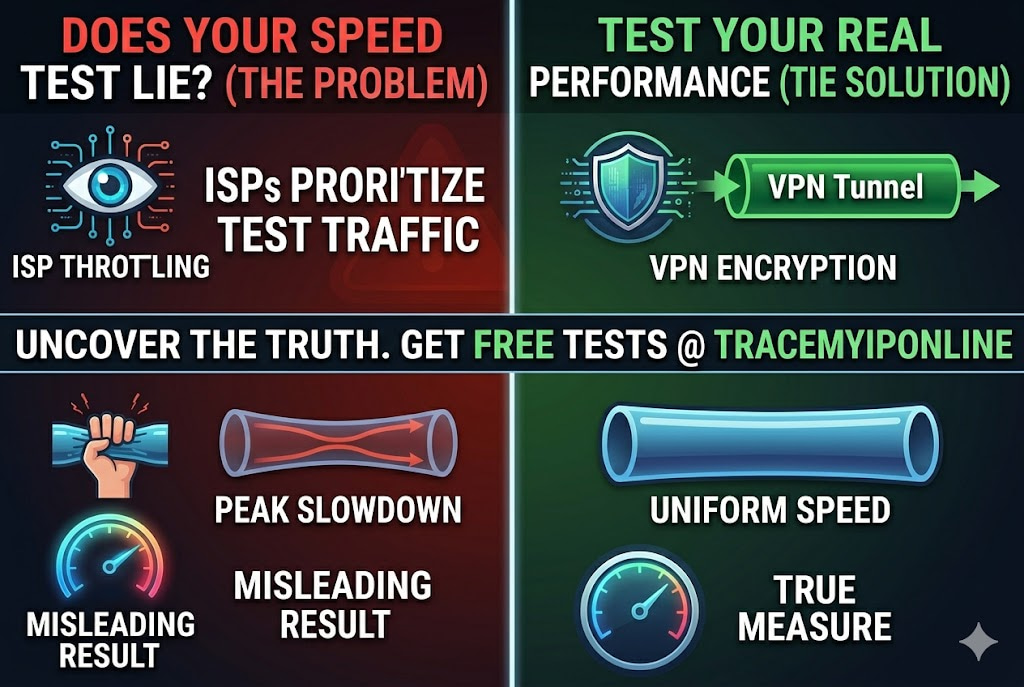
The number your internet speed test returns is not the number you should care about. Most speed testing services use servers on networks your ISP specifically optimizes. Your result looks good. Your Netflix still buffers every evening. This guide covers how to test accurately, what the numbers mean, and how to use results to catch ISP throttling — free speed test included.
Most Internet Speed Tests Lie to You — Here Is Why
The number your internet speed test returns is not the number you should care about. Most speed testing services use servers located close to you, on networks your ISP specifically optimizes for. The result looks good. Your Netflix still buffers every evening.
There is a documented phenomenon — and in some cases, a documented practice — of ISPs prioritizing traffic to well-known speed test servers while throttling other traffic types. Your speed test result can be genuinely fast while your actual streaming, gaming, and working-from-home experience is significantly slower. Testing correctly means understanding what you are actually measuring.
Test your internet speed right now at tracemyiponline.com/speed-test — free, no signup, no app download needed.
"The speed test result is only meaningful if the test server is representative of your actual traffic destinations. When ISPs and their contractors operate speed test infrastructure, the results measure performance to that specific server — which may be on the same network as the customer, essentially bypassing the open internet entirely. A customer with 'gigabit service' whose traffic to external content providers is capped at 40 Mbps during peak hours has received a misleading picture of their service quality."
— Professor Mark Chiang, Internet Measurement Research, Georgia Institute of Technology
What an Internet Speed Test Actually Measures
A speed test works by transferring data between your device and a test server, then measuring how fast that transfer occurs. The three numbers it produces:
Download speed (Mbps): How fast data arrives at your device from the server. This is what most people mean when they say "internet speed." Affects streaming video quality, web page loading, file downloads, and software updates. Netflix requires 25 Mbps for 4K. YouTube works at lower speeds due to better compression. A household with multiple simultaneous users should multiply these requirements.
Upload speed (Mbps): How fast data leaves your device toward a server. Affects video calls, file uploads, live streaming, cloud backups, and gaming (sending your actions to game servers). ISPs routinely provision upload speeds 5-20 times slower than download. This matters more than most people realize for video calls and remote work.
Ping (ms): Round-trip latency — how long a signal takes to reach the server and return. Not about bandwidth. A low-ping connection with moderate speed plays games better than a high-speed, high-ping connection. Under 20ms is excellent. Over 100ms causes noticeable lag in real-time applications.
Jitter: Variation in ping over time. Even a 20ms average ping becomes problematic if it spikes to 200ms unpredictably. Jitter is the cause of choppy video calls and erratic gaming experiences. A speed test that reports jitter is giving you more useful information than one that only reports average ping.
How to Get an Accurate Speed Test Result
The difference between a misleading result and an accurate one comes down to test conditions.
Use a wired connection if possible. WiFi introduces interference and overhead that reduces measured speed below what your connection is actually capable of. An ethernet cable connected directly from your computer to your router removes this variable. If you only ever use WiFi, test on WiFi — but know the result reflects your WiFi performance, not your broadband line speed.
Close background applications. Windows Update, iCloud sync, Dropbox, and streaming services all consume bandwidth during tests. Close or pause them before testing.
Test at multiple times of day. Morning results differ from evening results if your ISP throttles peak-hour traffic. A single test does not tell you whether you have a time-based throttling problem. Test at 8 AM, 12 PM, and 8 PM and compare. Consistent results across all times suggest no peak throttling. A significant evening drop is a strong indicator.
Test multiple times in the same session. Run three tests back to back and average them. Single results can be unusually high or low due to transient network conditions.
Test from different devices. If one device consistently gets lower speeds than others on the same network, the device itself may be the bottleneck — old wireless card, full storage, background processes.
Before vs After: Catching ISP Throttling With Speed Tests
User on a 500 Mbps broadband plan, evening test results over one week:
Monday 8 AM: Download 487 Mbps. Monday 8 PM: Download 89 Mbps. Tuesday 8 AM: 491 Mbps. Tuesday 8 PM: 76 Mbps. Wednesday 8 AM: 495 Mbps. Wednesday 8 PM: 112 Mbps.
Pattern: morning speeds match the plan. Evening speeds drop to 15-22% of the advertised rate consistently. This is not network congestion — congestion varies day to day. This is a consistent, time-based pattern that indicates deliberate throttling during peak hours.
Additional test: connected VPN during an evening test. Result with VPN on at 8 PM: 381 Mbps. Conclusion: the ISP is throttling general traffic during peak hours. VPN hides traffic type from the ISP, preventing throttling. The speed difference confirms deliberate throttling rather than infrastructure congestion.
What Speed Do You Actually Need? Real Requirements
Advertised speed tiers often bear little relationship to what different activities actually need. Here are actual requirements, not the inflated numbers ISPs use to sell higher tiers:
Web browsing and email: 5-10 Mbps comfortably handles a single user. The bottleneck is usually server response time, not bandwidth.
HD video streaming (Netflix, Disney+, YouTube HD): 5-8 Mbps per stream. A household streaming two 4K streams simultaneously needs around 50 Mbps, not 1 Gbps.
4K video streaming: 25 Mbps per Netflix stream. YouTube 4K works at lower speeds. Multiple simultaneous 4K streams add up.
Video calls (Zoom, Teams, Google Meet): 3-5 Mbps up and down per call for HD quality. The upload speed is often the bottleneck — check yours. An asymmetric plan that delivers 500 Mbps download but only 20 Mbps upload will struggle with multiple simultaneous video callers in the household.
Online gaming: 3-15 Mbps is plenty. Latency and jitter matter far more than raw bandwidth for gaming. A 50 Mbps connection with 8ms ping beats a 500 Mbps connection with 80ms ping in every game.
Remote work with large file transfers: 50-100 Mbps handles most scenarios. Cloud storage sync, large file uploads, and VPN work all benefit from higher upload speeds, which are often the real-world bottleneck.
For California and New York Users: Speed Test Evidence and ISP Complaints
California's net neutrality law (SB-822) prohibits ISPs from throttling specific content or applications — making documented speed differences by traffic type potentially actionable. New York's Affordable Broadband Act sets minimum speed standards for qualifying low-income residents.
For both states: if your speed tests consistently show results significantly below your contracted rate, you have grounds for an ISP complaint. Document with timestamped screenshots from tracemyiponline.com/speed-test at multiple times of day over several days. Include morning and evening comparisons. This documentation package is what state public utility commissioners and the FCC ask for when investigating complaints.
For London and UK Users: Ofcom's Speed Code of Practice
Ofcom's Voluntary Code of Practice on Broadband Speeds requires participating UK ISPs — including BT, Sky, Virgin Media, TalkTalk, and Plusnet — to provide customers with a minimum guaranteed access line speed at sign-up. If your speeds are consistently below this guarantee, you have the right to exit your contract without penalty after giving the ISP 30 days to resolve the issue.
To exercise this right: run speed tests at different times using tracemyiponline.com/speed-test, document results with timestamps, and compare against the minimum guarantee in your contract. Three days of consistent under-performance below the guaranteed minimum is typically sufficient to open a formal complaint.
For Toronto and Ontario Users: CRTC Broadband Standards
The CRTC's broadband target is 50 Mbps download and 10 Mbps upload for all Canadians — a target that remains unmet in many rural Ontario areas despite public funding to ISPs for network expansion. Rogers, Bell, and Videotron customers who consistently receive speeds significantly below their contracted rate can file formal complaints with the CCTS (Commission for Complaints for Telecom-television Services).
The complaint process works best with documented evidence. Test at tracemyiponline.com/speed-test multiple times over several days, note the times, and compare to your contracted rate. The CCTS handles thousands of successful speed-related complaints annually.
For Sydney and Australian Users: ACCC Broadband Performance Reporting
The ACCC publishes an annual Broadband Performance Report based on real-world speed tests from monitored Australian services. In 2025, the report found that NBN users on 100 Mbps plans received an average of 91 Mbps during peak hours — with individual ISP performance varying significantly. Checking your speeds against the ACCC's published benchmarks for your plan tier and ISP tells you whether your performance is typical or genuinely problematic.
Australian consumers with persistent under-performance relative to ACCC benchmarks can complain to the TIO (Telecommunications Industry Ombudsman) — a process that requires documented evidence including speed test results with timestamps from tracemyiponline.com/speed-test.
Common Speed Test Misconceptions
"I got 980 Mbps on a gigabit plan — that is basically 1 Gbps, it is working." True on a wired connection to a nearby server. Does not mean every real-world destination receives similar performance. Test to various international servers to see how performance varies across the actual internet.
"My speed test is great, but everything still feels slow." Speed is not the only variable. High ping, jitter, packet loss, and DNS resolution times all affect perceived speed. Also check whether your router is the bottleneck — an old router can cap your throughput below your line speed. Run a DNS check at tracemyiponline.com/dns-lookup and consider a DNS change to Cloudflare (1.1.1.1) if resolution is slow.
"My speed test fluctuates a lot between tests." Network conditions genuinely vary. Running several tests back to back and averaging them is more informative than a single result. Extreme variation (50 Mbps to 400 Mbps in consecutive tests) suggests an unstable connection worth investigating.
Frequently Asked Questions
Is the speed test tool completely free?
Yes — 100% free, no account, no app download. Visit tracemyiponline.com/speed-test and get results in under 30 seconds.
Why is my speed test result different on different devices?
Different devices have different wireless cards, processing power, and network drivers. A laptop from 2015 with a 2.4 GHz WiFi card will test slower than a current-generation device on 5 GHz WiFi, even on the same network. Test from your primary device for the most relevant result.
Why is my upload speed so much lower than download?
Most consumer internet plans are asymmetric by design — ISPs provide more download capacity because that is what most households consume more of. Upload capacity is more expensive per unit to provision. If your work involves significant file uploads, video calls, or live streaming, check whether your plan offers adequate upload speeds rather than focusing only on download.
What is a good ping for video calls?
Under 50ms ping produces smooth video calls. 50-100ms is acceptable with minor degradation. Over 150ms causes noticeable delay in conversation. Jitter (variation) matters as much as average ping — consistent 40ms is better than an average of 20ms that spikes to 200ms unpredictably.
Will my speed improve if I restart my router?
Sometimes. Router firmware can develop memory leaks or connection tracking tables that bloat over time, degrading performance. A restart clears these. If your speed consistently improves after a router restart and then degrades again over days, your router may need a firmware update or replacement.
My neighbor has the same ISP and gets much faster speeds — why?
Distance from the ISP infrastructure node matters significantly for some connection types. For cable internet, distance from the node affects speed. For fiber, distance matters much less. Your neighbor might be on a different network segment, closer to infrastructure, or on a different plan tier. If the difference is large and consistent, it is worth raising with your ISP.
Test, Document, Then Decide
The speed test result means whatever the test conditions were when you ran it. A single result at noon on a Tuesday is not representative of your evening gaming or morning video call experience. Multiple tests at multiple times — documented with timestamps — tell the real story.
Start at tracemyiponline.com/speed-test. If you notice significant variation by time of day, test whether a VPN changes the evening result at tracemyiponline.com/vpn-detector. Check your DNS performance at tracemyiponline.com/dns-lookup. All free at TraceMyIPOnline.com.