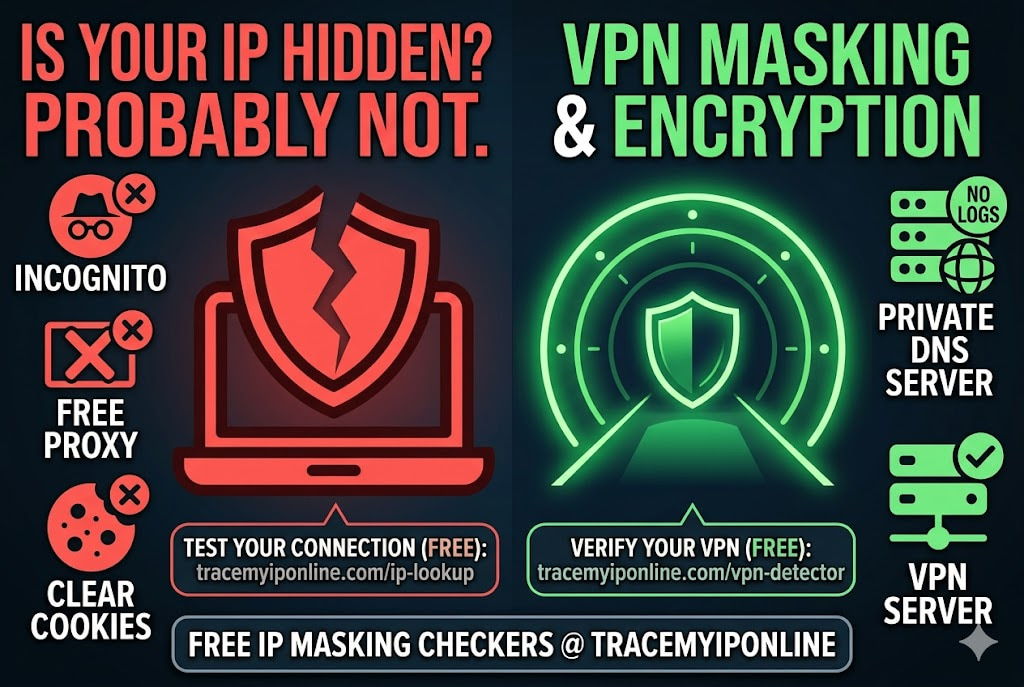
There is a wide gap between wanting to hide your IP address and successfully doing it. The methods range from completely ineffective — private browsing, clearing cookies — to genuinely robust. Most people who think they are hidden are not. This guide covers every method, what each actually does, and how to verify it is working. Free IP check included.
Why People Hide Their IP Address — And Which Methods Actually Work
There is a wide gap between wanting to hide your IP address and successfully doing it. The methods range from completely ineffective (private browsing, clearing cookies) to genuinely robust (properly configured VPN with no leaks, Tor for high-stakes situations). Most people who think they are hidden are not — and the ones who are genuinely protected usually got there by testing their setup rather than trusting it.
This guide covers every method, what each one actually does, and how to verify it is working. Check your current IP exposure free at tracemyiponline.com/ip-lookup — no signup needed.
"The most common mistake I see is people equating 'private browsing' with 'hidden IP.' Incognito mode was designed to prevent local storage of browser history — it has no effect on what your ISP, the websites you visit, or anyone monitoring your network connection can observe. Hiding your IP actually requires routing your traffic through an intermediary. Anything less is cosmetic."
— Dr. Yusuf Oladele, Network Privacy Researcher, UCL Department of Computer Science
Why You Might Want to Hide Your IP Address
The reasons vary enough that they require different solutions.
Privacy from advertisers and trackers: Every site you visit logs your IP. Ad networks build cross-site behavioral profiles tied to IP addresses. A VPN or privacy-focused DNS prevents this — though browser fingerprinting can still track you independent of IP. Check your fingerprint at tracemyiponline.com/browser-fingerprint.
Privacy from your ISP: ISPs in the US can legally sell browsing data. UK ISPs retain metadata for 12 months under the Investigatory Powers Act. Australian ISPs retain metadata for two years. A VPN prevents your ISP from seeing DNS queries and connection destinations — but only if it has no DNS leaks. Verify at tracemyiponline.com/vpn-detector.
Avoiding geo-restrictions: Streaming services, content platforms, and some government sites restrict access by geographic location. A VPN changes your apparent location by routing traffic through a server in a different country. This works until the service detects and blocks VPN datacenter IPs.
Gaming privacy: In P2P games and some voice chat setups, opponents or other players can see your IP. DDoS attacks from gaming disputes are common. A VPN prevents opponents from obtaining a usable IP address.
Preventing targeted attacks: If someone has your IP and is using it to target you — DDoS, port scanning, social engineering — hiding your IP removes their target.
Method 1: VPN — The Most Practical Option
A VPN (Virtual Private Network) routes your internet traffic through a server operated by the VPN provider. Websites you visit see the VPN server's IP address rather than yours. Your ISP sees encrypted traffic going to the VPN server, but not your destinations or traffic content.
What it protects: Your real IP from websites and services. DNS queries (if no DNS leak). Traffic content from your ISP.
What it does not protect: Browser fingerprint. Account-linked activity (if you are logged into Google or Facebook, those services can still identify you regardless of IP). Your traffic from the VPN provider itself — choose a provider with a verified no-logs policy.
The critical caveat: A VPN that leaks — through WebRTC, DNS, or IPv6 — does not hide your IP. The icon showing "connected" is not proof. Test yours at tracemyiponline.com/vpn-detector before relying on it.
Best for: Everyday privacy, ISP data avoidance, streaming geo-restriction, gaming. Practical speed. Monthly cost $3–8 for reputable providers.
Method 2: Tor Browser — Most Anonymous, Slowest
Tor routes your traffic through at least three volunteer-operated relay nodes, with each relay knowing only the previous and next hop — no single point can see both your real IP and your destination simultaneously. The exit node sees your destination but not your real IP. The entry node sees your real IP but not your destination.
What it protects: Real IP from destination sites. Activity from ISP (ISP sees encrypted Tor connection, not destinations). Browser fingerprint standardization — all Tor Browser users present near-identical fingerprints by design.
What it does not protect: Account-linked activity. Traffic you send unencrypted through Tor. Exit node visibility of destination (but not origin).
Practical reality: Tor is significantly slower than a VPN. Video streaming is barely usable. Most streaming services block Tor exit node IPs. It is appropriate for high-sensitivity browsing where speed is not the priority — journalism, activism, research in sensitive areas.
Best for: High-anonymity requirements where speed trade-off is acceptable.
Method 3: Proxy — Minimal Protection, Widely Misused
A proxy server forwards your requests using its own IP address. Websites see the proxy's IP rather than yours. Unlike a VPN, a standard proxy does not encrypt your traffic — your ISP can still see traffic content. Your communication with the proxy is unencrypted.
What it protects: IP from destination websites. That is essentially all.
What it does not protect: Traffic content from ISP or network monitors. DNS queries (usually still go to your ISP). Any endpoint that looks at traffic patterns rather than just IP.
Free proxies specifically: Free proxy services have a consistently poor track record. Many log all traffic. Some inject ads or malware. Some sell access to your bandwidth to other users. Using a free proxy for privacy is, in many cases, worse than using no proxy.
Best for: Simple IP masking in low-stakes situations where encryption is not needed. Not recommended for privacy-sensitive activity.
Method 4: Changing Your IP Without Any Tool
If you have a dynamic IP (most home connections do), these methods change your IP without installing anything:
Restart your router: Most ISPs assign a new IP when you reconnect. Power off your router for 30 seconds, then back on. Visit tracemyiponline.com/ip-lookup after reconnecting to confirm the change. Some ISPs take minutes to assign a new address; some reassign the same one.
Switch to mobile data: Your phone's mobile data connection uses your carrier's IP pool — a completely different IP from your home ISP. Instant change, no setup required. Your carrier logs mobile traffic, so this is not a privacy measure — it is just a different IP.
Connect to a different WiFi network: Each network has its own public IP. Coffee shop WiFi, a friend's network, or a public hotspot all have different IPs from your home network.
Before vs After: IP Hiding — What Changes and What Stays the Same
Before VPN — what a website can determine about you: Your real IP address. Your ISP (Comcast, BT, Rogers, Telstra). Your approximate city and region. Connection type (residential). Your IP's reputation. Cross-referenced with browser fingerprint: high probability of unique identification across sessions.
After connecting VPN (properly configured, no leaks): VPN server IP visible — not yours. ISP shows as VPN provider or their datacenter. Location shows VPN server city. Connection type: datacenter (VPN detected). Your real IP: not visible. Your ISP: not visible. However — browser fingerprint unchanged. If you are logged into any account, that account's history links to your activity regardless of IP. Your VPN provider can see all of this.
For California and New York Users: IP Hiding and CCPA Rights
California's CCPA treats IP addresses as personal information. California residents have the right to request that companies delete their IP data and opt out of its sale. However, exercising opt-out rights with every ad network, analytics provider, and ISP is a significant administrative burden — and opt-outs are prospective only. Data already collected is not recalled.
Technical IP hiding via VPN prevents collection from the point of deployment forward. For California users specifically: CCPA's right to opt out of data sale applies to ISPs — Comcast and AT&T have opt-out processes available. A VPN also works but hides data from the VPN provider's perspective rather than through regulatory channels.
New York does not have equivalent CCPA-level consumer privacy law for ISPs as of April 2026. New York users relying on IP privacy have primarily technical tools available. Check what your current IP reveals at tracemyiponline.com/ip-lookup.
For London and UK Users: IP Privacy and UK GDPR
UK GDPR gives individuals rights over personal data including IP addresses — access, deletion, and objection to processing. In theory, UK residents can request any company to delete their IP logs. In practice, this is exercised one company at a time and does not prevent future collection.
For UK users who want to limit ISP visibility specifically: VPN use routes traffic through a non-UK endpoint, meaning the UK ISP connection log shows a VPN connection rather than individual site visits. This does not eliminate the retained record — it changes what is in it. The IPA requires 12 months retention of connection records; a VPN means those records show VPN traffic rather than browsing destinations.
Test your VPN at tracemyiponline.com/vpn-detector and check for DNS leaks at tracemyiponline.com/dns-lookup.
For Toronto and Ontario Users: IP Privacy Under Canadian Law
PIPEDA classifies IP addresses as personal information when they can identify an individual — which, in practice, they can with ISP cooperation. Canadians have the right to request access to personal information held by organizations and to request correction or deletion.
For Ontario users: Rogers and Bell both have PIPEDA-compliant privacy policies with opt-out processes for certain data uses. However, operational network data — including connection logs — is generally retained under network management exemptions. VPN use remains the more reliable technical approach for limiting ISP data collection. Verify any VPN is leak-free at tracemyiponline.com/vpn-detector.
For Sydney and Australian Users: IP Privacy and Australian Law
Australia's mandatory data retention regime requires ISPs to retain metadata for two years — and this requirement exists regardless of customer preferences or opt-out requests. There is no mechanism for Australian consumers to prevent their ISP from retaining the legally mandated metadata.
VPN use changes what goes into the retained records: instead of individual site visit metadata, the ISP retains records of a VPN connection. The two-year retention period applies to that record too, but its contents are less informative. For Sydney and Melbourne users wanting to limit the informational value of mandatory retention, a tested, no-leak VPN is the practical tool. Test at tracemyiponline.com/vpn-detector.
Things That Do Not Hide Your IP — Common Misconceptions
Incognito / Private Browsing: Prevents local storage of browser history. Has zero effect on your IP address. Your ISP and every site you visit see your real IP in incognito mode exactly as in normal mode.
Clearing cookies: Removes local tracking cookies. No effect on IP address. Websites can still see your IP and use browser fingerprinting for persistent identification.
Using a different browser: Your browser choice does not change your IP address. Chrome, Firefox, and Safari all use the same underlying network connection with the same IP.
Using a DNS server like 1.1.1.1: Changes where your DNS queries are resolved — does not change your IP address. Better for DNS privacy (Cloudflare does not log queries) but your IP is still visible to every site you visit.
Firewall software: Manages incoming and outgoing connections on your device. Does not hide your IP from websites — it manages access to your device but not your outgoing identity.
Frequently Asked Questions
Is hiding your IP address legal?
VPN use is legal in the US, UK, Canada, and Australia. It is a standard privacy tool. Using a VPN to engage in illegal activity remains illegal — the VPN does not create legal immunity for illegal acts. Some countries restrict VPN use; check local laws if you are outside these jurisdictions.
Does hiding my IP address make me completely anonymous online?
No. IP masking is one layer. Browser fingerprinting, account activity, payment information, and behavioral patterns all allow identification independent of IP address. Check your browser fingerprint at tracemyiponline.com/browser-fingerprint to see what persists beyond your IP.
Will hiding my IP address affect my internet speed?
A VPN always adds some latency and reduces throughput slightly, because traffic takes a longer path. Premium VPN providers on nearby servers typically reduce speed by 5-15%. Free VPNs with overloaded servers can reduce speed by 50-80%. Test at tracemyiponline.com/speed-test with and without VPN to measure the difference.
My VPN has a "no-logs" policy — can I trust it?
No-logs claims vary in reliability. The most trustworthy are policies that have been independently audited by security firms — look for providers that publish audit results. Jurisdiction matters too: a provider in a country outside the Five Eyes intelligence-sharing alliance has less legal pressure to retain logs.
Can my employer see my IP if I use their WiFi with a VPN?
Your employer's network can see that you are connected to a VPN server — the destination IP of the VPN endpoint is visible. They cannot see your activity within that VPN connection if it is properly encrypted. However, company-managed devices may have endpoint monitoring software installed that logs activity at the device level, bypassing the VPN entirely.
Does a VPN hide my IP from my router?
No. Your router sees all traffic from your device before it reaches any VPN server — it has to, because the router is what sends traffic to the VPN server. The router logs show a connection to the VPN server IP.
The Honest Assessment
Hiding your IP address is achievable and useful. It is not a complete privacy solution on its own. IP masking via VPN prevents your IP from being logged by sites you visit, limits ISP data collection about your destinations, and removes your home IP from gaming and P2P contexts where it could be used against you.
What it does not do: make you anonymous if you are logged into accounts, prevent browser fingerprinting, or guarantee protection if the VPN is leaking. Test the effectiveness of whatever method you use.
Check your current IP at tracemyiponline.com/ip-lookup. Test VPN protection at tracemyiponline.com/vpn-detector. Check DNS at tracemyiponline.com/dns-lookup. Check browser fingerprint at tracemyiponline.com/browser-fingerprint. All free at TraceMyIPOnline.com.
Frequently Asked Questions
Can websites tell I am using a VPN?
Often yes. VPN server IPs come from datacenters — recognizable by their ASN classification. Netflix, Disney+, and many banking sites maintain lists of known VPN IP ranges and can block or flag them. Residential VPN IPs (from services that use real ISP IP addresses) are harder to detect but cost more. Check whether your IP is flagged at tracemyiponline.com/vpn-detector.
What happens if my VPN disconnects while I am browsing?
Without a kill switch, your traffic reverts to your real IP immediately. Sites you are connected to will see the IP change. With a kill switch enabled, all traffic stops when the VPN drops — nothing routes over your real IP until the VPN reconnects. Enable kill switch in your VPN app settings and keep it on.
Is Tor completely anonymous?
Tor provides strong anonymity for browser traffic but is not completely immune to de-anonymization. Sophisticated traffic analysis attacks, exit node compromise, and user behavior mistakes (logging into accounts, using the same Tor session for identified and anonymous activity) have all led to de-anonymization in documented cases. For most users and most threat models, properly configured Tor provides more anonymity than practically needed.