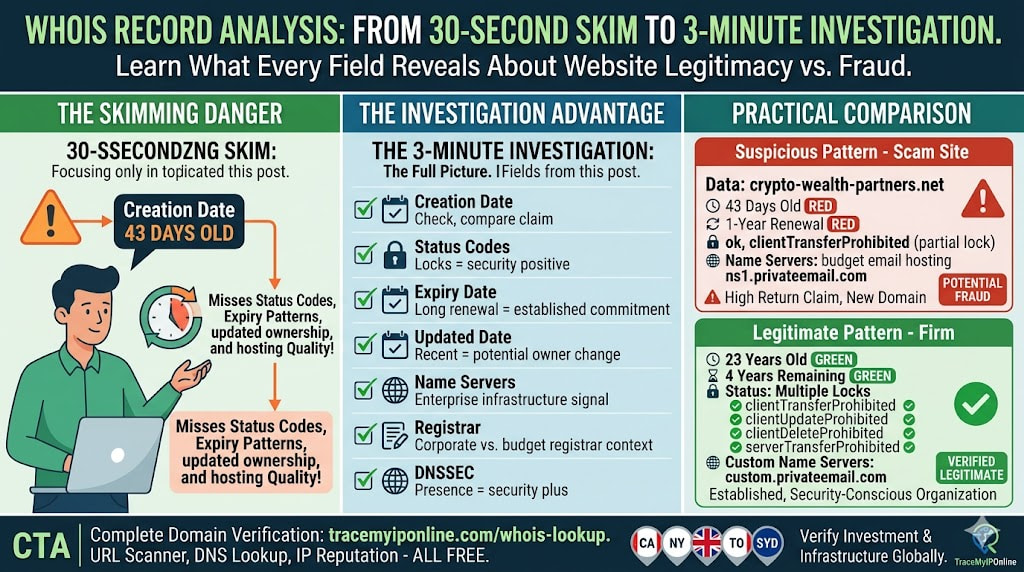
Most guides to WHOIS lookup stop at "check the registration date." That is correct but incomplete. A full WHOIS record contains a dozen fields, each revealing something different. Knowing which fields to look at — and what the values actually mean — turns a 10-second check into a genuinely useful investigation tool rather than a single data point.
Reading a WHOIS Record Properly Takes About 3 Minutes — Most People Read It Wrong
Most guides to WHOIS lookup stop at "check the registration date." That is correct but incomplete. A full WHOIS record contains a dozen fields, each telling you something different about a domain. Knowing which fields to look at and what the values mean turns a 10-second check into a genuinely useful investigation tool.
This guide covers every significant WHOIS field, what each one reveals, and what patterns in those fields indicate legitimate businesses versus fraud operations.
Check any domain's complete WHOIS record free at tracemyiponline.com/whois-lookup — no account needed.
"Most people use WHOIS like a single-question test: how old is this domain? That is valuable, but it is only one signal. The combination of registration date, registrar choice, renewal pattern, name server provider, domain status codes, and registrant country — all read together — gives a substantially more complete picture than any single field alone. I have seen scam sites with 5-year-old domains and legitimate new businesses registered last month. The full pattern matters more than any individual data point."
— Dr. Fatima Al-Rashid, Digital Forensics and Cybercrime Investigation, Dubai Police Academy
Every Significant WHOIS Field — What It Means
Domain Name: The registered domain. Check this carefully against what the site's URL shows — homograph attacks use visually similar Unicode characters (e.g., pаypаl.com using Cyrillic 'а' instead of Latin 'a'). If anything looks slightly off, the domain name field will show the actual registered characters.
Registry Domain ID: A unique identifier assigned by the domain registry. Not directly useful for fraud assessment, but confirms the domain is registered through legitimate registry channels rather than being a fake or spoofed record.
Creation Date: When the domain was first registered. The single most important field for fraud detection. The APWG found 95% of phishing domains are under 30 days old. Also compare this against the company's claimed founding date — a site claiming 15 years of experience with a 6-month-old domain has an obvious problem.
Updated Date: The last time registration information was modified. Recent updates on an old domain can indicate a change of ownership — new owner, potentially different purpose. A domain that was dormant for years and updated recently combined with aggressive marketing activity is a pattern worth noting.
Registry Expiry Date: When the registration lapses if not renewed. Short renewals — 1 year from a new registration — indicate minimal commitment. Long renewals — 5-10 years — are more typical of established businesses that plan ahead. An expiry date in the next 2-3 months on a site currently soliciting payment is a red flag: why is a working business about to let its domain expire?
Registrar: The company that sold the domain registration. Different registrars have different verification standards and fraud rates. Some appear in fraud investigation databases disproportionately. The registrar name alone is not a definitive signal, but combined with other factors it adds context.
Registrar IANA ID: The ICANN-assigned identifier for the registrar. Can be used to verify whether the listed registrar is a legitimate ICANN-accredited registrar or a fraudulent entry.
Registrar Abuse Contact Email and Phone: Where to report abuse of the domain. Useful when filing complaints about fraudulent use.
Domain Status: One of the most information-rich fields. The status codes have specific meanings — see the detailed breakdown below.
Name Servers: Which DNS infrastructure manages this domain. Reveals the hosting provider indirectly. Enterprise-grade name servers (Cloudflare, AWS Route 53) suggest more serious infrastructure than free/budget hosting name servers.
DNSSEC: Whether Domain Name System Security Extensions are enabled. DNSSEC prevents DNS hijacking by verifying responses are authentic. Most legitimate businesses have not implemented DNSSEC (it requires technical setup), so its absence is not suspicious. Its presence is a positive indicator.
Domain Status Codes — The Field Most People Skip
The Domain Status field contains standardized codes that tell you the current operational state and security posture of the domain. Multiple codes can apply simultaneously.
clientTransferProhibited: The domain is locked against unauthorized transfer to another registrar. A security feature that legitimate domain owners use to prevent theft. Its presence is a good sign.
clientDeleteProhibited: The domain cannot be deleted through normal registrar channels. Combined with clientTransferProhibited, this indicates the owner has enabled security locks. Common on valuable established domains.
clientUpdateProhibited: Changes to the domain's registration data require additional verification. Again, a security feature the owner chose to enable.
serverTransferProhibited: Registry-level transfer lock — more restrictive than the client-level version. Often seen on country-code domains and high-value domains.
pendingDelete: The domain has expired and passed through the grace period. It is queued for deletion and will be available for public registration shortly. If you see this on a domain that a website is actively using, something is wrong with their renewal.
redemptionPeriod: The domain has expired and is in the redemption grace period — the original registrant can reclaim it for a significantly higher fee. After this period ends, it enters pendingDelete.
clientHold: The domain has been suspended by the registrar, typically for abuse or non-payment. A domain with clientHold will not resolve — its DNS does not function. Seeing this code on an apparently live site indicates the WHOIS data and the actual domain state are out of sync.
Active (or ok): The domain is in normal operational state with no holds or locks. This is the default state for domains without additional security configuration.
Before vs After: Reading a Full WHOIS Record on a Suspicious Site
Investment platform promising 20% monthly returns — full WHOIS analysis:
Domain Name: crypto-wealth-partners.net. Creation Date: 2026-04-01 (43 days ago). Updated Date: 2026-04-02. Registry Expiry Date: 2027-04-01 (exactly 1 year registration). Registrar: Namecheap. Domain Status: clientTransferProhibited, ok. Name Servers: ns1.privateemail.com, ns2.privateemail.com (Namecheap private email hosting). DNSSEC: Unsigned.
Red flags in this record: 43-day-old domain. Exactly 1-year registration (minimum commitment). Name servers on a private email hosting service rather than proper web hosting infrastructure. No security locks beyond the standard transfer lock. Combined with the investment returns claim: this is a scam pattern. ❌
Legitimate financial services firm — WHOIS analysis:
Domain Name: [actual firm name].com. Creation Date: 2003-07-22 (23 years ago). Updated Date: 2024-11-15. Registry Expiry Date: 2028-07-22 (long-term renewal, 4 years remaining). Registrar: MarkMonitor Inc. (corporate domain registrar used by large enterprises). Domain Status: clientTransferProhibited, clientUpdateProhibited, clientDeleteProhibited, serverTransferProhibited. Name Servers: ns1.company-infrastructure.com (custom). DNSSEC: signedDelegation. ✅
Every field in the second record is consistent with a large, established, security-conscious organization. Check any domain at tracemyiponline.com/whois-lookup.
For California and New York Consumers: WHOIS for Investment and Business Verification
California's Department of Financial Protection and Innovation (DFPI) and the SEC's investor education resources both recommend verifying the digital infrastructure of financial services before engaging with them. WHOIS lookup is part of this verification — a domain registered in the last few months claiming to represent an established investment firm is a fundamental mismatch that no amount of professional-looking website design can explain.
New York's financial regulatory environment — NYDFS licensed entities, SEC-registered advisors — involves regulated businesses with verifiable histories. A licensed financial firm in New York has been operating long enough for its domain to be established. Check any financial firm's domain at tracemyiponline.com/whois-lookup.
For London and UK Users: WHOIS for FCA Verification
The FCA's ScamSmart tool specifically recommends checking how long a website has been operating as part of investment scam verification. WHOIS lookup operationalizes this recommendation. The FCA maintains a warning list of unauthorized investment firms — cross-referencing WHOIS data with this list adds another verification layer.
UK consumers: check the domain at tracemyiponline.com/whois-lookup, then cross-reference the company name with the FCA register at register.fca.org.uk. An authorized firm appears on both; a fraud operation appears on neither.
For Toronto and Ontario Consumers: WHOIS for OSC Verification
The Ontario Securities Commission's investor education resources recommend verifying financial firms through multiple channels including web presence age. WHOIS lookup provides the domain age data. Combined with an OSC registration check (aretheyregistered.ca), this gives consumers a straightforward two-step verification process for any investment platform.
Check any financial domain at tracemyiponline.com/whois-lookup and cross-reference with the OSC's registration database.
For Sydney and Australian Users: WHOIS for ASIC Verification
ASIC's MoneySmart investor protection resources recommend checking whether a company's web presence is consistent with its claimed history. WHOIS lookup provides the objective data point. Combined with an ASIC company registration check, this covers the digital and regulatory verification steps that ASIC recommends for investment offers.
Check any investment platform's domain at tracemyiponline.com/whois-lookup and cross-reference with ASIC Connect at connectonline.asic.gov.au.
Frequently Asked Questions
Is the WHOIS Lookup tool free?
Yes — 100% free, no signup, unlimited lookups. Visit tracemyiponline.com/whois-lookup and check any domain instantly.
What is the difference between clientTransferProhibited and serverTransferProhibited?
Client-level status codes are set by the registrar on behalf of the domain owner — they are security features the owner chose to enable. Server-level codes are set by the registry itself and are more restrictive. Server-level locks cannot be overridden by the registrar and typically apply to high-value or sensitive domains.
The WHOIS record shows privacy protection — what can I still see?
With WHOIS privacy protection (also called "WHOIS guard"), the registrant's personal contact details are replaced by the privacy service's generic contact. You still see: creation date, expiry date, last updated date, registrar name, domain status codes, name servers, and DNSSEC status. These are the most fraud-relevant fields and privacy protection does not hide them.
The domain is 5 years old — does that mean it is safe?
Domain age is a strong negative indicator for fraud when new, but not a guarantee of legitimacy when established. Aged domains can be purchased by new owners, repurposed, or hacked. Read the updated date alongside the creation date — significant recent updates on an old domain warrant extra investigation. Combine WHOIS with URL scanning at tracemyiponline.com/url-scanner for a more complete assessment.
Can I use WHOIS to find a domain owner's email address?
Only if they have not enabled privacy protection — increasingly rare as most registrars include privacy protection by default. Even without privacy protection, GDPR and similar regulations in the EU/UK restrict publication of personal data in WHOIS. For abuse reporting, the registrar abuse contact (which is always visible) is the correct channel regardless of whether the registrant details are hidden.
Reading WHOIS Properly Takes Three Minutes — Skimming It Takes Thirty Seconds and Misses Half the Information
The investment in learning what each field means pays off across hundreds of future checks. Once you know that clientUpdateProhibited indicates a security-conscious owner and pendingDelete indicates an expiring domain, you read records faster and more accurately.
Check any domain at tracemyiponline.com/whois-lookup. Combine with URL scanning at tracemyiponline.com/url-scanner, DNS lookup at tracemyiponline.com/dns-lookup, and IP reputation check at tracemyiponline.com/blacklist-checker. Complete domain verification in under 2 minutes, all free at TraceMyIPOnline.com.