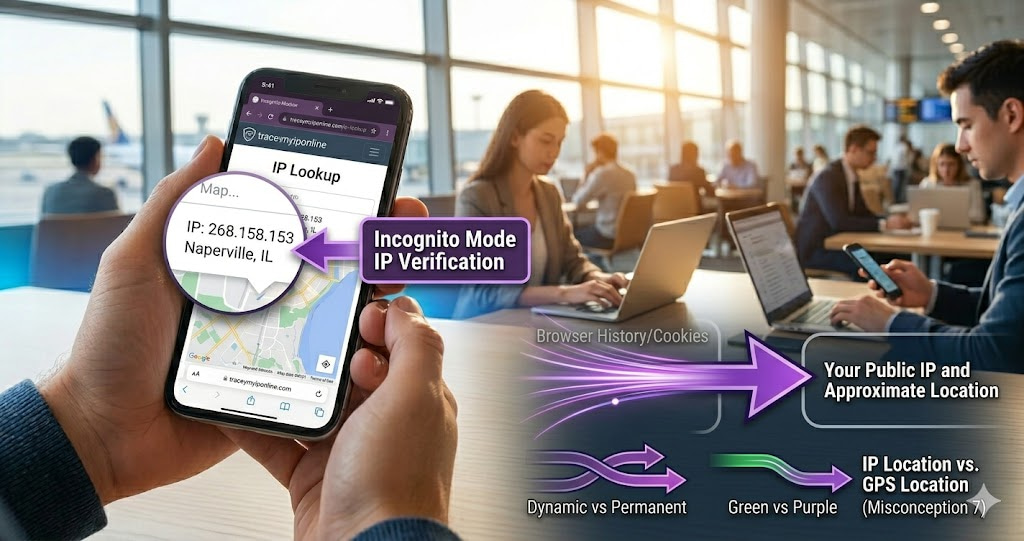
IP address misconceptions are remarkably consistent. The same wrong ideas appear across forums and everyday privacy conversations — making IP addresses sound either more dangerous or more hideable than they actually are. People make real security decisions based on these misconceptions, some of which leave them thinking they are protected when they are not. Here are the seven most common ones, corrected.
Incognito Mode Does Not Hide Your IP Address — And 6 Other Things People Get Wrong
IP address misconceptions are remarkably consistent. The same wrong ideas appear across forums, social media, and everyday conversations about online privacy. Most of them make IP addresses sound either more dangerous than they are or more hiding-from than is actually possible with the approaches people try.
Getting this right matters practically. People make real security and privacy decisions based on these misconceptions — and some of those decisions leave them thinking they are protected when they are not.
Check what your IP actually reveals right now at tracemyiponline.com/ip-lookup — free, no signup needed.
"The incognito mode misconception is the one I encounter most often, and it is the most consequential. People use incognito specifically because they believe it provides IP privacy — it absolutely does not. The mode was designed to prevent local browser history storage. It has no network-level effects whatsoever. Your IP is fully visible to every site you visit in incognito mode. I have seen people take privacy-sensitive actions in incognito believing they were protected, when from a network perspective they were identical to normal browsing."
— Prof. Sarah Buchanan, Privacy and Security Education Research, University of Edinburgh
Misconception 1: Incognito Mode Hides Your IP Address
This is the most widespread IP address misconception and the one with the most practical consequences. Incognito mode (Chrome), Private Browsing (Firefox, Safari), and InPrivate (Edge) were designed for one specific purpose: preventing the browser from storing local history, cookies, and form data after the session ends.
From a network perspective, incognito traffic is identical to regular browser traffic. Your IP address is fully visible to every website you visit. Your ISP logs the connection. Advertisers can track you through fingerprinting.
Open an incognito window right now and visit tracemyiponline.com/ip-lookup. Compare the result to your regular browser. The IP, ISP, and location are identical — because incognito mode changes nothing about your network connection.
Misconception 2: Changing Your Password Changes Your IP Address
Your IP address is assigned by your ISP at the network level. It has nothing to do with passwords for any account or service. Changing your Gmail password, your router admin password, or any other password has zero effect on your IP address.
Your IP is determined by your ISP's DHCP system. Changing that requires either restarting your router (which may or may not get you a new IP) or requesting a new IP from your ISP directly.
Misconception 3: Someone With Your IP Can Access Your Computer
Your computer is not accessible from external IP connections by default. Your router shares your public IP address among all devices in your home and only forwards traffic that your devices requested. Unsolicited incoming connections from the internet are dropped unless you have specifically configured port forwarding.
An attacker with your IP address can attempt to flood your connection with traffic (a DDoS attack), which disrupts your internet service but does not access your device. Check your open ports at tracemyiponline.com/port-checker. Without an open vulnerable port, an IP address alone provides no way into your device.
Misconception 4: Your IP Reveals Your Home Address
IP geolocation can typically reveal your country, state or region, and approximate city. It cannot reveal your street address, apartment number, or any more specific location. The database that maps IPs to locations is maintained from ISP registration data — which typically goes no further than city level.
The only organization that knows which street address corresponds to your IP at any given time is your ISP, which links subscriber accounts to IP assignments in their internal databases. This information is released only through legal process to law enforcement. No public tool can retrieve your home address from your IP.
Check what your IP actually reveals at tracemyiponline.com/ip-lookup.
Misconception 5: A VPN Makes You Completely Anonymous
A VPN masks your IP address from websites and prevents your ISP from seeing your browsing destinations. Those are real and useful privacy benefits. A VPN is not anonymity.
What a VPN does not protect against: your VPN provider seeing all your traffic. Browser fingerprinting, which identifies your specific browser regardless of IP. Account activity — if you are logged into Google while on a VPN, Google tracks everything. Payment information you voluntarily submit.
Also: a VPN that leaks your real IP through WebRTC or DNS provides none of the IP-masking benefits while you believe you are protected. Verify your VPN is actually working at tracemyiponline.com/vpn-detector.
Misconception 6: Your IP Is Unique to You Permanently
Most home internet connections use dynamic IP addresses — your ISP assigns an IP from a shared pool and it can change. When you restart your router, when your DHCP lease expires, or when your ISP makes changes, you can get a different IP. Your current IP may previously have been used by another customer.
This has a practical consequence: IP address evidence in any investigation must be accompanied by a timestamp. An IP address alone, without the specific time it was active for your connection, cannot be definitively linked to your account.
Misconception 7: Disabling Location Services Hides Your IP Location
Location services on your phone or computer are separate from your IP address. Location services use GPS, WiFi positioning, and cell tower triangulation — you can disable them in privacy settings. Disabling location services has no effect on IP-based location.
Your IP address reveals approximate location based on ISP registration data regardless of whether your GPS is on or off. The two systems are independent.
Before vs After: Testing Common IP Myths
Testing incognito mode — does it hide your IP? Open regular browser, check IP at tracemyiponline.com/ip-lookup. Open incognito window, check same URL. Result: identical IP, identical ISP, identical location. Myth busted — incognito changes nothing about network identity.
Testing VPN — is it actually working? Disconnect VPN, check IP at tracemyiponline.com/ip-lookup, note result. Connect VPN, check again. If working correctly: completely different IP, different country, different ISP. Test specifically at tracemyiponline.com/vpn-detector to catch WebRTC leaks that the basic IP check might miss. ✅
For California and New York Users: Getting the Facts Right for Privacy Decisions
California's CCPA gives residents rights over their personal data — including IP-linked data. Making effective use of these rights requires understanding what IP addresses actually reveal, which companies collect them, and what the practical protections are.
The correct mental model: your IP reveals your ISP and approximate city to every website you visit automatically. Incognito mode does not change this. A VPN does change this — but only if it is working and leak-free. Your home address is not accessible via your IP through any public tool.
For London and UK Users: IP Facts Under UK GDPR
UK GDPR treats IP addresses as personal data. Understanding what that means practically — what your IP reveals, what it does not, and how it changes — helps in evaluating subject access requests and understanding what data controllers actually hold. The ICO's guidance aligns with the factual picture: approximate location and ISP identity, not precise home address or full identity.
For Toronto and Ontario Users: IP Facts for Informed Privacy Choices
Canadian PIPEDA rights depend on understanding what personal information is actually collected. Your ISP collects the association between your IP and your account. Websites collect your IP and approximate location. A VPN shifts what the website sees. PIPEDA rights apply to both your ISP's data and websites' data. Understanding the actual data collected is the prerequisite for effectively exercising these rights.
For Sydney and Australian Users: IP Facts Under the Privacy Act
Australia's mandatory data retention requirement covers "metadata" including IP connection records. Your ISP retains which IP you were assigned and when — not your browsing content, but the connection facts — for two years. Your home address is not in any of these public records. Check your current IP profile at tracemyiponline.com/ip-lookup.
Frequently Asked Questions
Is the IP Lookup tool free?
Yes — 100% free, no signup. Visit tracemyiponline.com/ip-lookup and check your current IP, ISP, and approximate location instantly.
If incognito does not hide my IP, what does it actually do?
Incognito mode prevents your browser from storing: browsing history, cookies set during the session, form inputs, and search history. It is useful for preventing browser-level tracking on a shared computer. It has no effect on network-level tracking, IP visibility, or anything your ISP or visited websites log.
Someone online said they will "find me" using my IP — is that possible?
Not without law enforcement involvement. Your IP reveals approximate city and ISP. Your street address requires a court-ordered subpoena to your ISP. No public tool can retrieve your home address from your IP. This type of threat is most often a bluff. Report it as harassment to the platform.
Does clearing my browser history change my IP address?
No. Browser history is stored locally on your device. Clearing it removes that local record. It has no effect on your IP address, your ISP's logs, or any external record of your browsing activity.
My IP shows a different location when I use my phone versus my laptop — why?
If your phone is on mobile data and your laptop is on home WiFi, they are on different network connections with different IPs. Your carrier's mobile IP geolocates differently from your home ISP IP. Check both at tracemyiponline.com/ip-lookup.
The Correct Mental Model
IP addresses reveal your ISP and approximate city to every site you visit — automatically, without any tracking code. They do not reveal your home address, your name, or anything on your device. Incognito mode does not change any of this. A working, leak-free VPN changes the IP that sites see. Understanding these facts helps you make privacy decisions based on what is real.
Check your actual IP right now at tracemyiponline.com/ip-lookup. Verify your VPN at tracemyiponline.com/vpn-detector. Check your IP reputation at tracemyiponline.com/blacklist-checker. All free at TraceMyIPOnline.com.