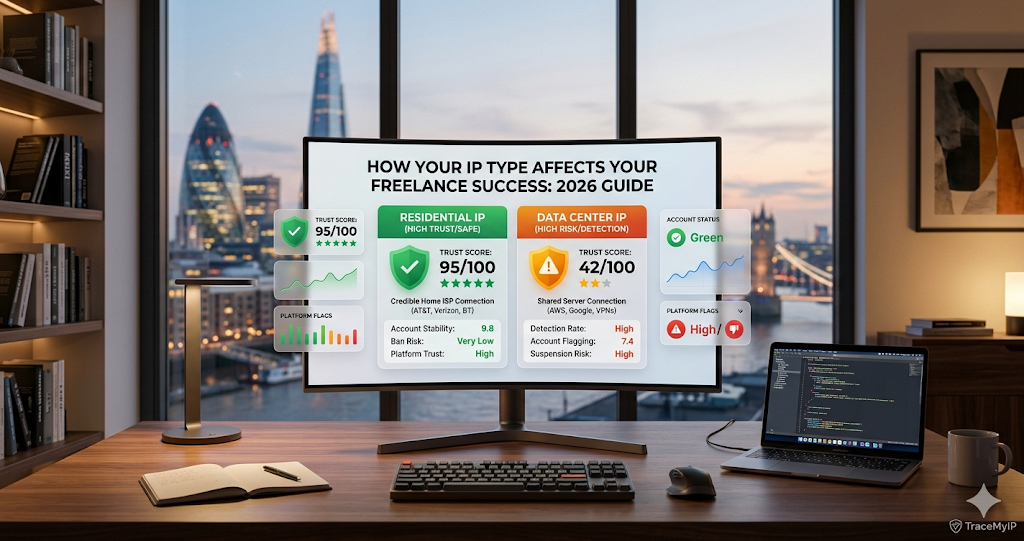
Working for a US or UK client? Your IP type matters more than you think. Discover why Residential IPs are the gold standard for freelancers and how to check yours today.
Residential vs. Data Center IP: Which is Best for Remote Work in 2026?
As a remote professional or freelancer in 2026, your internet connection is your lifeline. However, most users don’t realize that the type of IP address they use can determine whether they are trusted by a platform or instantly blocked.
If you are accessing platforms like Upwork, Fiverr, or banking portals in the USA, UK, or Canada, you must understand the critical difference between Residential IPs and Data Center IPs.
Quick Check: Before diving in, find out exactly what type of IP you are using with our LIVE IP TYPE ANALYZER.
1. What is a Residential IP?
A Residential IP is an address assigned by an Internet Service Provider (ISP) like Comcast, AT&T, or Verizon to a physical home location.
- Trust Factor: Extremely High. Websites see you as a "real person" browsing from home.
- Best For: Remote jobs, online banking, and managing sensitive freelance accounts.
2. What is a Data Center IP?
Data Center IPs are not associated with an ISP. Instead, they come from secondary corporations (like AWS, Google Cloud, or DigitalOcean). These are often used by VPNs and bulk proxy services.
- Trust Factor: Low to Medium. Many security systems flag these as "bots" or "automated traffic."
- Best For: High-speed web scraping or bulk data tasks, but risky for personal accounts.
The 2026 Comparison: Why Freelancers Must Care
Feature | Residential IP | Data Center IPAnonymity | High (Looks like a local user) | Low (Easily detected as a proxy)
Speed | Standard ISP speeds | Ultra-fast (Server grade)
Account Safety | [Gold Standard for Safety] | [High Risk of Shadowbanning]
Cost | Expensive / Comes with Home Internet | Very Cheap
Speed | Standard ISP speeds | Ultra-fast (Server grade)
Account Safety | [Gold Standard for Safety] | [High Risk of Shadowbanning]
Cost | Expensive / Comes with Home Internet | Very Cheap
Why Tier-1 Platforms Block Data Center IPs
In 2026, AI-driven security algorithms are aggressive. If you try to log into a US-based payroll system using a Data Center IP, the system assumes you are using a cheap VPN to hide your true location. This leads to:
- Mandatory Identity Verification: Constant ID checks.
- Shadowbanning: Your profile stops appearing in search results.
- Instant Suspension: Due to "Suspicious Network Activity."
Is your IP clean? Check if your current connection is flagged as a proxy here: PROXY & VPN DETECTION TOOL.
Which One Should You Choose?
Choose Residential IP if:
- You work for high-ticket clients in the USA, UK, or Europe.
- You manage social media accounts for brands.
- You need to access geo-restricted corporate portals without being flagged.
Choose Data Center IP if:
- You are performing high-volume technical tasks like SEO crawling.
- Speed is more important than "human-like" behavior.
- You are not accessing accounts that require strict security.
How to Verify Your IP Reputation
Don't wait for an account ban to find out your IP is low quality. Use a professional diagnostic tool to see how the world sees your connection.
- Step 1: Visit TRACEMYIPONLINE.COM to see your ISP and Org details.
- Step 2: Ensure your "Organization" matches a known residential provider (e.g., Spectrum, British Telecom) and not a data center (e.g., M247, Akamai).
- Step 3: If you are on a blacklisted data center range, follow our guide on HOW TO CHANGE YOUR IP WITHOUT A VPN to get a fresh residential start.
Conclusion
In the competitive landscape of 2026, a Residential IP is a non-negotiable tool for any serious freelancer. It provides the authenticity and security needed to work across borders without technical friction.
Stay Secure. Stay Professional.