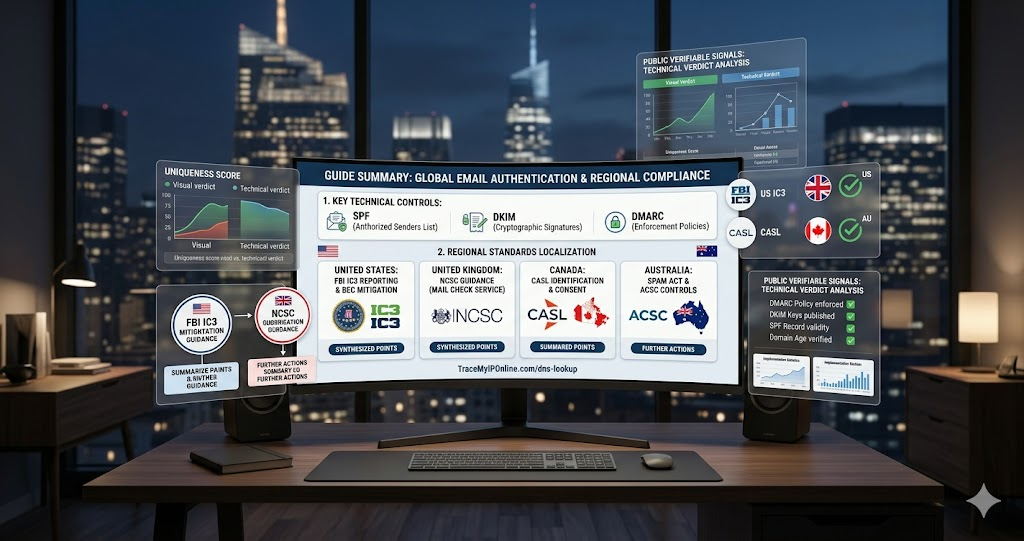
Every legitimate email-sending domain should have three DNS records configured: SPF, DKIM, and DMARC. These records are public, readable by anyone, and take 10 seconds to check. When a domain claiming to be a real business is missing all three, it is a significant signal — either the business is negligent about email security, or the domain was recently registered specifically for sending fraudulent email.
DNS Lookup Is the Fastest Way to Verify a Business Email Is Legitimate
Every legitimate email-sending domain should have three DNS records configured: SPF, DKIM, and DMARC. These records are public, readable by anyone, and take 10 seconds to check. When a domain claiming to be a real business is missing all three, it is a significant signal — either the business is negligent about email security, or the domain was recently registered specifically for sending fraudulent email.
"SPF, DKIM, and DMARC together form the minimum acceptable email authentication infrastructure for any organization sending email at scale. A domain without these records cannot reliably prevent spoofing of its address and has not implemented the baseline controls expected by major email providers since 2024. When I investigate a suspicious email, missing authentication records on the claimed sender domain are among the most actionable signals — they are objective, publicly verifiable, and carry no ambiguity."
— Dr. Priya Nair, Email Security Standards Research, IIIT Bangalore
What SPF, DKIM, and DMARC Actually Do
SPF (Sender Policy Framework): A DNS TXT record listing which IP addresses and mail servers are authorized to send email from this domain. If an email arrives claiming to be from yourcompany.com but was sent from a server not in yourcompany.com's SPF record, receiving mail servers can reject it or mark it as suspicious.
DKIM (DomainKeys Identified Mail): Adds a cryptographic signature to outgoing emails. The receiving server verifies the signature against a public key published in DNS. A passing DKIM check means the email was sent by someone with access to the domain's private key — strong evidence of authorized sending.
DMARC (Domain-based Message Authentication, Reporting, and Conformance): Tells receiving servers what to do when SPF or DKIM fails — reject, quarantine (spam folder), or take no action — and provides reporting on authentication failures. Since 2024, Gmail and Yahoo require DMARC for bulk senders. A domain without DMARC has no policy governing what happens to unauthorized emails claiming to be from it.
How to Check DNS Authentication Records
Go to tracemyiponline.com/dns-lookup. Enter the domain name you want to check (just the domain — no @ symbol, no email address format). Select TXT from the record type options. Results appear immediately showing all TXT records for the domain, which includes SPF and DMARC if they are configured.
For DKIM, you need the DKIM selector — a prefix used by the sender's email system. Common selectors include "google," "k1," "default," and "mail." Enter "google._domainkey.example.com" (with "google" being the selector and "example.com" being the domain) to check for a Google Workspace DKIM record.
Before vs After: DNS Records on Suspicious vs Legitimate Domains
Email claiming to be from a financial advisory firm — DNS check at tracemyiponline.com/dns-lookup:
SPF record: not found. DKIM: not found. DMARC: not found. Domain creation date at tracemyiponline.com/whois-lookup: 18 days ago.
An 18-day-old domain with no email authentication records, sending financial investment advice. No legitimate established financial firm lacks SPF, DKIM, and DMARC. This is a new domain set up to spoof a legitimate-looking financial services email. ❌
DNS check on a legitimate bank's domain:
SPF record: present, lists authorized mail servers including Microsoft 365 infrastructure. DKIM: present with multiple selectors. DMARC: present, policy set to "reject" — unauthorized emails claiming to be from this domain are rejected rather than delivered. ✅
For California and New York Users: DNS Authentication and Business Email Fraud
Business Email Compromise (BEC) costs California and New York businesses more than any other cyber fraud category — the FBI's IC3 report consistently shows both states near the top of BEC losses by state. BEC attacks almost always involve sending from domains without proper authentication records, or from newly registered lookalike domains.
For California and New York businesses: verify that your own domain has SPF, DKIM, and DMARC configured at tracemyiponline.com/dns-lookup. This protects your customers from receiving spoofed emails claiming to come from your domain. Check your domain's WHOIS age alongside DNS records at tracemyiponline.com/whois-lookup.
For London and UK Users: DNS Authentication Under NCSC Guidance
The NCSC's email security guidance explicitly requires SPF, DKIM, and DMARC for all UK government domains and strongly recommends them for all organizations. The NCSC's Mail Check service specifically monitors DNS authentication records for UK public sector organizations. For London and UK businesses: check authentication records for your own domain at tracemyiponline.com/dns-lookup and verify any suspicious sender's domain records before acting on financial requests.
For Toronto and Ontario Users: DNS Authentication and CASL Compliance
CASL's identification requirements for commercial email become meaningless if the domain in the From address has no authentication records — anyone can spoof that address. For Ontario businesses sending commercial email: proper SPF, DKIM, and DMARC configuration is both a security measure and increasingly an expectation for inbox delivery. Check your domain's records at tracemyiponline.com/dns-lookup.
For Sydney and Australian Users: DNS Authentication and the Spam Act
Australia's Spam Act requires commercial email to include accurate sender identification. Proper DMARC configuration prevents domain spoofing that could be used to send spam falsely attributed to your domain — protecting both your customers and your domain's reputation. The ACSC's email security guidance includes SPF, DKIM, and DMARC as required controls for organizations handling sensitive data. Check at tracemyiponline.com/dns-lookup.
Reading DNS Lookup Results — What to Look For
SPF record present: Starts with "v=spf1" in the TXT record. Lists authorized mail servers and ends with "-all" (hard fail — reject unauthorized senders) or "~all" (soft fail — mark as suspicious). "-all" is the stricter and more secure configuration.
DMARC record present: Found at "_dmarc.yourdomain.com" as a TXT record. Starts with "v=DMARC1". Look for "p=reject" (strongest — unauthorized emails rejected), "p=quarantine" (moderate — unauthorized emails go to spam), or "p=none" (monitoring only — no enforcement, weakest).
No records found: The domain has not configured email authentication. Any email claiming to come from this domain cannot be verified as legitimate through technical means. Treat with significant caution, particularly for financial requests.
Frequently Asked Questions
Is the DNS Lookup tool free?
Yes — 100% free, no signup. Visit tracemyiponline.com/dns-lookup and check any domain's DNS records instantly.
My company's domain has SPF but no DMARC — is that a problem?
Yes. SPF without DMARC means there is no policy governing what receiving servers do when SPF fails — they may still deliver spoofed emails to inboxes. DMARC at "p=reject" is the configuration that actually prevents email spoofing of your domain. Configure DMARC with at minimum "p=quarantine" to improve protection.
I see multiple SPF records for a domain — is that a problem?
Yes — having more than one SPF record is an RFC violation. Multiple SPF records cause unpredictable behavior in email authentication checks and should be merged into a single record. If you are managing your own domain's email authentication, merge all SPF records into one.
Does DMARC "p=none" provide any protection?
Minimal. "p=none" is a monitoring mode that generates reports but does not instruct receiving servers to do anything with unauthorized emails. It is the first step in a DMARC deployment — you collect reports to understand your email sending patterns before enforcing. For domains that are not actively managing DMARC deployment, "p=none" provides no spoofing protection.
Can a domain pass DMARC and still be a phishing domain?
Yes — a phishing domain can configure its own valid DMARC, SPF, and DKIM. These records prove the email came from the claimed domain — but the domain itself may be a lookalike registered last week. Always combine DNS authentication checks with domain age at tracemyiponline.com/whois-lookup. Authentication records mean the email is from that specific domain; WHOIS tells you whether that domain is legitimate.
Ten-Second Email Verification
Before acting on any unexpected financial request in an email: check the sender domain's DNS authentication records at tracemyiponline.com/dns-lookup. Check the domain age at tracemyiponline.com/whois-lookup. Check the IP reputation at tracemyiponline.com/blacklist-checker. Three checks, under two minutes, that catch the vast majority of email-based fraud attempts.