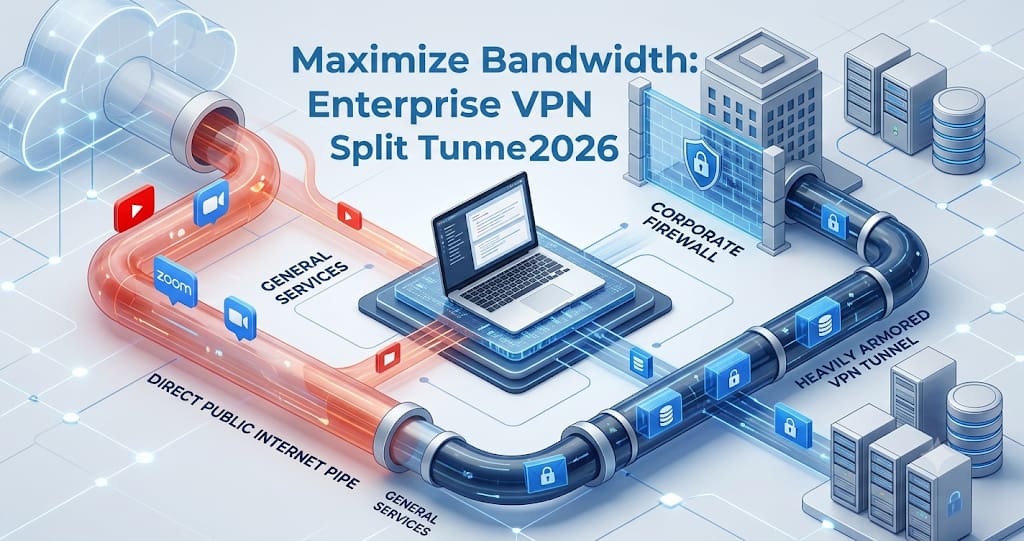
Forcing 100% of your remote workforce's internet traffic through a central corporate VPN gateway is a recipe for crippling latency and massive bandwidth costs. In 2026, routing a remote employee's Spotify or Netflix stream through your expensive secure firewall is completely unnecessary. Discover how implementing Enterprise VPN Split Tunneling intelligently separates high-risk corporate data from low-risk public internet traffic, drastically boosting application speeds and reducing server load.
The traditional Enterprise VPN was designed with a "hub-and-spoke" mentality: every single byte of data from a remote worker's laptop had to travel back to the central corporate headquarters before going out to the internet. If an employee in London wanted to watch a public YouTube training video, that video stream was routed all the way to the VPN server in New York, and then back to London. In 2026, with the explosion of bandwidth-heavy SaaS applications and video conferencing, this legacy routing model completely collapses the network.
The modern solution to this bottleneck is Enterprise VPN Split Tunneling. This technology allows network administrators to create dynamic routing rules. Sensitive corporate traffic (like accessing an internal database or an HR portal) is securely encrypted and routed through the VPN tunnel. Meanwhile, general internet traffic (like Zoom calls, Google searches, or personal browsing) is sent directly through the user's local internet service provider (ISP), bypassing the VPN entirely. To set these rules up correctly, IT teams often use an IP address lookup tool to map exactly which cloud applications require secure routing and which can be safely excluded.
"Split tunneling is the difference between a congested, unusable corporate network and a high-performance digital workspace. By offloading 70% of non-essential traffic directly to the local ISP, you instantly reclaim massive amounts of bandwidth for your critical B2B applications." — Lead Network Architect, TraceMyIPOnline.
3 Types of Split Tunneling Configurations
Implementing split tunneling isn't a simple on/off switch. In 2026, modern B2B VPNs and SASE platforms offer three distinct ways to split the traffic, depending on your organization's Zero Trust architecture.
Configuration Type | How It Works | Best Use Case (2026) | Security Risk LevelInverse (Exclude) Split | Everything goes through the VPN except specifically whitelisted apps (e.g., Zoom, Netflix). | High-security environments looking to offload specific video apps. | Low
App-Based (Include) Split | Only specific approved apps (e.g., SAP, Salesforce) go through the VPN. Everything else goes local. | Modern Cloud-first companies migrating from VPN to ZTNA. | Medium
Dynamic IP/URL Split | Traffic is routed based on the destination IP or URL in real-time. | Complex multi-cloud deployments (AWS + Azure). | Low
App-Based (Include) Split | Only specific approved apps (e.g., SAP, Salesforce) go through the VPN. Everything else goes local. | Modern Cloud-first companies migrating from VPN to ZTNA. | Medium
Dynamic IP/URL Split | Traffic is routed based on the destination IP or URL in real-time. | Complex multi-cloud deployments (AWS + Azure). | Low
Programmatic Bandwidth Optimization: Tier-1 Scenarios (H2s)
Different industries utilize split tunneling to solve entirely different networking crises. Here is how modern global teams are optimizing their routing.
Software Engineering: Silicon Valley DevOps
In Silicon Valley, DevOps engineers routinely push and pull gigabytes of Docker containers and raw data sets from AWS. If thousands of engineers force these massive data transfers through a single corporate VPN gateway, the gateway will crash. IT directors implement dynamic URL split tunneling. Traffic destined for *.internal.company.com goes through the secure Dedicated IP VPN, while traffic destined for public GitHub repositories or public AWS endpoints routes directly over the engineer's local high-speed fiber connection.
Remote Customer Support: UK VoIP Centers
For remote call center agents in the UK, voice clarity is the top priority. Routing Voice over IP (VoIP) traffic through a heavily encrypted VPN tunnel introduces jitter, packet loss, and latency, leading to dropped customer calls. By utilizing app-based split tunneling, IT administrators explicitly exclude the VoIP application (like RingCentral or Microsoft Teams) from the VPN. The voice data travels via the fastest, most direct internet route, significantly improving Enterprise VPN Performance Benchmarks.
Healthcare Administration: US Medical Billing
Medical billing in the US operates under strict regulatory frameworks. Billers need to access electronic Protected Health Information (ePHI) securely. Here, inverse split tunneling is used. 100% of the computer's traffic is forced through the heavily monitored corporate VPN to ensure absolute HIPAA compliance and maintain strict Enterprise VPN Logs. The only exception allowed by the firewall might be the Windows Update service, saving the corporate network from downloading terabytes of Microsoft patches simultaneously.
Top Split-Tunneling VPN Vendors (Competitor Table)
If your enterprise network is suffering from congestion, these vendors provide the most granular and reliable split-tunneling controls on the market.
Security Vendor | Split Tunneling Approach | Granularity Level | Best ForPerimeter 81 | App & Subnet Level | Extremely High | B2B SaaS & Tech
NordLayer | App-Level (Include/Exclude) | High | Startups & SMEs
ExpressVPN (Business) | Per-Device & App-Level | Medium | Remote Marketing Teams
Cisco Secure Access | Deep Packet URL Routing | Maximum | Fortune 500 Enterprises
TraceMyIPOnline | IP Routing Verification | N/A (Diagnostic) | Network Diagnostics
NordLayer | App-Level (Include/Exclude) | High | Startups & SMEs
ExpressVPN (Business) | Per-Device & App-Level | Medium | Remote Marketing Teams
Cisco Secure Access | Deep Packet URL Routing | Maximum | Fortune 500 Enterprises
TraceMyIPOnline | IP Routing Verification | N/A (Diagnostic) | Network Diagnostics
2026 Bandwidth & Performance Statistics
- Bandwidth Reclamation: Organizations that implement video-conferencing split tunneling report an average 45% reduction in total corporate VPN bandwidth consumption.
- Latency Reduction: Offloading SaaS traffic directly to the local ISP reduces application latency by an average of 30 to 50 milliseconds per request.
- ZTNA Adoption: 70% of companies utilizing app-based split tunneling treat it as the first transitional step toward a full Zero Trust Network Access (ZTNA) deployment.
Frequently Asked Questions (FAQ)
1. What exactly is split tunneling?
Split tunneling is a networking feature that allows you to route some of your device's traffic through a secure VPN tunnel, while letting the rest of your traffic access the internet directly through your local, unsecured network.
2. Does split tunneling reduce my security?
It can, if configured poorly. If a remote worker's local network is infected with malware, and you allow a split tunnel, that malware could potentially bridge the gap between the unprotected local traffic and the secure corporate tunnel. This is why "Inverse Split" (where only low-risk apps are excluded) is preferred for high-security environments.
3. Why does Zoom or Microsoft Teams lag when connected to a VPN?
Video conferencing requires massive bandwidth and is highly sensitive to latency. Encrypting that real-time video data and sending it to a central corporate server before it goes to the Zoom servers adds significant delay. Split tunneling fixes this by sending Zoom traffic straight to the internet.
4. Can an employer see my personal browsing if split tunneling is on?
If your IT department configures the VPN to only route corporate traffic (App-Based Split), then your personal browsing (like checking your personal bank account or watching Netflix) goes through your own ISP and is generally invisible to the corporate VPN logs.
5. How do I know if my VPN is using split tunneling?
You can run a simple test. Connect to your corporate VPN, open a web browser, and use TraceMyIPOnline to check your public IP address. If the IP shows your corporate server, your web traffic is going through the VPN. If it shows your home ISP (like Comcast or Virgin Media), your web browser is being split-tunneled outside the VPN.