Most people interact with IP addresses the same way they interact with DNS — they rely on it constantly without thinking about it. That is fine for most purposes. But there are specific situations where not knowing what your IP is, what it reveals, and how to check it costs real money or creates real security problems. This guide is for people who have heard the term but never got a plain explanation. No networking prerequisites required.
What Your IP Address Is — And Why You Should Actually Care
Most people interact with IP addresses the same way they interact with the DNS system — they rely on it constantly without thinking about it. That is fine for most purposes. But there are a handful of situations where not knowing what your IP is, what it reveals, and how to check it costs you real money or creates real security problems.
This guide is for people who have heard the term but never got a plain explanation. No networking prerequisites required.
Check your current IP address free at tracemyiponline.com/ip-lookup — results in under 5 seconds, no account needed.
"The IP address is one of the most misunderstood concepts in everyday computing. People think it is either scarier than it is — 'someone has my IP address' treated like a crisis — or more boring than it is — ignored entirely until it causes a problem. The practical reality is somewhere specific: your IP reveals your ISP and approximate location to every site you visit, can be used to disrupt your internet connection, and changes in ways that matter for troubleshooting. That is the scope of it. Understanding that scope takes about 10 minutes."
— Prof. James Okafor, Computer Networks and Security, University of Birmingham
The Simplest Explanation of What an IP Address Is
When you send a letter, you need a return address on the envelope so the recipient can write back. Your IP address is that return address for internet traffic. Without it, the websites and services you request data from would not know where to send their responses.
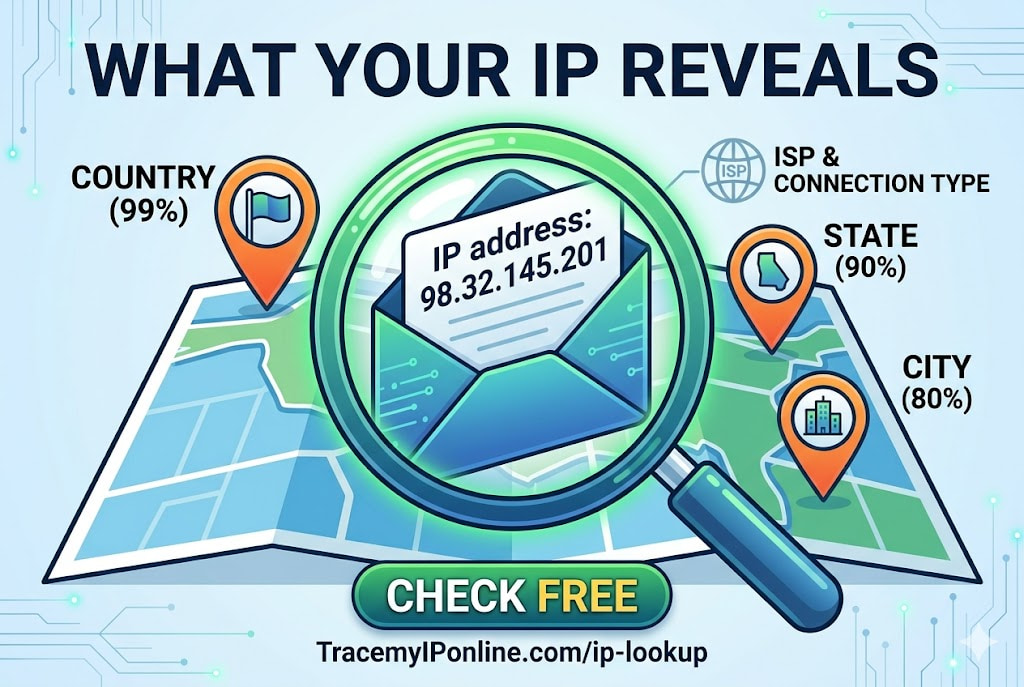
IP stands for Internet Protocol. The "address" part is a number — in the most common format (IPv4), it looks like four groups of numbers separated by dots: 98.32.145.201. Every device communicating on the internet needs one.
There are two types that matter for everyday use:
Public IP address: The address that the internet sees. Assigned by your ISP (internet service provider — Comcast, BT, Rogers, Telstra, whoever you pay for internet). Every device in your home shares this one address, because your router acts as the translator between your devices and the internet. This is the address that reveals your location and ISP to websites.
Private IP address: The address your router assigns to each individual device on your home network. Your laptop might be 192.168.1.5, your phone 192.168.1.8, and your smart TV 192.168.1.12. These are internal addresses — the internet never sees them, and they are not unique globally.
When people talk about "your IP address" in any privacy or security context, they almost always mean the public IP.
What Your IP Address Actually Reveals to Websites
Every time you visit any website, the server receiving your request automatically has access to your public IP. No tracking code needed. No cookies. No login. It is simply how internet connections work — the server needs to know where to send the response, and that is your IP address.
From your IP address, the server can query public databases and find out:
Your country: Near-certain. Country-level IP geolocation is over 99% accurate globally.
Your state or region: Highly accurate in most countries — around 90% for Tier-1 countries like the US, UK, Canada, and Australia.
Your approximate city: Around 80% accurate in urban areas. Less reliable in rural regions, where your IP might resolve to your ISP hub city rather than where you actually are.
Your ISP name: Always accurate. IP addresses are registered to ISPs in public databases.
Your connection type: Residential, business, mobile, or datacenter/VPN. This is how Netflix detects VPN usage — VPN server IPs come from datacenters, not residential ISPs.
What Your IP Address Does NOT Reveal
This part is worth being clear about, because there is a lot of misinformation online.
Your IP address does not reveal your name, home address, phone number, email, or any personal identifying information. The only organization that can link your IP to your specific identity is your ISP — and they only share this with law enforcement through legal process (court orders, subpoenas).
Your IP does not give anyone access to your computer, files, or accounts. Knowing someone's IP address does not let you "hack" them in the way movies suggest. What it does allow is flooding their connection with traffic (a DDoS attack) — which is disruptive but not a privacy breach.
How Your IP Address Changes
Most home broadband connections use dynamic IP addresses — your ISP assigns you an IP from their pool, and it can change. Restart your router and you often get a different IP. Wait a few weeks and it may change on its own as your ISP rotates assignments.
Some plans offer static IP addresses that never change — typically a paid add-on for business accounts. Static IPs are useful if you host servers or need consistent remote access to your home network.
Mobile data uses a different IP from your home broadband — your carrier assigns a mobile IP from a separate pool. If you switch from home WiFi to your phone's data, your IP changes completely.
Check what your current IP is at any time at tracemyiponline.com/ip-lookup. Useful after router restarts, when troubleshooting, or when verifying a VPN is working.
Before vs After: Seeing What Your IP Reveals
Typical home broadband user — IP lookup results: IP: 98.32.145.201. Country: United States. State: Illinois. City: Chicago. ISP: Comcast Cable Communications. Connection type: Residential. ASN: AS7922. Reputation: Clean.
This is the information any website you visit can access the moment your browser makes a request. No login. No interaction. Just loading the page.
Same user with a VPN connected: IP: 185.220.101.47. Country: Netherlands. City: Amsterdam. ISP: VPN Provider. Connection type: Datacenter. ASN: AS9009. Reputation: VPN detected.
Every visible data point changed. The real home location, real ISP, and real IP are not visible. Verify your VPN is actually doing this at tracemyiponline.com/vpn-detector.
For California and New York Beginners: Why Your IP Matters Legally
California's CCPA explicitly classifies IP addresses as personal information. This means businesses collecting your IP have legal obligations — you have rights to know what data was collected, request deletion, and opt out of its sale. Your IP address is not just a technical identifier — it is personal data under California law.
For New York residents: while New York does not have a CCPA equivalent as of 2026, federal law through the FTC Act covers deceptive data practices. ISPs in New York — Spectrum, Verizon, Optimum — collect and in some cases monetize IP-linked browsing data. Understanding what your IP reveals is the starting point for evaluating your own data exposure. Check at tracemyiponline.com/ip-lookup.
For London and UK Beginners: IP Addresses Under UK GDPR
The ICO (Information Commissioner's Office) confirmed that IP addresses are personal data under UK GDPR when they can reasonably be linked to an individual — which, given ISP records, they usually can. UK websites and services collecting your IP have obligations under UK GDPR including lawful basis for processing and subject access rights.
For London, Manchester, and Edinburgh residents: you have the right to submit a Subject Access Request to any UK business asking what personal data they hold about you — IP logs included. Understanding what an IP reveals helps you evaluate SAR responses more meaningfully. Check your current IP profile at tracemyiponline.com/ip-lookup.
For Toronto and Ontario Beginners: IP Addresses Under Canadian Law
The OPC (Office of the Privacy Commissioner of Canada) has consistently treated IP addresses as personal information under PIPEDA when they can identify an individual or their device. Canadian businesses collecting IP data have consent and purpose limitation obligations.
For Ontario residents new to understanding their IP: Rogers, Bell, and Videotron are your most likely ISPs, and each collects connection metadata including your IP assignments. PIPEDA gives you the right to request what personal information any Canadian organization holds about you — including IP data. Check your current IP at tracemyiponline.com/ip-lookup.
For Sydney and Australian Beginners: IP Addresses and the Privacy Act
Under Australia's Privacy Act 1988 and the Australian Privacy Principles, IP addresses are personal information when linked to identifiable individuals. The OAIC has treated IP-based location data as sensitive personal information in several guidance documents and findings.
For Sydney and Melbourne residents: Telstra and Optus retain IP connection metadata for two years under Australian mandatory data retention laws. Understanding what your IP reveals — and what that means for two-year government-accessible records — is relevant context for privacy decisions. Check your IP profile at tracemyiponline.com/ip-lookup.
Common Things People Get Wrong About IP Addresses
"Someone having my IP can hack my computer." Not accurate. Your computer is not remotely accessible from external IP connections by default. An IP address is not an access credential. The realistic risk from IP exposure is a DDoS attack — which disrupts your internet connection but does not access anything on your device.
"My IP is the same as my neighbor's." No. Each household connected to the internet has its own public IP. Your neighbor's Comcast connection has a different IP from yours, even though you share the same ISP and live next door. (CG-NAT is an exception in some configurations, but even then, the IP pool is large.)
"Incognito mode hides my IP." No. Incognito mode prevents local browser history storage. Your IP is fully visible to every website in incognito mode, exactly as in normal browsing. Only a VPN or similar routing tool changes your visible IP.
"My IP gives away my exact home address." No. IP geolocation is approximate — city level at best. Your home address is not in any public database linked to your IP. Only your ISP has that connection, and they only share it under legal compulsion.
"Changing my password changes my IP." No. Your IP is assigned by your ISP at the network level. Account passwords for any service are irrelevant to your IP assignment. Restart your router if you want a new dynamic IP.
Practical Situations Where Knowing Your IP Matters
Troubleshooting access problems: If a website or service blocks you and the problem is your IP rather than your account, a different IP fixes it. Check your current IP, then restart your router or connect from a different network and test again.
Verifying VPN protection: Check your IP before connecting to a VPN, then again after. The IP and ISP shown should change completely. If they do not — or if they show your real ISP alongside a VPN IP — you have a leak. Verify at tracemyiponline.com/vpn-detector.
Email deliverability: If your business emails go to spam and you self-host email, your IP's reputation may be the problem. Check at tracemyiponline.com/blacklist-checker.
Security investigations: If you receive a threatening email or suspicious business communication, the sender's IP is in the email header. That IP, traced through tracemyiponline.com/ip-lookup, tells you the country and ISP of origin — useful for fraud detection and reporting.
Frequently Asked Questions
Is the IP Lookup tool completely free?
Yes — 100% free, no signup, no account. Visit tracemyiponline.com/ip-lookup and your IP appears automatically within seconds.
Why does my IP lookup show a different city than I live in?
IP geolocation reflects ISP infrastructure, not GPS location. Your ISP routes traffic through regional hubs, and your IP is registered to that hub's location rather than your specific city. Rural users often see the nearest large city. Mobile users typically see their carrier's central routing city. This is normal, not an error.
Can I have more than one IP address?
You have multiple IPs but they serve different purposes. Your public IP (what external sites see), your private/local IP (your position within your home network), and potentially an IPv6 address (the newer IP format). If you use mobile data and home WiFi, each gives you a different public IP.
How do I get a new IP address?
For most home connections: restart your router and wait a few minutes. Your ISP may assign a different IP. This is not guaranteed — some ISPs reassign the same IP. For a guaranteed change: contact your ISP and request one, or use a VPN to appear with a different IP immediately.
Is my IP the same on my phone and computer?
On the same home WiFi: yes, same public IP (both go through the same router). On mobile data: different IP from your carrier's mobile pool. Check both scenarios at tracemyiponline.com/ip-lookup.
What is the difference between IP address and MAC address?
An IP address is a network address assigned by your ISP or router — it can change and is visible across networks. A MAC address is a hardware identifier built into your network adapter — it is stable and only visible within your local network. External sites see your IP, not your MAC address.
Can the government find me using my IP address?
Law enforcement can obtain a court order requiring your ISP to identify which subscriber was assigned a specific IP at a specific time. This is how IP-based criminal investigations work. The ISP is the link between a public IP and a real person. For ordinary users engaged in legal activities, this process is irrelevant. For criminal investigations, it is available to law enforcement.
Now You Know — Here Is What To Do With It
Understanding your IP takes the mystery out of most of the situations where it comes up. Someone threatens to "use your IP" — you know what they realistically can and cannot do. Your emails go to spam — you know IP reputation is a potential cause. A website blocks you — you know changing your IP might fix it. You use a VPN — you know how to verify it is actually working.
Start with a check at tracemyiponline.com/ip-lookup to see your own profile. Check your VPN at tracemyiponline.com/vpn-detector if you use one. Check your IP's reputation at tracemyiponline.com/blacklist-checker. All free at TraceMyIPOnline.com.