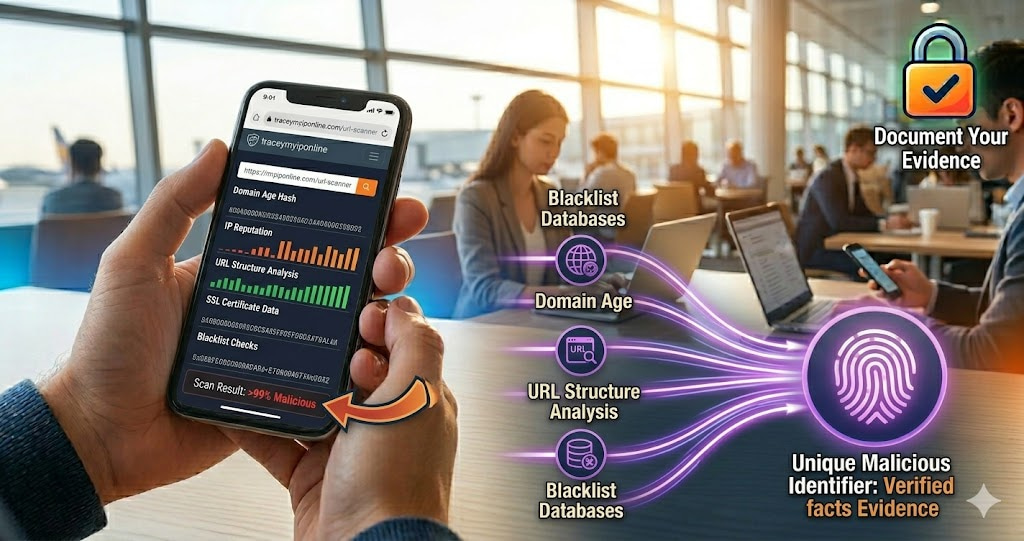
A URL scanner checks a web address against threat intelligence databases — collections of known phishing sites, malware distributors, and fraudulent pages — before you visit. The check happens without your browser touching the site at all. You get the verdict in seconds. The damage from clicking a malicious link often happens immediately on page load. Scanning before clicking breaks this chain.
Before You Click Any Suspicious Link, This Free Check Takes 10 Seconds
A URL scanner checks a web address against threat intelligence databases — collections of known phishing sites, malware distributors, spam domains, and fraudulent pages — before you visit. The check happens without your browser touching the site at all. You get the verdict in seconds: clean, suspicious, or flagged.
This matters because the damage from clicking a malicious link often happens immediately on page load. Drive-by malware downloads, credential harvesting forms that look identical to login pages, redirect chains that deposit trackers — none of these require you to do anything beyond loading the page. A URL scan before clicking breaks this chain.
"URL scanning is one of the highest-ROI security habits available to everyday users. The intelligence databases behind URL scanners aggregate threat data from millions of sources globally — security vendors, ISPs, honeypots, user reports — and are updated continuously. A URL that appeared legitimate 48 hours ago may be flagged today. Scanning immediately before clicking, rather than relying on earlier clean checks, is the correct approach because phishing infrastructure can be activated on very short notice."
— Dr. Sanjay Krishnamurthy, Cyber Threat Intelligence Research, National University of Singapore
What URL Scanners Actually Check
A URL scan queries multiple threat intelligence sources simultaneously:
Blacklist databases: Google Safe Browsing, Phishtank, OpenPhish, URLhaus, and others maintain continuously updated lists of known malicious URLs. A URL appearing on any of these lists triggers an immediate warning.
Domain age and registration: Malicious sites are almost always newly registered — phishing campaigns spin up domains hours before deployment. A URL pointing to a 3-day-old domain is high-risk by default, even before other checks. This integrates with WHOIS data available at tracemyiponline.com/whois-lookup.
IP reputation: The server hosting the URL has its own reputation history. An IP that has previously hosted malware, spam operations, or phishing pages carries forward risk signals even when new domains are pointed at it. Check IP reputation directly at tracemyiponline.com/blacklist-checker.
URL structure analysis: Phishing URLs often contain characteristic patterns — brand names embedded in long random strings, excessive subdomains, hyphen-heavy domain names, lookalike characters. Heuristic analysis catches URLs that are not yet in blacklists but display these patterns.
SSL certificate data: Certificate transparency logs track which domains have obtained SSL certificates and when. A domain that obtained an SSL certificate yesterday and is now sending urgent banking emails is a strong phishing signal, because SSL certificates no longer confer legitimacy — they only encrypt traffic, and malicious sites use them too.
When to Always Scan Before Clicking
Links in unexpected emails: Any link in an email you were not expecting — a parcel notification for something you did not order, a security alert for an account you do not recognize, an invoice for something you did not buy. Even if the email appears to come from a known brand. Especially if the email creates urgency.
Links shared in messages: Links sent through SMS, WhatsApp, Telegram, or other messaging apps — particularly from unknown numbers or recent contacts. URL shorteners (bit.ly, tinyurl.com, t.co) hide the actual destination and warrant scanning before following.
Links in social media ads: Fraudulent products and investment schemes advertise aggressively on social platforms. The ad may look professional. The linked site may have been live for 11 days.
Links from search results beyond the first page: SEO poisoning places malicious sites in search results for common queries — software downloads, recipe sites, news topics. Results beyond the top tier warrant more caution.
Any link that creates urgency: "Your account will be suspended in 24 hours." "Claim your prize before midnight." "Immediate action required." Urgency is the most consistent psychological trigger in phishing — it reduces careful evaluation. A scan takes 10 seconds regardless of how urgent the link appears.
Before vs After: URL Scanning Catches What Visual Inspection Misses
Email received: "Your Apple ID has been suspended. Verify immediately."
Visual inspection: Email looks correct — Apple logo, professional formatting, correct colors. Link text shows "appleid.apple.com". This looks legitimate to most users.
URL scan at tracemyiponline.com/url-scanner on the actual link destination: Domain is "appIe-id-verify.security-check.com" (capital I replacing lowercase L in Apple). WHOIS: registered 6 days ago. IP: flagged on 3 threat intelligence databases. PhishTank: confirmed phishing page. Google Safe Browsing: flagged.
Result: confirmed credential harvesting phishing page designed to steal Apple ID and password. The visual deception is sophisticated — link text shows a legitimate URL while the actual href points elsewhere. Scan before clicking catches this; visual inspection alone does not. ❌ / ✅ (scanned and avoided)
For California and New York Users: Link Safety and Financial Security
California and New York have the highest concentration of financial account holders targeted by phishing in the US. Banking credential theft, investment account access, and payment service compromise all begin with a clicked phishing link. The FBI's IC3 report consistently shows California and New York at or near the top of phishing victim counts by state.
California users: the state's strong consumer protection framework means financial institutions bear responsibility for certain categories of fraud loss, but recovery processes are slow and not guaranteed. Prevention through URL scanning before clicking financial links is significantly easier than recovery after credential theft. Scan at tracemyiponline.com/url-scanner.
New York users, particularly in finance and legal sectors: business email compromise frequently involves malicious links embedded in what appear to be legitimate document sharing emails. Scan every unexpected link from a document service, regardless of how familiar the sender appears.
For London and UK Users: URL Scanning and NCSC Guidance
The NCSC's Suspicious Email Reporting Service (SERS) — report@phishing.gov.uk — has received over 25 million reports since launch in 2020, leading to the removal of over 235,000 malicious sites. The NCSC specifically recommends checking suspicious links before clicking as a first-line defense.
For London and UK users: the NCSC's Cyber Aware campaign emphasizes link checking as one of its six key security behaviors. Our URL scanner at tracemyiponline.com/url-scanner queries the same threat intelligence databases used by professional security teams. After scanning and finding a malicious URL, forward the email to report@phishing.gov.uk to help protect other UK users.
For Toronto and Ontario Users: URL Scanning and CAFC Alerts
The Canadian Anti-Fraud Centre issues regular alerts about active phishing campaigns targeting Canadian users — Canada Revenue Agency impersonation, Canada Post parcel notification scams, and financial institution credential harvesting are among the most common. Ontario users receive a disproportionate volume of these due to the province's large population and concentration of financial services.
For Ontario users: scan any link claiming to be from CRA, Canada Post, major banks, or government services before clicking, regardless of how convincing the email appears. Check at tracemyiponline.com/url-scanner, and if confirmed malicious, report to the CAFC at antifraudcentre-centreantifraude.ca.
For Sydney and Australian Users: URL Scanning and Scamwatch
The ACCC's Scamwatch recorded over AUD $2.7 billion in scam losses in Australia in 2025, with phishing-initiated losses accounting for a significant portion. The ACCC's guidance for online safety consistently includes link verification as a first-line defense against phishing. Australia Post parcel scams, myGov credential harvesting, and financial institution phishing are the most frequently reported categories.
For Sydney and Melbourne users: scan any unexpected link from Australia Post, myGov, the ATO, or any bank before clicking. Report confirmed malicious URLs to Scamwatch and to ReportCyber. Scan at tracemyiponline.com/url-scanner.
URL Shorteners — The Extra Step
URL shorteners hide the actual destination. Bit.ly, tinyurl.com, t.co, and similar services are legitimate tools used by millions of businesses — and by phishers who use them specifically because they obscure the real URL.
For shortened URLs: expand the short URL first using a URL expander service to see the actual destination, then scan that destination at tracemyiponline.com/url-scanner. Most URL expanders simply add a preview parameter — for bit.ly links, adding "+" to the end (bit.ly/example+) shows the destination without visiting it.
Frequently Asked Questions
Is the URL Scanner tool free?
Yes — 100% free, no signup. Visit tracemyiponline.com/url-scanner and scan any URL instantly.
Does scanning a URL visit the site?
No. URL scanning queries databases that have already catalogued and analyzed the URL. Your browser does not make any connection to the destination site during the scan. This is precisely why scanning before clicking is effective — you get intelligence about the site without exposing yourself to it.
The URL scanned as clean but I am still suspicious — should I click?
Not necessarily. Threat intelligence databases have coverage lag — a URL deployed hours ago may not yet be in any blacklist. If the email creating urgency, the domain name looks slightly wrong, or the context is implausible (parcel notification for something you did not order), trust your instinct regardless of the scan result. Scan results reduce risk; they do not eliminate it entirely for brand-new malicious infrastructure.
The URL has HTTPS — does that mean it is safe?
No. HTTPS means the connection between your browser and the server is encrypted. It says nothing about whether the server is legitimate or malicious. All phishing sites use HTTPS now — the padlock icon no longer indicates trustworthiness. Scan the URL regardless of whether HTTPS is present.
Can I scan URLs on my phone?
Yes — tracemyiponline.com/url-scanner works on mobile browsers. Before following any link on your phone — particularly from SMS messages — copy the link and paste it into the scanner first. This is especially important on mobile where the full URL destination may not be visible.
What do I do if a URL I already clicked scanned as malicious?
If you only loaded the page without entering any credentials: close the tab, clear your browser cache, and run a malware scan on your device. If you entered a password or other credentials: change that password immediately from a different device, enable two-factor authentication, and check for unauthorized activity on the account.
Ten Seconds That Change the Outcome
Phishing campaigns succeed because they create enough urgency or familiarity to trigger a click before careful evaluation. A URL scan introduces one deliberate pause into that process — 10 seconds between seeing a link and clicking it. Most malicious links are caught in that pause.
Scan any URL at tracemyiponline.com/url-scanner. Check domain age at tracemyiponline.com/whois-lookup. Check IP reputation at tracemyiponline.com/blacklist-checker. Check DNS at tracemyiponline.com/dns-lookup. All free at TraceMyIPOnline.com.