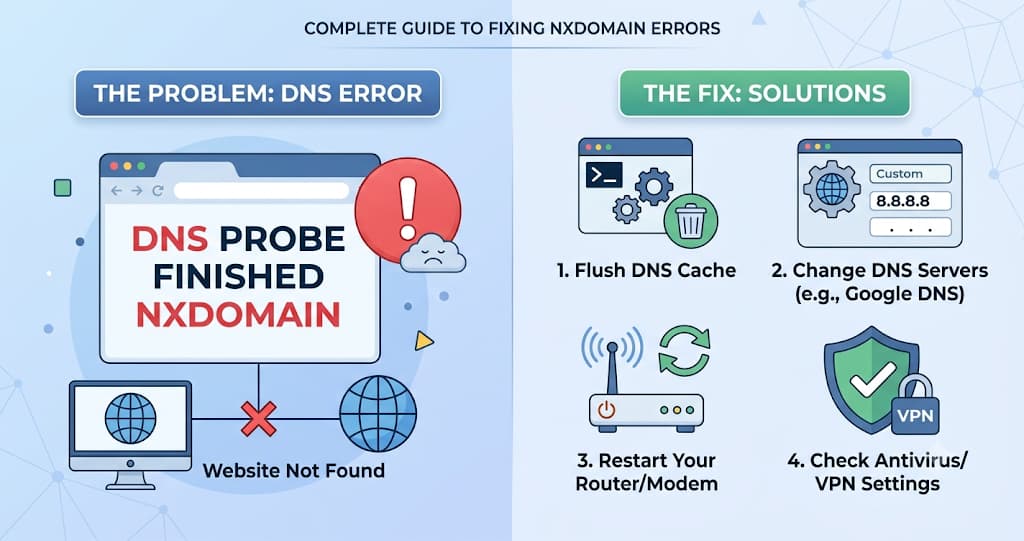
This site can't be reached" with DNS_PROBE_FINISHED_NXDOMAIN underneath. One 30-second test tells you whether it's your device or the domain.
Chrome runs 69% of the world's browser traffic as of mid-2026, and DNS_PROBE_FINISHED_NXDOMAIN is one of the errors it throws most often when a domain will not resolve. "This site can't be reached," the page says, with that code sitting underneath, and most people have no idea whether the problem is their laptop or the website itself. There is a 30-second test that tells you which, and this guide walks through it.
Before anything else, run a DNS Lookup on the domain that's failing. If it returns no records at all, the problem is almost certainly the domain's DNS, not your device, and you can skip straight to the fixes for site owners below.
NXDOMAIN is not a timeout and not a dead server. It is DNS answering clearly: this name does not exist, at least not from where you asked. That distinction decides whether you fix your own machine or someone else's domain.
—TMIO Editorial Team, TraceMyIPOnline
WHAT DNS_PROBE_FINISHED_NXDOMAIN ACTUALLY MEANS
Every domain visit starts with a DNS lookup: your browser asks a resolver to translate the name into an IP address. NXDOMAIN is the specific response code, defined in RFC 1035, that means "no such domain." The lookup did not time out and did not fail to connect. It completed, and the answer was that the name does not exist, at least according to the resolver you asked.
That matters because it rules out a whole category of problems. A DNS_PROBE_FINISHED_NXDOMAIN is not a server-down issue, not a certificate issue, and not a firewall block. It is purely a naming problem, which narrows the fix considerably.
IS IT YOU OR THE SITE? THE 30-SECOND TEST
Before trying any fix, answer this one question: does the error happen on every device and network, or just yours?
1. Switch to mobile data. Turn off Wi-Fi on your phone and load the same site using cellular data instead. This puts you on a completely different DNS resolver.
2. Run the domain through the DNS Lookup tool. This checks the domain from TMIO's servers, independent of your network entirely.
3. Compare the results. If the site loads on mobile data or the DNS Lookup tool shows valid records, the problem is local to your device or network. If it fails everywhere, including the lookup tool, the domain's own DNS is broken.
This single step saves the most common mistake people make: spending twenty minutes flushing a DNS cache when the real problem is that the domain's nameservers are misconfigured, or the other way around.
HOW TO FIX IT ON YOUR OWN DEVICE
If the 30-second test pointed at your side, work through these in order.
1. Flush your DNS cache. On Windows, run `ipconfig /flushdns` in Command Prompt. On a Mac, run `sudo dscacheutil -flushcache; sudo killall -HUP mDNSResponder` in Terminal. On Linux, `sudo systemd-resolve --flush-caches` covers most distributions.
2. Switch to a public DNS resolver. Set your network's DNS to 1.1.1.1 (Cloudflare) or 8.8.8.8 (Google) instead of your ISP's default. A misconfigured or overloaded ISP resolver is a common, invisible cause.
3. Check for a stale hosts file entry. A line left behind by a developer tool, a VPN, or an ad blocker can override real DNS for one domain. Open the hosts file (`/etc/hosts` on Mac and Linux, `C:\Windows\System32\drivers\etc\hosts` on Windows) and remove any line mentioning the broken domain.
4. Restart your router. A router with a corrupted DNS cache of its own can keep serving the stale NXDOMAIN answer even after your computer's cache is clear.
5. Disable your VPN or antivirus DNS filtering temporarily. Some security tools intercept DNS and can misfire on a domain they have not seen before. Turning the feature off for one test tells you if it's the cause.
WHEN THE PROBLEM IS THE DOMAIN, NOT YOU
If the error shows up from the DNS Lookup tool too, independent of your own network, the fault sits with the domain's DNS setup. These are the three most common causes:
● No A record exists. The domain has no record pointing to an IP address at all. This happens most often right after a domain is registered, before hosting is configured, or after a migration where the new A record was never added.
● The domain expired or the nameservers are wrong. An expired domain gets pulled from public DNS, and a domain pointed at the wrong nameservers after a registrar transfer will NXDOMAIN for everyone until it's corrected.
● A recent DNS change has not propagated yet. If a record was just added or fixed, some resolvers around the world may still be caching the old "no such domain" answer until the TTL expires.
For the first two, the fix is on the registrar or DNS host: add the missing A record, renew the domain, or correct the nameservers. For the third, the fix is patience, usually no more than a few hours.
DNS_PROBE_FINISHED_NXDOMAIN FOR CALIFORNIA USERS
California's dense mix of fiber, cable, and 5G home internet means DNS resolver quality varies a lot between providers. If the error only shows up on a specific ISP's network, especially a smaller regional provider, that resolver may simply be slow to pick up a recent DNS change elsewhere in the country.
Switching to 1.1.1.1 or 8.8.8.8 on a California connection usually resolves it faster than waiting out your ISP's own cache, since both public resolvers refresh far more aggressively than many regional ISP resolvers do.
DNS_PROBE_FINISHED_NXDOMAIN FOR NEW YORK USERS
In dense New York buildings running shared or managed internet, a single misconfigured router serving many units can produce this error for everyone on that connection while the same site loads fine on mobile data. If a neighbor or building IT recently changed router settings, that's worth asking about before assuming it's a DNS propagation issue.
For remote workers on a corporate VPN split-tunneled through a New York office, a DNS policy set by IT can also NXDOMAIN internal or newly launched domains that haven't been added to the corporate resolver's allowlist yet.
DNS_PROBE_FINISHED_NXDOMAIN FOR LONDON USERS
Several major UK ISPs run default content filtering that intercepts DNS for certain categories of sites, and a filter miscategorizing a legitimate domain can produce an NXDOMAIN-style failure that looks identical to a real DNS problem. Checking the domain through the DNS Lookup tool rules this out, since TMIO's lookup bypasses UK ISP-level filtering entirely.
If the domain resolves cleanly through the tool but fails only on a specific UK ISP, the household's parental control or network filtering settings are the next place to check, not the domain's DNS records.
DNS_PROBE_FINISHED_NXDOMAIN FOR TORONTO USERS
Canadian ISPs commonly ship modems with DNS hijacking for mistyped or unregistered domains, redirecting to a search or ad page instead of returning a clean error. That behavior can mask a genuine NXDOMAIN, or interact oddly with browsers that expect a standard DNS response. Testing the domain against 1.1.1.1 or 8.8.8.8 directly removes the ISP's modem from the equation entirely.
For anyone running a .ca domain themselves, CIRA's registry infrastructure is independent of US-based DNS providers, so a propagation delay affecting .com domains does not necessarily affect .ca domains on the same timeline.
BEFORE AND AFTER: DIAGNOSING A REAL NXDOMAIN CASE
These are made-up example values, but the pattern matches a real migration mistake.
● Symptom — Before: site unreachable, DNS_PROBE_FINISHED_NXDOMAIN on every device. After: site loads normally.
● DNS Lookup result — Before: no A record returned for the domain. After: A record returns 203.0.113.45.
● Mobile data test — Before: fails the same way as home Wi-Fi. After: not applicable, already fixed.
● Cause found — Before: A record was never re-added after a hosting migration. After: n/a.
● Fix applied — Before: n/a. After: A record added at the DNS host, pointing to the new server.
The giveaway in this case was that the DNS Lookup tool failed too, not just the browser. That ruled out a local cache problem in under a minute and pointed straight at the missing A record.
NXDOMAIN TROUBLESHOOTING TOOLS COMPARED
● Confirms it's not just you — TMIO DNS Lookup: Yes, checks from an independent network. Mobile data test: Yes, but uses your own device. Command-line `dig`/`nslookup`: Yes, if run from a different network.
● No installation needed — TMIO: Yes. Mobile data test: Yes. Command line: built into most operating systems already.
● Shows the actual DNS record (or lack of one) — TMIO: Yes. Mobile data test: No, only shows pass/fail. Command line: Yes, in full detail.
● Beginner friendly — TMIO: Yes. Mobile data test: Yes. Command line: requires knowing the right flags.
The mobile data test is the fastest first move because it needs no tool at all. Once that narrows the problem to "everyone, not just me," a DNS Lookup confirms exactly what the domain is or isn't publishing.
HOW OFTEN DOES THIS HAPPEN? 2026 CONTEXT
● Chrome accounted for roughly 68 to 69% of global browser traffic across devices through mid-2026, meaning Chrome's exact DNS_PROBE_FINISHED_NXDOMAIN wording is what the large majority of people actually see (StatCounter).
● Edge, built on the same Chromium engine as Chrome, shows the identical error message and code, extending this guide to a further 5% or so of browser traffic (StatCounter).
● Firefox and Safari report the same underlying failure with different wording ("Hmm, we can't find that site" and "Safari can't find the server"), so the diagnosis steps here apply regardless of which browser throws the error.
Because the fix depends entirely on whether the fault is local or on the domain, and not on which browser shows it, the 30-second test above is the right starting point no matter which error message you're staring at.
FREQUENTLY ASKED QUESTIONS ABOUT DNS_PROBE_FINISHED_NXDOMAIN
What does DNS_PROBE_FINISHED_NXDOMAIN mean?
It means the DNS lookup for that domain completed and returned NXDOMAIN, a response code meaning "no such domain." It is not a timeout or a connection failure; DNS gave a definite answer that the name does not exist from the resolver that was asked.
Is DNS_PROBE_FINISHED_NXDOMAIN my problem or the website's?
Test it: load the same site on mobile data with Wi-Fi off, or run it through a DNS Lookup tool. If it works there, the problem is local to your device or network. If it fails everywhere, the domain's own DNS is broken.
How do I flush my DNS cache?
On Windows, run `ipconfig /flushdns` in Command Prompt. On a Mac, run `sudo dscacheutil -flushcache; sudo killall -HUP mDNSResponder` in Terminal. On Linux, use `sudo systemd-resolve --flush-caches`.
Why does a typo cause this exact error?
A mistyped domain simply does not exist in DNS, so the lookup correctly returns NXDOMAIN. It is the single most common cause of this error for visitors, ahead of any actual technical fault.
Can a VPN or antivirus cause DNS_PROBE_FINISHED_NXDOMAIN?
Yes. Some VPNs and security tools intercept DNS requests and can misfire on a domain they have not seen before, or route the request somewhere that returns no answer. Temporarily disabling the feature is a fast way to test for this.
Why does the site work on my phone but not my computer?
This points to something local to the computer, most likely a stale DNS cache, a hosts file entry, or a VPN or antivirus DNS filter, since the phone is using an entirely different network path and resolver.
What's the difference between NXDOMAIN and a connection error?
NXDOMAIN means DNS could not find the domain at all. A connection error means DNS worked fine and returned an IP address, but the server at that address did not respond. They point to different problems and need different fixes.
How do I know if a domain's DNS is actually broken?
Run it through a DNS Lookup tool from an independent network. If no A record comes back, or the nameservers look wrong, the issue is on the domain's side, not yours.
How long does it take for a DNS fix to take effect?
It depends on the TTL set on the record, typically anywhere from a few minutes to 48 hours. Most modern setups use short TTLs, so an hour or two is common for a fresh fix to reach most resolvers.
Does switching to Google or Cloudflare DNS fix NXDOMAIN permanently?
It fixes cases caused by a slow or misconfigured ISP resolver, but not cases where the domain itself has no valid DNS records. Run a DNS Lookup first to confirm which situation you're in before relying on a resolver switch alone.
Ready to check a domain? Run the free DNS Lookup tool now, no signup needed, to see in seconds whether a domain's DNS is actually broken or the problem is local to your device.