IP address threats get both overstated and understated on the internet. Some sources make it sound like knowing your IP is equivalent to having your front door key. Others dismiss it entirely. The reality is more specific — the things an IP address actually enables are real, even if they are not what most people imagine. This guide covers both sides accurately.
Someone Has Your IP Address. Here Is What They Can Actually Do With It.
IP address threats get both overstated and understated on the internet. Some sources make it sound like knowing your IP is equivalent to having your front door key. Others dismiss it entirely. The reality is more specific than either extreme, and worth understanding precisely — because the things an IP address actually enables are real, even if they are not what most people imagine.
Find out exactly what your current IP address reveals right now at tracemyiponline.com/ip-lookup — free, no signup, takes 10 seconds.
"The most dangerous thing about IP address threats is the gap between what people fear and what is actually possible. Victims sometimes panic over IP exposure when the realistic risk is limited — and then miss the genuinely serious risks like DDoS targeting or IP-enabled social engineering. Understanding the actual threat model lets you take proportionate action rather than either overreacting or ignoring a real problem."
— Dr. Caroline Marsh, Cybersecurity Threat Analyst, Lancaster University
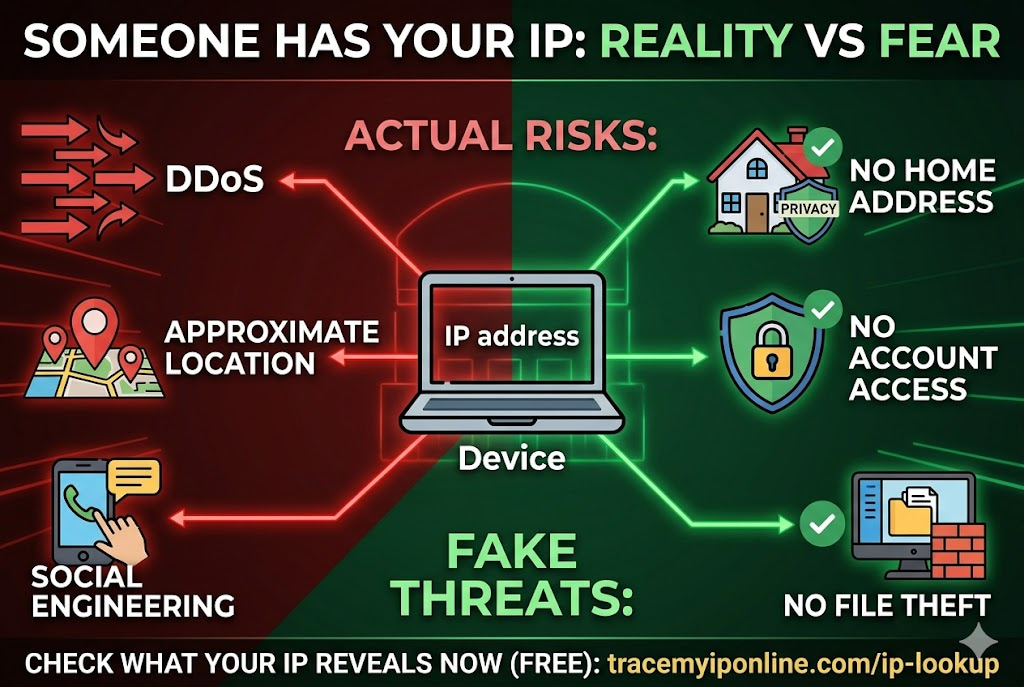
What Someone Can Do With Your IP Address — The Complete List
Find your approximate location. This is real. Country and state with high accuracy, city with moderate accuracy. Not your street address — but if someone knows your city and has other contextual information about you, this narrows things down. Check exactly what your IP reveals at tracemyiponline.com/ip-lookup.
Identify your ISP. Your internet provider's name is visible to anyone who queries your IP against a geolocation database. This is public information by design — IP blocks are registered to ISPs in public databases. By itself this is low risk, but combined with other information it helps build a profile.
Launch a DDoS attack. This is the most practically significant threat for most users. A Distributed Denial of Service attack floods your IP address with more traffic than your connection can handle, cutting you off from the internet. This requires your IP as a target address. Gamers are the most common targets — DDoS attacks in gaming are used to disconnect opponents in competitive play or to settle personal disputes. The attack itself does not access your device — it just overwhelms your connection.
Ban or target you on specific platforms. Online services sometimes ban by IP rather than (or in addition to) by account. If someone has your IP and reports it to a service, some platforms will block your access. Conversely, if you are banned somewhere and someone knows your IP, they can monitor whether you are evading the ban from the same IP.
Build a partial dossier for social engineering. Location, ISP, and connection type information can be used to make social engineering attempts more convincing. "I can see you're connecting from [your city] with [your ISP]" sounds more credible if accurate — which it will be if they have your IP. This is used in phishing calls and tech support scams.
Target you with connection-level threats if your ports are open. If you have vulnerable services running on open ports — which you can check at tracemyiponline.com/port-checker — a known IP address is a known target. This is a combination risk: IP exposure plus open ports. Either alone is lower risk; together they are a concrete attack surface.
What Someone Cannot Do With Just Your IP Address
This is where a lot of misinformation circulates.
Cannot access your computer or files. An IP address is a network address, not an access credential. Knowing your IP does not give anyone the ability to connect to your computer, read your files, access your accounts, or install anything. Your computer is not listening for incoming connections from random internet addresses unless you have specifically configured it to do so (which would be a bad idea).
Cannot determine your exact home address. City-level geolocation is achievable. Street-level location is not possible from an IP address alone. The only way to get from an IP to a physical home address is through the ISP — which requires a court order and is only available to law enforcement.
Cannot see your browsing history or account activity. Your browsing history lives on your device and in your accounts. Your IP address is a network identifier that tells other systems where to send responses — it is not a window into your activity.
Cannot steal your identity directly. Identity theft requires personal information — name, date of birth, government ID numbers, financial account details. None of this is attached to or accessible via an IP address.
Cannot access your accounts. Accounts are protected by passwords and (ideally) multi-factor authentication. IP addresses are not login credentials.
Before vs After: The DDoS Scenario
Situation — competitive online gaming, PC game with voice chat: Player A and Player B are in an extended competitive match. Player B is frustrated. Player B uses a tool to capture Player A's IP address from the voice chat connection. Player B launches a DDoS attack targeting Player A's home IP. Player A's internet connection becomes unusable — not just the game, but all internet on that connection simultaneously. Player A is disconnected from the match.
What Player B could do with Player A's IP: Disrupt internet connection. Discover approximate city and ISP name.
What Player B could NOT do: Access Player A's computer, files, or accounts. Find Player A's home address. Do anything beyond the connection disruption.
Player A's mitigation options: VPN hides real IP from voice chat (verified working at tracemyiponline.com/vpn-detector). Router restart assigns new dynamic IP after the attack ends. Report to ISP if attacks are persistent. Check ports are not unnecessarily open at tracemyiponline.com/port-checker.
How IP Addresses Are Exposed — The Common Vectors
Direct connections in peer-to-peer games: Some games use peer-to-peer networking rather than dedicated servers. In P2P games, players connect directly to each other — meaning your opponent's game client can see your IP and vice versa. Modern games increasingly use dedicated servers to avoid this, but older games and some game modes still use P2P.
Voice chat applications: Discord, TeamSpeak, and similar voice platforms historically exposed user IPs in peer-to-peer voice connections. Most platforms have moved to server-relayed connections, but third-party voice servers may still expose IPs.
Email headers: Emails you send can contain your IP in the header if sent directly from a mail server. Webmail services like Gmail and Outlook mask this — the IP shown is the webmail provider's server, not yours. If you send email from a locally configured mail client, your IP may appear.
File download links: If you click a link to download a file from someone's personal server, your IP is visible in their server logs. This is how "IP grabber" links work — a short URL that resolves to a server specifically configured to log incoming IPs.
Online forums and services: Your IP is logged by essentially every online service you use. The service itself has your IP — whether they share or expose it is a separate question.
For California and New York Users: IP-Based Threats and Legal Recourse
DDoS attacks are illegal under the Computer Fraud and Abuse Act in the US, regardless of the motivation — gaming disputes included. California Penal Code 502 additionally covers unauthorized computer access at the state level. For persistent DDoS attacks, the practical path is reporting to your ISP (who can work with upstream providers to filter attack traffic) and, for severe cases, reporting to the FBI's Internet Crime Complaint Center (IC3.gov).
New York has similar federal coverage under the CFAA and state-level computer crime statutes. For doxxing and harassment using IP information, New York has specific cyberstalking and harassment statutes. Understanding what your IP reveals is the starting point — check at tracemyiponline.com/ip-lookup.
For London and UK Users: DDoS and Malicious Communications Law
DDoS attacks in the UK are an offence under the Computer Misuse Act 1990 (as amended). The Police Intellectual Property Crime Unit (PIPCU) and the National Cyber Security Centre both handle cybercrime reports. For gaming-related DDoS, Action Cyber's guidance recommends reporting to the gaming platform first, then to Action Fraud (actionfraud.police.uk) for persistent attacks.
Using someone's IP for harassment — including doxxing, location revealing, or targeted disruption — can be prosecuted under the Malicious Communications Act, the Protection from Harassment Act, or the Online Safety Act 2023. The NCSC's personal cybersecurity guidance recommends VPN use specifically for gaming to prevent IP exposure. Test yours at tracemyiponline.com/vpn-detector.
For Toronto and Ontario Users: Gaming IP Threats and RCMP Reporting
DDoS attacks in Canada are criminal offences under the Criminal Code of Canada. IP-based harassment can fall under criminal harassment provisions. For gaming-related incidents, the Canadian Centre for Cyber Security (cyber.gc.ca) accepts reports and provides guidance.
Ontario-based gamers experiencing IP-related disruption should report to both the gaming platform and, for criminal matters, the Ontario Provincial Police's cybercrime unit. VPN use during gaming — with leak testing at tracemyiponline.com/vpn-detector — is the most practical preventive measure.
For Sydney and Australian Users: IP Threats and the ACSC
Unauthorized DDoS attacks are a criminal offence under the Australian Criminal Code Act's computer offence provisions. The Australian Cyber Security Centre (cyber.gov.au) and Australian Federal Police (AFP) handle reports of serious cyber incidents. For gaming-related IP threats, reports to the gaming platform and ReportCyber (cyber.gov.au/report) are appropriate starting points.
Gamers in Sydney and Melbourne using platforms that expose IPs in P2P connections should use a VPN — tested at tracemyiponline.com/vpn-detector — and check their open ports at tracemyiponline.com/port-checker.
How to Protect Your IP Address
Use a VPN for high-risk activities: Gaming, streaming, or any activity where you are connecting with strangers who might have motivation to target you. A VPN shows the VPN server's IP rather than yours. Verify it is working at tracemyiponline.com/vpn-detector.
Do not click unknown links from strangers: IP grabber links are common in gaming contexts. A link from someone you just met online may be a logging link rather than actual content. Our URL Scanner can check suspicious links before you click.
Close unnecessary open ports: An IP address combined with vulnerable open ports is a more serious threat than IP alone. Check what is open on your network at tracemyiponline.com/port-checker and close anything you are not actively using.
Restart your router after a DDoS attack: For dynamic IP users, a router restart typically triggers a new IP assignment from your ISP. This changes your target address and ends the attack. Static IP users need to contact their ISP to get a new IP address.
Use game-specific settings where available: Many modern games offer settings to use server-relayed connections rather than P2P, specifically to prevent IP exposure. Enable these where they exist.
Frequently Asked Questions
Someone online said they have my IP and will find my house. Should I worry?
The threat to find your house from an IP is not technically feasible without law enforcement involvement. IP geolocation gives approximate city location — not a street address. This kind of statement is most often a bluff designed to cause fear. Report it as harassment to the platform and, if threats are credible, to local police. Do not give personal information to the person making threats.
Can someone hack into my computer with just my IP?
No — not with the IP alone. Your computer is not accessible from external IP connections unless you have configured specific services to accept incoming connections. An IP plus an open vulnerable port is a different situation — check your open ports at tracemyiponline.com/port-checker and close anything not needed.
My game is lagging and someone threatened to "boot me offline" — is that related?
Possibly. A DDoS attack causes exactly this symptom — high latency, disconnection, or complete loss of internet access. If the timing correlates with the threat, the attack is likely real. Restart your router to get a new IP, report the player to the game's moderation system, and consider a gaming VPN going forward.
How do I find out if my IP is being used maliciously by someone else?
Check your IP's reputation at tracemyiponline.com/blacklist-checker. If your IP appears on spam or abuse blacklists, it may have been associated with malicious activity — either from a previous user of that dynamic IP, or from malware on your network sending traffic without your knowledge.
Can someone track my location in real time using my IP?
No. IP geolocation is a static database lookup — it maps IP address ranges to approximate locations. It does not provide real-time location tracking, GPS data, or movement history. Your physical location can only be tracked in real time through GPS-enabled apps with location permission, or through physical surveillance. An IP address does not enable any of this.
Does my IP address change if I use mobile data instead of WiFi?
Yes — switching from your home WiFi to mobile data changes your public IP to your carrier's mobile IP pool. This is an instant change and gives you a different IP that the person targeting you does not have. For immediate relief from a DDoS attack, switching to mobile data while your router restarts is a practical short-term measure.
The Accurate Summary
An IP address in someone else's hands can enable: approximate location lookup, DDoS disruption of your connection, targeted harassment using location information, and (combined with open ports) active exploitation attempts.
An IP address cannot enable: accessing your files, logging into your accounts, finding your home address, stealing your identity, or accessing your device directly without additional vulnerabilities.
The proportionate response: use a VPN for activities where strangers might want to target you, check and close unnecessary open ports, do not click links from unknown parties, and know how to get a new IP if you need one.
Check what your IP currently reveals at tracemyiponline.com/ip-lookup. Test your VPN at tracemyiponline.com/vpn-detector. Check your open ports at tracemyiponline.com/port-checker. Check your IP reputation at tracemyiponline.com/blacklist-checker. All free at TraceMyIPOnline.com.