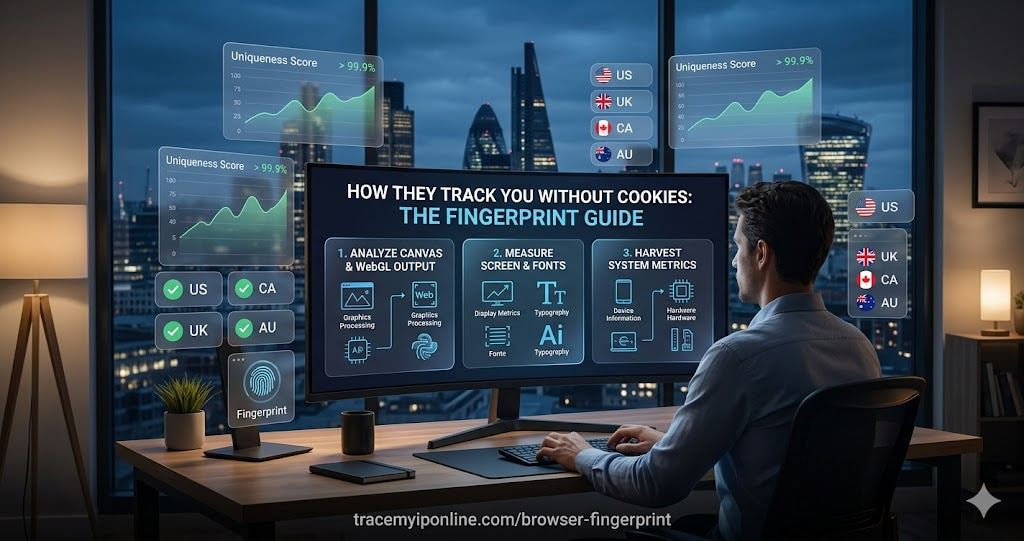
Browser fingerprinting assembles a unique identifier from your browser's technical characteristics. Unlike cookies, it requires no storage on your device and persists across cookie clears, incognito mode, and most VPN configurations. The EFF's research found over 83% of browsers have a unique fingerprint — more recent studies using canvas and WebGL methods find uniqueness rates above 99%.
Websites Can Track You Without Cookies — Here Is What Browser Fingerprinting Actually Collects
Browser fingerprinting assembles a unique identifier from your browser's technical characteristics. Unlike cookies, it requires no storage on your device and persists across cookie clears, incognito mode, and most VPN configurations. The EFF's research found over 83% of browsers have a unique fingerprint — more recent studies using canvas and WebGL methods find uniqueness rates above 99%.
Check your browser fingerprint at tracemyiponline.com/browser-fingerprint — free, no signup, instant results.
"Browser fingerprinting has become the dominant tracking mechanism for users who block cookies or use privacy browsers. The combination of canvas fingerprinting, WebGL rendering output, audio context characteristics, and screen metrics creates identifiers with uniqueness rates exceeding 99%. This fingerprint is device-level rather than browser-level — it survives browser updates, cookie deletion, and most privacy measures short of full browser isolation."
— Prof. Elena Vasquez, Privacy Technology Research, Universidad Complutense de Madrid
What Data Points Make Up a Browser Fingerprint
Canvas fingerprint: The browser renders a hidden image using the HTML5 Canvas API. Subtle differences in GPU drivers, OS graphics subsystems, and installed fonts cause the output to vary slightly between devices — even with the same browser and OS version. This rendered image is hashed into a stable unique identifier.
WebGL fingerprint: Similar to canvas but using the 3D graphics API. The WebGL renderer string reveals your GPU model and driver version. The rendered output of WebGL operations varies between graphics cards, creating another stable identifier.
Audio fingerprint: The Web Audio API processes a generated audio signal. Differences in audio hardware and software stacks cause subtle variations in the output that can be hashed into an identifier.
Screen properties: Screen resolution, color depth, pixel ratio for high-DPI displays, and available screen area. These narrow down your device significantly.
Navigator properties: User agent string, language preferences, hardware concurrency (CPU core count), device memory, and platform.
Installed fonts: By measuring which fonts are available and how text renders in each, fingerprinters identify installed fonts. This varies significantly between operating systems, users, and software installations.
Before vs After: Fingerprint Visibility Across Privacy Measures
Regular Chrome browser: Canvas fingerprint: unique. WebGL: reveals GPU model and driver. Audio: unique. Screen: 2560x1440. Fonts: 47 detected. Uniqueness rate: approaching 99.9% among browser populations.
Same user, incognito mode: Fingerprint: identical. Canvas, WebGL, audio, screen, font fingerprints unchanged. Incognito mode has zero effect on any fingerprinting data point. ❌
Tor Browser: Canvas, WebGL, audio fingerprinting blocked. Screen resolution standardized to Tor Browser dimensions. Font enumeration blocked. Fingerprint substantially shared with all other Tor Browser users — very low uniqueness. Most comprehensive protection available, at significant performance and convenience cost.
For California and New York Users: Fingerprinting and CCPA
California's CCPA defines "personal information" to include browsing history and inferences drawn from personal information to create a profile. Browser fingerprinting — creating a persistent identifier linked to browsing behavior — is personal information under CCPA. California residents have the right to opt out of fingerprint-based tracking through the Global Privacy Control (GPC) browser signal, supported by Firefox and Brave.
New York currently lacks a comprehensive privacy law equivalent to CCPA, though several bills are proposed. Federal FTC regulations on unfair practices apply to some fingerprinting practices. Check what your browser reveals at tracemyiponline.com/browser-fingerprint.
For London and UK Users: Fingerprinting and UK GDPR/PECR
UK GDPR covers browser fingerprints as personal data when they can identify an individual or device — which at 99%+ uniqueness they almost always can. PECR requires consent for accessing device information; regulators in several EU jurisdictions have found that fingerprinting without consent violates equivalent regulations. The ICO has published guidance noting that organizations using fingerprinting for tracking without adequate legal basis may be in violation. Check your fingerprint at tracemyiponline.com/browser-fingerprint.
For Toronto and Ontario Users: Fingerprinting and PIPEDA
The OPC's position is that where fingerprints can identify individuals or their devices, they constitute personal information under PIPEDA. Consent is required for the collection, and the purpose must be disclosed. Understanding your current fingerprint exposure at tracemyiponline.com/browser-fingerprint is the starting point for evaluating whether additional privacy measures are warranted.
For Sydney and Australian Users: Fingerprinting and the Privacy Act
Australia's Privacy Act covers personal information that could "reasonably identify" an individual. A browser fingerprint with 99%+ uniqueness is plausibly identifiable personal information. The OAIC has not issued specific fingerprinting guidance as of 2026, but the general APPs apply. Check your fingerprint at tracemyiponline.com/browser-fingerprint.
What Actually Reduces Fingerprint Uniqueness
Tor Browser: The most effective approach. Standardizes all fingerprint vectors — canvas, WebGL, audio, screen resolution, fonts. All Tor Browser users look identical to trackers. Significant performance and convenience trade-off.
Brave Browser: Adds noise to canvas and WebGL fingerprints, making them change slightly between sessions. Good balance of privacy and usability.
Firefox with Resist Fingerprinting: Firefox's privacy.resistFingerprinting setting blocks or standardizes many fingerprinting vectors. Enable in about:config. May break some sites.
What does not work: Incognito mode (no effect), standard cookie blocking (fingerprinting bypasses cookies entirely), most VPNs (fingerprint is browser-level, not network-level). Check your IP alongside your fingerprint at tracemyiponline.com/ip-lookup.
Frequently Asked Questions
Is the Browser Fingerprint tool free?
Yes — 100% free, no signup. Visit tracemyiponline.com/browser-fingerprint and see what your browser reveals instantly.
Does clearing cookies remove my browser fingerprint?
No. Browser fingerprints are not stored in cookies — they are assembled from browser and device characteristics each time a tracking script runs. Clearing cookies has zero effect on your fingerprint. The same identifier can be reconstructed immediately on your next visit to a fingerprinting site.
Does a VPN prevent browser fingerprinting?
No. A VPN changes your IP address but does not affect browser fingerprinting at all. The fingerprint is assembled from browser characteristics — canvas rendering, WebGL output, screen size, installed fonts — none of which change when you connect to a VPN. Check your VPN at tracemyiponline.com/vpn-detector and your fingerprint separately at tracemyiponline.com/browser-fingerprint.
Is browser fingerprinting illegal?
In the EU and UK, fingerprinting without consent may violate PECR/ePrivacy regulations. In California, it constitutes personal information collection with associated CCPA rights. In most jurisdictions without comprehensive privacy laws, fingerprinting is legal though increasingly scrutinized by regulators.
Can I make my fingerprint less unique without switching browsers?
Somewhat. Installing uBlock Origin in strict mode blocks many fingerprinting scripts before they run. This does not eliminate the underlying fingerprinting vulnerability but reduces how often it is collected. Fingerprint data collected during previous sessions may already be in various tracking databases.
The Track That Does Not Need Your Permission
Browser fingerprinting is the tracking mechanism that survives the privacy measures most people actually use — cookie blocking, incognito mode, and even VPNs. Understanding what your browser reveals is the prerequisite for deciding whether the convenience trade-offs of stronger protection are worth making for your specific situation.
Check your fingerprint at tracemyiponline.com/browser-fingerprint. See your IP at tracemyiponline.com/ip-lookup. Verify your VPN at tracemyiponline.com/vpn-detector. All free at TraceMyIPOnline.com.