IANA officially exhausted its pool of unallocated IPv4 addresses on February 3, 2011. The internet did not break. That apparent contradiction is worth understanding — because the solution has direct implications for your privacy, your location accuracy in IP lookups, and why your IP sometimes shows in unexpected places. Here is what actually happened and what it means for you.
The Internet Ran Out of IPv4 Addresses in 2011 — Here Is What Actually Happened Next
IANA — the organization that manages global IP address allocation — officially exhausted its pool of unallocated IPv4 addresses on February 3, 2011. The internet did not break. It does not look broken now. That apparent contradiction is worth understanding, because the solution has direct implications for your privacy, your location accuracy in IP lookups, and why your IP address sometimes shows up in unexpected places.
Check which IP version your connection currently uses at tracemyiponline.com/ip-lookup — free, no signup.
"The IPv4 exhaustion story is instructive about how technical transitions actually happen. We did not switch cleanly from IPv4 to IPv6 — we built workarounds that let IPv4 limp forward while IPv6 gradually grew alongside it. CG-NAT, in particular, has had significant unintended consequences for attribution accuracy, privacy, and network debugging that most non-technical users never encounter directly but experience constantly in subtle ways."
— Prof. David Korhonen, Internet Protocol Research, Aalto University
IPv4 and IPv6 — The Actual Difference
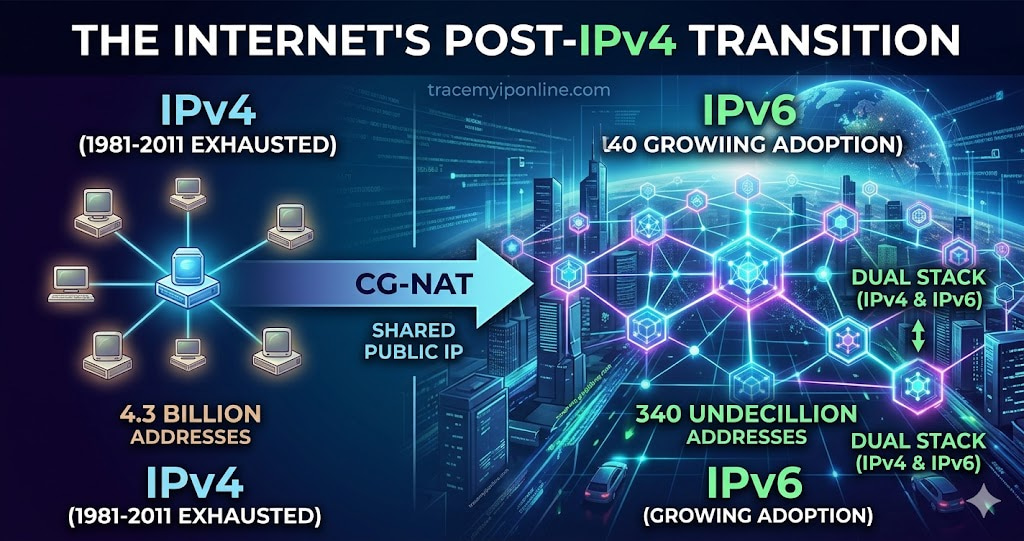
An IP address is a number. IPv4 addresses are 32 bits long, written as four groups of numbers from 0-255 separated by dots: 192.168.1.1. The total number of possible IPv4 addresses is 2^32 — about 4.3 billion. In 1981 when IPv4 was designed, 4.3 billion addresses seemed like more than enough for a research network. By the 2000s, it was clearly not.
IPv6 addresses are 128 bits long, written in hexadecimal groups separated by colons: 2001:0db8:85a3:0000:0000:8a2e:0370:7334. The total number of possible IPv6 addresses is 2^128 — approximately 340 undecillion, or 340 followed by 36 zeros. That is enough to assign multiple addresses to every atom on the surface of the earth. The exhaustion problem does not recur with IPv6.
The practical transition from IPv4 to IPv6 has been slower than engineers hoped and is still incomplete. As of 2026, approximately 45% of global internet traffic uses IPv6 (Google IPv6 statistics). Most networks run both simultaneously — a configuration called "dual stack."
How the Internet Kept Running After IPv4 Exhaustion — CG-NAT
The main workaround is Carrier Grade NAT (CG-NAT), also called Large Scale NAT (LSN). Your home router already uses NAT — it shares one public IP address among all devices in your house. CG-NAT extends this one level up: your ISP shares one public IP address among many customers, potentially hundreds.
The implication: multiple households can be using the same public IP address simultaneously. When you check your IP address, you might be sharing that address with dozens or hundreds of other customers of the same ISP in the same geographic area.
This has several practical consequences:
For IP geolocation accuracy: The city shown in an IP lookup for a CG-NAT address is the location of the ISP's NAT device, not your physical location. This explains why some users see a city quite different from where they actually are — the NAT infrastructure is located there, even though they are not.
For IP-based attribution: If someone uses an IP address to identify a specific person or household, CG-NAT makes this much harder — the same IP might be used by hundreds of different customers during the same time period. Law enforcement subpoenas have to go further into ISP logs to associate a specific user with a specific connection at a specific time.
For IP reputation: If you are assigned a CG-NAT address shared with someone running a spam operation, your shared IP might end up on a blacklist even though your traffic is perfectly clean. Check your IP's reputation at tracemyiponline.com/blacklist-checker.
Before vs After: Checking Both IP Versions
User on a dual-stack connection — IP lookup results:
IPv4 address: 98.32.145.201. ISP: Comcast Cable. Location: Chicago, Illinois. Connection type: Residential. ASN: AS7922.
IPv6 address: 2601:0148:8200:1234:a1b2:c3d4:e5f6:7890. ISP: Comcast Cable. Location: Chicago, Illinois. Connection type: Residential. ASN: AS7922.
Both versions show the same ISP and location — expected for a properly configured dual-stack connection. The IPv6 address is unique to this household rather than shared via CG-NAT, which is actually better for privacy in some contexts (the ISP knows which address belongs to which customer) and better for attributability (no ambiguity from shared IPs).
Why Your IPv6 Address Is Different From Your IPv4 Address — And What That Means
On a dual-stack connection, your device has both an IPv4 address and an IPv6 address. These are different numbers. When you visit a website that supports IPv6 (most major sites do now), your browser may prefer IPv6 automatically. When you visit a site that only supports IPv4 (there are still many), your browser uses IPv4.
This creates an interesting privacy situation. If you are using a VPN that only tunnels IPv4 traffic, your IPv6 connections bypass the VPN entirely — this is an IPv6 leak, similar to the WebRTC leak problem. Your real IPv6 address, which is unique to your connection in a way that CG-NAT IPv4 addresses are not, is exposed to sites you visit.
A properly configured VPN handles both IPv4 and IPv6 traffic. Verify that yours does at tracemyiponline.com/vpn-detector.
For California and New York Users: IPv6 Privacy Considerations
IPv6 introduces a privacy consideration that does not exist with IPv4 CG-NAT. Under IPv4 CG-NAT, your public IP is shared with many customers — making you less individually identifiable by IP alone. Under IPv6, your address is typically globally unique to your connection, which makes IP-based identification more precise.
California's CCPA treats IP addresses as personal information. An IPv6 address that uniquely identifies a specific household's connection is personal information in a more direct sense than a CG-NAT IPv4 address shared among hundreds of users. California residents with IPv6 connections may want to ensure their VPN is properly tunneling IPv6 if IP privacy is a concern. Check at tracemyiponline.com/vpn-detector and see your full IP profile at tracemyiponline.com/ip-lookup.
For London and UK Users: IPv6 Adoption and BT/Sky Infrastructure
UK ISP IPv6 adoption has been uneven. BT completed its consumer IPv6 rollout in 2022 after years of delays. Sky Broadband enabled IPv6 for most customers by 2023. Virgin Media's IPv6 rollout for cable customers is more variable by area. Some smaller UK ISPs still run IPv4-only networks.
For London, Manchester, and Edinburgh users: whether you have an IPv6 address and what it reveals can vary based on your specific ISP and infrastructure area. Check what your connection exposes at tracemyiponline.com/ip-lookup. If you are using a VPN, check it handles IPv6 correctly at tracemyiponline.com/vpn-detector.
For Toronto and Ontario Users: Rogers and Bell IPv6 Status
Rogers enabled IPv6 for residential customers in 2019. Bell began IPv6 deployment in 2021 and has been progressively rolling it out to Ontario customers. Videotron's IPv6 availability varies by region. As of 2026, most Ontario major-ISP customers should have dual-stack IPv4/IPv6 connections available, though some areas and older infrastructure still run IPv4-only.
Check your current IP version at tracemyiponline.com/ip-lookup. If you see an IPv6 address listed and use a VPN, verify IPv6 is being tunneled correctly at tracemyiponline.com/vpn-detector.
For Sydney and Australian Users: NBN and IPv6 Rollout
NBN Co's IPv6 deployment for Australia's National Broadband Network has been phased, with Telstra, Optus, and TPG progressively enabling IPv6 for NBN customers. As of 2026, most metropolitan Australian NBN customers have dual-stack access, though regional and remote connections vary.
Australian internet users should check their current IP version at tracemyiponline.com/ip-lookup. The two-year mandatory metadata retention under Australian law applies to both IPv4 and IPv6 connection records — the version does not affect what is retained.
What IPv6 Means for Your DNS
IPv6 introduces AAAA records (sometimes called "quad-A" records) in DNS — the equivalent of A records for IPv4. Where an A record maps a domain to an IPv4 address, an AAAA record maps it to an IPv6 address. When a domain has both A and AAAA records and you have a dual-stack connection, your browser typically prefers IPv6.
You can check whether a domain has IPv6 records by querying for AAAA records at tracemyiponline.com/dns-lookup. Sites with AAAA records serve IPv6-connected users from their IPv6 infrastructure. Sites without AAAA records are reachable only via IPv4.
Frequently Asked Questions
Which IP version does my device use?
Check at tracemyiponline.com/ip-lookup — it shows your current public IP and indicates whether it is IPv4 or IPv6. Many dual-stack connections show both.
Is IPv6 more secure than IPv4?
IPv6 includes IPSec (IP Security) as a standard component rather than an optional add-on, which was supposed to improve end-to-end encryption. In practice, IPSec is not widely used for regular internet traffic. IPv6 does not have an inherent security advantage over IPv4 in typical consumer internet use — the security differences are largely theoretical at this level.
Does my VPN need to support IPv6?
If you have a dual-stack connection and want full privacy protection, yes. A VPN that only tunnels IPv4 leaves your IPv6 traffic unprotected. Your real IPv6 address is then visible to any site that supports IPv6 — which is most major sites. Check whether your VPN handles IPv6 at tracemyiponline.com/vpn-detector.
Why do some sites block IPv6 addresses?
Some services block IPv6 ranges because IPv6 addresses are not well-represented in older geolocation and reputation databases. An IPv6 address that falls outside the service's expected geographic range might trigger a block that would not happen for an equivalent IPv4 address. This is a database coverage issue that improves over time as IPv6 geolocation data matures.
What is a link-local IPv6 address and should I be concerned about it?
Link-local IPv6 addresses start with fe80:: and are only valid on your local network — they never appear on the internet. They are automatically assigned to network interfaces for local communication and are normal and expected. They are never exposed to external sites and present no privacy concern.
Can I check if a website supports IPv6?
Yes — look up the domain at tracemyiponline.com/dns-lookup and check for AAAA records. If AAAA records exist, the site supports IPv6. If only A records appear, the site is IPv4-only.
Does my phone use IPv4 or IPv6 on mobile data?
It depends on your carrier and their network configuration. Some mobile networks are IPv6-only (with IPv4 access through NAT64). Others are dual-stack. Others are still IPv4-only. Check at tracemyiponline.com/ip-lookup on your phone while on mobile data to see which version your carrier assigns.
The Practical Summary
IPv6 is not a replacement for IPv4 yet — it is running alongside it on most modern networks. Whether you have an IPv4 address, an IPv6 address, or both depends on your ISP's infrastructure. What each version exposes in a lookup — and what each means for your privacy — differs in ways that matter if you use a VPN or care about IP-based tracking.
Check your current IP version and full profile at tracemyiponline.com/ip-lookup. Verify your VPN handles both versions at tracemyiponline.com/vpn-detector. Check domain IPv6 support at tracemyiponline.com/dns-lookup. All free at TraceMyIPOnline.com.