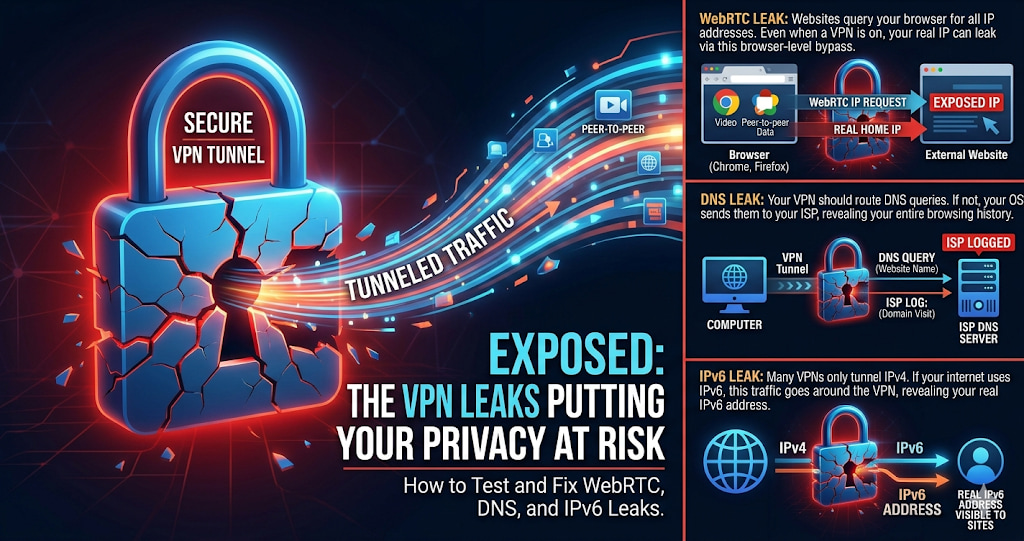
A VPN showing "connected" in its app is not the same as a VPN actually protecting your traffic. Three specific leak types — WebRTC leaks, DNS leaks, and IPv6 leaks — can expose your real IP address to every website you visit, even when the VPN indicator shows green. Most users have never tested for any of them.
Your VPN Says Connected — But Your Real IP Might Still Be Visible
A VPN showing "connected" in its app is not the same as a VPN actually protecting your traffic. Three specific leak types — WebRTC leaks, DNS leaks, and IPv6 leaks — can expose your real IP address to every website you visit, even when the VPN indicator shows green. Most users have never tested for any of them.
The leaks happen silently. No error message. No disconnection notice. The VPN tunnel is technically active, but specific traffic bypasses it through other routes. Websites receive your real IP alongside the VPN IP, your real DNS queries go to your ISP's servers, or your IPv6 address stays exposed because the VPN only tunnels IPv4.
"VPN leak testing is one of the most important and most neglected aspects of VPN use. The three major leak types — WebRTC, DNS, and IPv6 — each arise from different protocol interactions that most VPN clients handle imperfectly. WebRTC is particularly insidious because it is implemented in the browser itself, not the network stack, so even a correctly configured VPN at the OS level may not prevent it. A significant minority of popular VPN providers fail at least one leak test."
— Dr. Aiko Tanaka, Applied Privacy Technology Research, Keio University
The Three VPN Leak Types Explained
WebRTC Leak: WebRTC is a browser technology for video calls and peer-to-peer transfer. To establish direct connections, WebRTC queries your device for all available IP addresses — including your real public IP — using STUN servers that bypass the VPN tunnel. Any website can run JavaScript to retrieve your real IP even when a VPN is active. This is browser-level, not OS-level.
DNS Leak: When you visit a website, your device translates the domain name to an IP address via a DNS query. If your VPN does not route these queries through its own servers, they go to your ISP's DNS servers — revealing which domains you visit despite the VPN tunnel carrying your web traffic. DNS leaks are particularly common on Windows due to "smart multi-homed name resolution."
IPv6 Leak: Many VPN clients only tunnel IPv4 traffic. If your internet connection has IPv6 enabled — increasingly common — IPv6 traffic bypasses the VPN tunnel entirely. Sites that support IPv6 receive your real IPv6 address, which is often more uniquely identifying than a shared IPv4 address. Check whether you have IPv6 at tracemyiponline.com/ip-lookup.
How to Test for All Three Leaks
The complete test: visit tracemyiponline.com/vpn-detector with your VPN connected. The tool checks your visible IPs, DNS servers, and WebRTC-detected IPs simultaneously. If any result shows your real home IP or your ISP's DNS servers, you have a confirmed leak.
For DNS specifically: with VPN connected, check at tracemyiponline.com/dns-lookup what DNS servers are resolving your queries. If your ISP's servers appear rather than your VPN provider's servers, DNS is leaking.
Before vs After: VPN Leak Test Results
Popular VPN — app shows "Protected" — leak test at tracemyiponline.com/vpn-detector: VPN IP shown: Netherlands server. WebRTC detected: Netherlands VPN IP AND real home IP (76.32.145.201). DNS servers: ISP's servers, not VPN's. IPv6: real IPv6 from home ISP, not tunneled.
Three simultaneous leaks. The VPN is active but the real IP leaks via WebRTC, DNS goes to the ISP, and IPv6 is not tunneled. Every website visited receives the real home IP. The VPN provides essentially no privacy despite showing "connected." ❌
After fixes applied: WebRTC disabled in browser. VPN DNS leak protection enabled. IPv6 disabled at OS level. Retest: only VPN IP visible, VPN's DNS servers shown, no IPv6 leak. ✅
How to Fix Each Leak Type
WebRTC leaks — fix by browser: Chrome: install uBlock Origin, enable "Prevent WebRTC from leaking local IP addresses" in settings. Firefox: navigate to about:config, set media.peerconnection.enabled to false. Brave: Settings, Privacy, WebRTC IP Handling Policy, select "Disable non-proxied UDP."
DNS leaks — fix in VPN client: Open your VPN client settings and look for "DNS leak protection" or "prevent DNS leaks" — enable it. If unavailable, manually set your OS DNS servers to your VPN provider's DNS servers. Enable DNS over HTTPS in your browser as an additional layer. Check DNS at tracemyiponline.com/dns-lookup after the fix.
IPv6 leaks — fix at OS level: Windows: Control Panel, Network and Sharing Center, Change adapter settings, right-click your connection, Properties, uncheck "Internet Protocol Version 6 (TCP/IPv6)." Mac: System Preferences, Network, select your connection, Advanced, TCP/IP, Configure IPv6: Off. Alternatively, use a VPN that explicitly tunnels IPv6 — Mullvad and ProtonVPN both handle this correctly.
For California and New York Users: VPN Leaks and Privacy Expectations
California users relying on VPNs for CCPA-based privacy from ISP tracking need leak-free VPN operation to get any actual benefit. A leaking VPN provides essentially no protection — the ISP still sees all DNS queries and the real IP is exposed to sites via WebRTC. Test at tracemyiponline.com/vpn-detector before any privacy-sensitive session.
New York financial and legal professionals using VPNs for client confidentiality should run leak tests quarterly. A DNS leak on a corporate VPN session means DNS queries for client domains are visible to the ISP — potentially a professional responsibility concern depending on the jurisdiction and practice area.
For London and UK Users: VPN Leaks and Investigatory Powers Act
UK users using VPNs to limit ISP logging under the IPA need leak-free VPNs for meaningful protection. A WebRTC or DNS leak negates this entirely — the ISP still sees DNS queries and the real IP is exposed. NCSC guidance on VPN use implies that leak-free configuration is a prerequisite for the privacy benefit to be realized. Test at tracemyiponline.com/vpn-detector.
For Toronto and Ontario Users: VPN Leak Testing
Canadian users relying on VPNs for privacy from ISP data collection under PIPEDA need confirmation their VPN is actually protecting traffic. A DNS leak to Rogers or Bell DNS servers while the VPN is "connected" means the ISP is still receiving DNS query data despite the VPN tunnel being active. Test at tracemyiponline.com/vpn-detector and check DNS at tracemyiponline.com/dns-lookup.
For Sydney and Australian Users: VPN Leaks and Mandatory Metadata Retention
Australian users using VPNs to limit mandatory metadata retention need leak-free VPNs. A DNS leak means Telstra or Optus is still receiving and logging DNS queries under the two-year mandatory retention requirement, despite the VPN tunnel being active for web traffic. Test at tracemyiponline.com/vpn-detector.
Frequently Asked Questions
Is the VPN Detector tool free?
Yes — 100% free, no signup. Visit tracemyiponline.com/vpn-detector and test your VPN for leaks instantly.
My VPN has a kill switch — does that prevent leaks?
No. A kill switch cuts all internet traffic when the VPN disconnects, preventing exposure during reconnection. It does not prevent WebRTC, DNS, or IPv6 leaks that occur while the VPN is actively connected. These are different problems requiring different solutions. Test at tracemyiponline.com/vpn-detector regardless of kill switch status.
Which VPN providers have the fewest leaks?
Mullvad, ProtonVPN, and ExpressVPN have strong leak-prevention track records based on independent audits. That said, testing your specific configuration on your specific device is always necessary — provider reputation does not guarantee leak-free operation in your particular setup.
I fixed the leaks but speeds decreased — is that expected?
Some fixes have minor trade-offs. Disabling WebRTC may affect browser-based video calls. Routing all DNS through the VPN adds minimal latency. The performance impact is typically small. Test speeds at tracemyiponline.com/speed-test with and without fixes to measure your specific situation.
How often should I test my VPN for leaks?
After every VPN software update, after every OS update, when connecting from a new network, and quarterly as routine maintenance. VPN client and OS updates can reintroduce leaks that were previously fixed.
Does a VPN kill switch stop DNS leaks?
No — a kill switch only cuts traffic when the VPN disconnects. DNS leaks occur while the VPN is connected, when DNS queries are routed outside the tunnel. Enable "DNS leak protection" in your VPN client settings specifically for this issue.
A Connected VPN Is Not a Leak-Free VPN
VPN providers market their products as privacy tools, but the privacy they actually provide depends entirely on whether the implementation is leak-free in your specific browser and OS configuration. The test takes 30 seconds. The fixes, once identified, take minutes. Believing you are protected when you are not is worse than either knowing you have a problem or knowing you are genuinely protected.
Test your VPN at tracemyiponline.com/vpn-detector. Check DNS at tracemyiponline.com/dns-lookup. See full IP profile at tracemyiponline.com/ip-lookup. All free at TraceMyIPOnline.com.